Description
Product Introduction (Non-Templated)
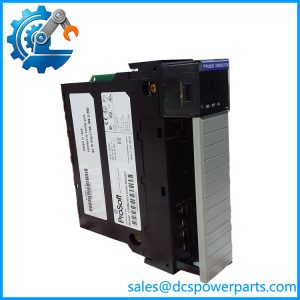
When a plant runs ControlLogix, Siemens, and legacy PLC equipment on the same production line, getting process data between controllers can become an engineering task of its own. The ProSoft Technology ILX56-MM inRAx Message Manager is a single-slot communication module designed to coordinate configured data transfers between compatible industrial control systems, reducing the need to build every transfer around custom PLC messaging logic.
Its two onboard Ethernet ports support Modbus TCP/IP and Siemens Industrial Ethernet, while compatible Rockwell communication bridges provide access to additional Rockwell network protocols. For a ControlLogix communication module replacement or legacy PLC integration project, preserve the existing transfer configuration and verify every source and destination connection before commissioning.
Key Technical Specifications
| Parameter | Specification |
|---|---|
| Manufacturer | ProSoft Technology |
| Model | ILX56-MM |
| Product Family | inRAx |
| Product Type | Message Manager communication module |
| Host Platform | Rockwell Automation ControlLogix |
| Chassis Compatibility | Single-slot 1756 chassis |
| Ethernet Ports | 2 × onboard Ethernet |
| Ethernet Protocols | Modbus TCP/IP and Siemens Industrial Ethernet |
| Additional Rockwell Protocols | EtherNet/IP, ControlNet, DH+, DH-485 through compatible Rockwell bridge modules |
| Configurable Connections | Up to 16 communication connections |
| Backplane Power | 5 V DC |
| Backplane Current | 1,000 mA |
| Maximum Power Consumption | 5 W |
| Operating Temperature | 0°C to 60°C (32°F to 140°F) |
| Storage Temperature | −40°C to 80°C (−40°F to 176°F) |
| Configuration Method | Built-in web-based configuration utility |
| Configuration Storage | Offline configuration files or onboard CompactFlash, depending on setup |
| Status Indication | Four-character alphanumeric display |
| Installation | Local or remote compatible 1756 rack |
| Removal Under Power | RIUP support documented; follow the applicable chassis and site procedures |
Specifications are drawn from ProSoft’s published documentation. The module’s Ethernet ports do not mean that every Rockwell protocol is available directly on those ports; some require a compatible bridge module.
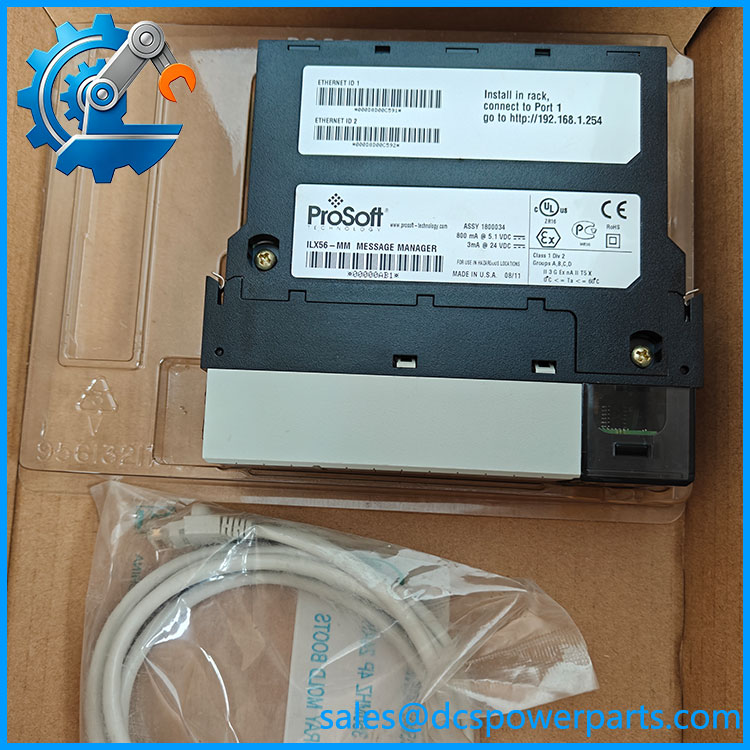
ILX56-MM
Application Scenarios & Pain Points
A controller-to-controller data transfer can fail even while both PLCs remain in RUN mode. The usual suspects include changed register addressing, incorrect network settings, incompatible bridge hardware, or a configuration that no longer matches the connected devices.
- Mixed-vendor production lines: Exchanges configured process data between ControlLogix and supported Siemens or Modbus TCP/IP systems.
- Legacy PLC integration: Helps connect existing controllers to a ControlLogix-based supervisory architecture without individually programming every transfer in ladder logic.
- Plant monitoring and control: Moves selected data between controllers so that supervisory systems can access relevant operating values.
- Control-system maintenance: Provides a replacement path when an existing ILX56-MM fails, provided the replacement supports the installed hardware and configuration.
Field note — illustrative scenario: During a planned shutdown, an integration engineer replaces a failed message manager and discovers that several downstream values remain stale. The replacement may be healthy, but the source addresses, bridge path, or saved configuration may not match the original installation. Verify data movement in both directions before releasing the system to production.
Related Products
These related components support different parts of a ControlLogix communication architecture. Confirm exact model numbers and supported configurations against the existing project before selecting any alternative.
- ILX56-MM — The original inRAx Message Manager. Used for configured data transfers between supported industrial communication interfaces and compatible control systems.
- 1756-EN2T — ControlLogix EtherNet/IP communication bridge. Provides network connectivity for compatible ControlLogix architectures; it does not automatically reproduce the ILX56-MM’s message-management functions.
- 1756-EN2TR — ControlLogix EtherNet/IP bridge with two-port ring-network capabilities. Consider it when the system architecture requires supported device-level ring connectivity rather than the ILX56-MM’s configured multi-system data-transfer role.
- 1756-CN2R — ControlNet bridge for compatible ControlLogix systems. Relevant when the legacy network architecture relies on ControlNet.
- 1756-DHRIO — Data Highway Plus and remote I/O interface for compatible ControlLogix configurations. Useful when older Rockwell equipment must remain connected through its established network.
- 1756-L83E — ControlLogix controller with embedded EtherNet/IP connectivity. A controller option for broader system upgrades, not a direct replacement for a dedicated Message Manager module.
- 1756-EN2TSC — A ControlLogix EtherNet/IP communication module with security-related capabilities. Assess it as part of a broader network modernization project, not as an assumed drop-in substitute.
- ProSoft configuration files for — Existing configuration data can be essential during replacement. Confirm file compatibility and retain a verified backup before changing hardware.
The related Rockwell catalog numbers above identify different network and controller functions; they are not confirmed drop-in replacements for the . Check the ControlLogix chassis compatibility, firmware requirements, network design, and application logic before changing the architecture. ProSoft maintains the legacy datasheet, setup guide, user manual, and EDS documentation.
The Engineer’s Guide: Field Pitfalls to Avoid
Warning 1: Misidentifying the communication path
Modbus TCP/IP and Siemens Industrial Ethernet are supported through the onboard Ethernet interfaces. Other Rockwell protocols require compatible bridge hardware. A network connection that comes up does not prove the intended protocol path is available.
How to avoid it: Document the network topology, IP settings, bridge-module catalog numbers, and source/destination controllers. Test each configured connection independently after installation.
Warning 2: Losing or misapplying the original configuration
A replacement module may not contain the previous message mappings, connection definitions, or network settings. Without those details, a module can appear healthy while transferring the wrong data—or none at all.
How to avoid it: Back up the existing configuration where possible. Record IP addresses, data mappings, trigger settings, and communication paths. Restore only a configuration appropriate for the replacement hardware, then verify actual values against the source PLC.
Warning 3: Overlooking chassis power and live-removal consequences
The draws 1,000 mA at 5 V DC, with maximum power consumption of 5 W. Although the documentation identifies removal and insertion under power support, live replacement can still affect process communications.
How to avoid it: Check the chassis power budget and the consequences of losing data transfers. Follow the applicable ControlLogix and plant procedures. Inspect the backplane connector for bent contacts, contamination, or oxidation before installing the replacement.
Frequently Asked Questions (FAQ)
1. What does the ProSoft Message Manager do?
The coordinates configured data transfers between compatible industrial controllers and communication interfaces. It is designed for multi-system integration, allowing users to establish transfers through its web-based configuration utility instead of writing individual PLC message routines for every transfer.
2. Can the communicate with Siemens PLCs and Modbus TCP/IP devices?
Yes. ProSoft documentation identifies Siemens Industrial Ethernet and Modbus TCP/IP support through the onboard Ethernet interfaces. Additional Rockwell protocols, including ControlNet and DH+, require compatible Rockwell bridge modules. Confirm the exact Siemens-side interface, addressing, and data mapping for your installation.
3. Can I replace a failed without reprogramming the PLCs?
Possibly, but do not assume the replacement will work immediately. The outcome depends on the existing configuration, network addressing, connected bridge modules, and how the system was engineered.
Before replacement:
- Save the original configuration and relevant PLC project files.
- Record network settings and communication mappings.
- Confirm that the replacement has compatible hardware and firmware.
- Test all required transfers and verify the values at their destination.
The module may reduce custom message programming, but it does not eliminate the need to validate the existing integration.
4. Is the discontinued, and can I still buy a replacement?
ProSoft lists the in its legacy-products documentation and provides its datasheet, setup guide, user manual, and EDS file. This confirms that legacy documentation remains available, but it does not establish current stock or guarantee ongoing product support.
For procurement, request confirmation of physical inventory, the exact model number, unit condition, and a functional test report. A listing alone is not proof that a tested unit is ready to ship.
5. What should I check when buying a used or surplus ?
Ask for evidence tied to the actual unit:
- Photographs of the model label, display, Ethernet ports, and backplane connector.
- Confirmation of the supplied condition and any repair history.
- A functional test covering startup, Ethernet connectivity, configuration access, and supported data transfers.
- Confirmation of included accessories and any CompactFlash media.
- Written warranty and return terms.
A module that passes a power-on test may still have communication or configuration problems. Protocol-level testing provides stronger evidence of operational condition.
6. What warranty and delivery lead time should I expect?
Warranty depends on the supplier and whether the module is new surplus or refurbished. Obtain written confirmation of the coverage period, exclusions, return procedure, and replacement arrangements.
Delivery time depends on verified inventory, testing requirements, and shipping arrangements. For a production-critical spare, request the dispatch estimate only after the exact unit’s availability and condition have been confirmed.
7. Can the be hot-swapped in an operating ControlLogix rack?
The user manual documents removal and insertion under power support.
That capability does not guarantee that removing the module will have no process impact.
Before removing it, determine which controller data transfers will stop, whether dependent equipment will enter a fault state, and whether the process can tolerate the interruption. Follow site-approved procedures and the applicable ControlLogix documentation. Where data continuity is critical, a planned maintenance window is generally the safer approach.
Procurement recommendation: For the ProSoft , prioritize configuration recovery, network-path verification, and tested data transfers. The decisive acceptance test is not whether the module starts up; it is whether the required data reaches the correct destination with the expected values and update behavior.