Description
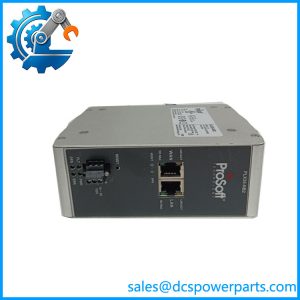
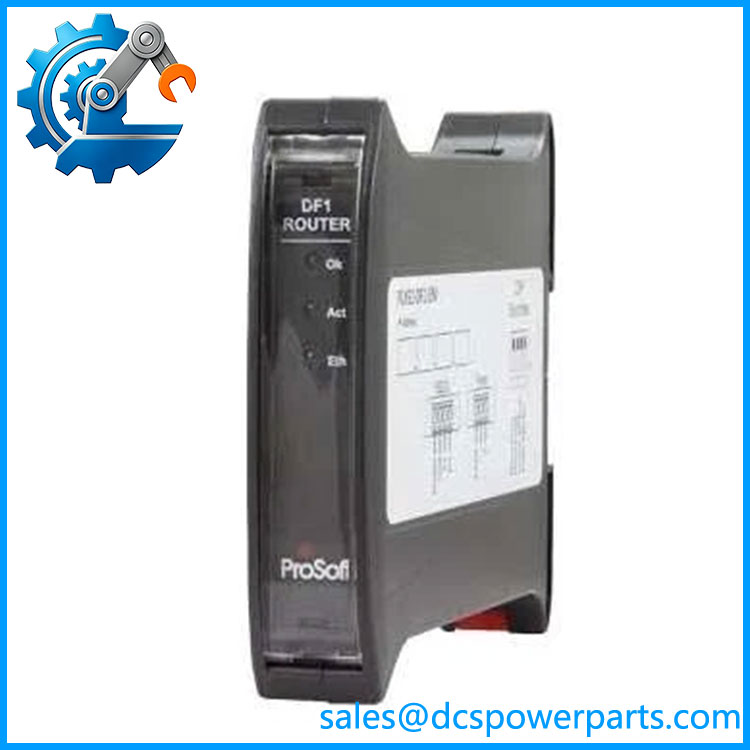
ProSoft Technology PLX51-DF1-ENI | DF1 to EtherNet/IP Router
Key Technical Specifications
| Parameter | Specification |
|---|---|
| Product Model | PLX51-DF1-ENI |
| Manufacturer | ProSoft Technology |
| Product Type | DF1 to EtherNet/IP Router |
| Ethernet Interface | RJ45 |
| Ethernet Speed | 10/100 Mbps |
| Ethernet Connections | Up to 20 ARP, 20 TCP, 10 CIP connections |
| Serial Interface | Isolated RS232, 4-way terminal |
| DF1 Protocols | DF1 Full Duplex, DF1 Half Duplex, DF1 Radio Modem |
| DF1 Baud Rates | 1,200 to 115,200 baud |
| DF1 Data Format | 8 data bits, 1 stop bit; None/Even/Odd parity |
| Error Detection | CRC, BCC |
| Bridge Routing | Up to 20 routes / 8 Logix controllers |
| DF1 Slave Mapping | Up to 20 mapping items |
| Scheduled Tag Mapping | Up to 20 mapping items |
| Input Voltage | 10–28 VDC |
| Power Consumption | 1.7 W |
| Current Draw | 70 mA @ 24 VDC; 130 mA @ 10 VDC |
| Operating Temperature | -20°C to +70°C |
| Enclosure | IP20, NEMA/UL Open Type |
| Dimensions | 101.0 × 22.5 × 120.0 mm |
| Mounting | 35 mm DIN rail |
| Configuration | ProSoft PLX50 Configuration Utility |
The published technical specifications identify 10/100 Mbps Ethernet, isolated DF1 serial communication, four DF1 operating modes, and support for up to eight Logix controllers in Bridge mode.
Product Introduction
The ProSoft Technology PLX51-DF1-ENI is a dedicated DF1-to-EtherNet/IP routing module intended to connect legacy serial automation equipment with modern Logix-based control architectures. It provides an interface between DF1/PCCC devices and ControlLogix or CompactLogix systems without requiring the legacy device itself to be replaced. ProSoft documents applications involving PLC-2, PLC-3, PLC-5, SLC, MicroLogix, and other DF1-based equipment.
The module supports four operating modes: Bridge, DF1 Slave, Scheduled Tag, and Unscheduled. Bridge mode can route DF1 PCCC messages toward Logix controllers and can also support remote programming with RSLogix 5/500. DF1 Slave mode maps incoming DF1 requests to Logix tags, while Scheduled Tag mode allows the module to initiate scheduled data transfers. Unscheduled mode is intended for Logix Message Instruction-based communication.
PLX51-DF1-ENI
Application Scenarios & Field Pitfalls — The Engineer’s Perspective
Engineering Pain Point
The difficult part of a legacy PLC migration is often not the Ethernet hardware; it is preserving the existing DF1 data model and message behavior. A ControlLogix or CompactLogix processor may have no native serial DF1 port, while an installed PLC-5, SLC, MicroLogix, drive, or other serial device may still depend on DF1/PCCC addressing. The PLX51-DF1-ENI provides the protocol boundary, but the application still has to be configured correctly at the DF1 node, PCCC addressing, Logix tag, and EtherNet/IP routing levels.
Typical Applications
- PLC-5 or SLC migration: Retain selected legacy DF1 devices while moving the supervisory or central controller toward ControlLogix or CompactLogix.
- MicroLogix integration: Provide Ethernet access to MicroLogix systems that continue using their serial DF1 interface.
- Remote programming: Bridge EtherNet/IP access to supported DF1 devices for RSLogix 5/500 programming applications.
- Redundant DF1 communication: Two PLX51-DF1-ENI modules can be used with devices having multiple DF1 ports, including Active/Standby arrangements controlled from the Logix system.
Technical Pitfalls to Avoid
- Do not treat this as a simple serial-to-Ethernet converter. The module performs protocol-aware DF1/PCCC routing and supports specific Bridge, Slave, Scheduled Tag, and Unscheduled operating modes. Configuration therefore affects how messages are interpreted and routed.
- Verify the DF1 settings against the existing device. Baud rate, parity, node address, duplex mode, error detection, and response behavior must agree with the legacy equipment. The module supports baud rates from 1,200 through 115,200 and DF1 full-duplex, half-duplex, and radio-modem modes.
- Check Logix tag access when using DF1 Slave or Scheduled Tag mode. A communication failure can actually be a Logix tag-mapping or tag-permission problem. ProSoft provides diagnostics for nonexistent tags, privilege violations, tag reads/writes, CIP timeouts, and EtherNet/IP retries.
- Do not ignore RS232 grounding and shielding. The RS232 shield connection is internally tied to the module earth. ProSoft specifically recommends connecting the module earth to a clean earth and grounding the cable shield at only one end to reduce the possibility of ground-loop problems.
- Plan IP addressing before commissioning. The factory default uses DHCP. DIP switches can also force DHCP mode or provide a temporary 192.168.1.100 address for recovery/configuration.
- Record the configuration before replacing an installed module. The application configuration is stored in nonvolatile memory, but the replacement still needs to match the intended IP configuration, DF1 parameters, routing mode, mapping, and Logix architecture.
Related Products
- ProSoft Technology PLX51-DF1-ENI — Dedicated DF1-to-EtherNet/IP router for legacy serial device integration.
- ProSoft Technology 5201-DFNT-DFCM — Earlier ProSoft communication hardware used in applications that may be candidates for migration to the PLX51 platform; verify application architecture before substitution.
- ProSoft Technology MVI56-DFCM — ControlLogix-platform communication module for DF1/DFCM applications; it is not simply the same hardware architecture as the .
- ProSoft Technology MVI56-DFCMR — Related ControlLogix communication solution with a different platform and application architecture; verify chassis and program requirements.
- ProSoft Technology MVI69-DFCM — CompactLogix-compatible communication module used in legacy DF1/DFCM applications; replacement requires architecture review.
- Allen-Bradley PLC-5 — Common legacy DF1/PCCC controller family that can be integrated into an EtherNet/IP migration architecture through the .
- Allen-Bradley SLC 500 — Legacy controller family frequently encountered in DF1 migration projects.
- Allen-Bradley MicroLogix — Compact legacy PLC family commonly connected through DF1 serial communication.
Procurement and Replacement Note
For a replacement installation, verify the complete model, existing firmware/configuration, Ethernet addressing, DF1 node address, serial parameters, operating mode, Logix controller type, and any PLC/SLC message mapping before removing the existing unit. ProSoft’s current documentation also provides firmware, EDS, configuration, and migration resources, so the configuration file and firmware revision should be recorded as part of the maintenance package.
The key point is that is a protocol-routing device, not merely an electrical interface converter. If the legacy application relies heavily on PCCC addressing, MSG instructions, mapped tags, or redundant DF1 paths, those software-level details should be validated during FAT/SAT rather than assuming a hardware replacement will be transparent.