Description
Product Core Brief
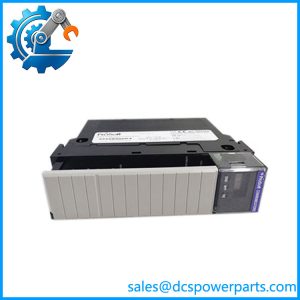
Product OverviewThe ProSoft MVI56-MBP is a dedicated Modbus Plus communication interface designed for integration with Rockwell Automation ControlLogix systems. Installed in a ControlLogix chassis, the module provides the protocol interface required for exchanging data between the ControlLogix processor and devices connected to a Modbus Plus network. This makes it useful in legacy automation installations where Modbus Plus equipment must remain in service while the supervisory or control layer is based on ControlLogix.
The MVI56-MBP does not function as a PLC CPU or conventional I/O module. Its purpose is protocol translation and data exchange between the ControlLogix backplane and Modbus Plus network. Application data is transferred between the module and ControlLogix processor through the chassis backplane, while the module handles the Modbus Plus network-side communication. This architecture avoids requiring the ControlLogix processor itself to implement the Modbus Plus protocol.
For ProSoft MVI56-MBP, compatibility should be evaluated at three levels: the ControlLogix chassis and processor environment, the ProSoft module firmware/configuration, and the Modbus Plus network characteristics. When replacing a module in an operating plant, matching the catalog number alone is not enough. Existing network addressing, data mapping, communication timing, and ControlLogix ladder logic should be documented before removing the installed unit.
Product Introduction
The MVI56-MBP is particularly useful in brownfield installations where Modbus Plus devices cannot simply be replaced. It provides a practical communication path between a ControlLogix controller and an existing Modbus Plus network without converting every field device to another protocol.
The module handles the network communication while presenting process data to the ControlLogix application through the chassis backplane. This separation is useful when troubleshooting because communication problems can generally be divided into three areas: ControlLogix backplane communication, MVI56-MBP configuration, and Modbus Plus network communication.
For a replacement, preserve the existing configuration before exchanging hardware. The most common field problem is not the physical module itself but a mismatch in configuration, node addressing, data registers, or processor-side data mapping.
Main Features and Advantages
ControlLogix Integration
The is designed for installation in a ControlLogix chassis and communicates with the host processor through the ControlLogix backplane. This provides a defined data path between the PLC application and the Modbus Plus network.
Modbus Plus Connectivity
The module provides the network interface required to communicate with Modbus Plus devices. This is particularly valuable in older plants containing Modicon PLCs, drives, HMIs, instrumentation, or other Modbus Plus equipment that remains operational.
Reduced PLC-Side Protocol Burden
The ControlLogix processor does not have to directly manage the complete Modbus Plus communication process. The communication module handles the network-side protocol functions and exchanges the required data with the processor.
Legacy-System Maintenance
For plants with a large installed Modbus Plus base, replacing an entire network can introduce unnecessary engineering and commissioning work. An can allow the existing Modbus Plus infrastructure to remain part of the control architecture.
Diagnostic Capability
The module’s status indicators and configuration/diagnostic functions are useful when separating PLC backplane problems from network-side communication faults. During troubleshooting, check module status first, then verify processor/module data exchange, and finally investigate Modbus Plus node communication.
Important Compatibility Consideration
The should not be selected solely because a device is described as “Modbus compatible.” Modbus Plus is distinct from standard Modbus RTU and Modbus TCP. A conventional RS-485 Modbus RTU interface cannot simply be connected to the ‘s Modbus Plus network.
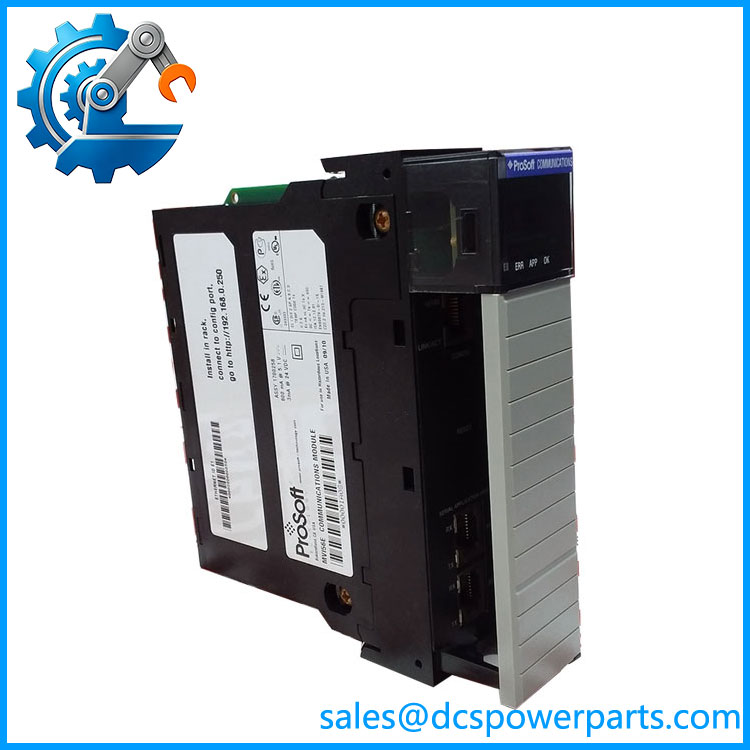
MVI56-MBP
Technical Specifications
| Parameter | Details |
|---|---|
| Model | |
| Manufacturer | ProSoft Technology |
| Product Category | Communication Module |
| Network Protocol | Modbus Plus |
| Host System | Rockwell Automation ControlLogix |
| Chassis Interface | ControlLogix backplane |
| Slot Requirement | Single ControlLogix chassis slot |
| Network Interface | Modbus Plus |
| Connector | DB-9 |
| PLC Data Interface | ControlLogix backplane |
| Application | ControlLogix ↔ Modbus Plus communication |
| Configuration | ProSoft module configuration |
| Diagnostics | Module/network status LEDs and diagnostic data |
| Mounting | ControlLogix chassis |
| Primary Use | Legacy Modbus Plus integration |
Related Products
- — Modbus Plus communication module for ControlLogix.
- ControlLogix 1756 chassis — Host hardware in which the is installed.
- ControlLogix processor — Exchanges application data with the through the chassis backplane.
- Modbus Plus network — Network infrastructure on the field/device side of the communication module.
- Modicon Modbus Plus PLCs — Common legacy devices that can be integrated through this type of interface.
- ProSoft MVI56 series — Family of ControlLogix communication modules supporting different industrial protocols. Individual modules are protocol-specific and should not be substituted based only on physical appearance.
Frequently Asked Questions
What is used for?
It connects a ControlLogix PLC system to a Modbus Plus network, allowing the ControlLogix application to exchange data with legacy Modbus Plus devices.
No. It is a communication module. The ControlLogix processor continues to execute the control program; the handles the Modbus Plus communication function.
Is Modbus Plus the same as Modbus RTU?
No. This is an important distinction. Modbus Plus is a separate industrial networking technology. An RS-485 Modbus RTU device cannot be connected directly as though it were a Modbus Plus node.
Does work with ControlLogix?
Yes. The module is designed for the ControlLogix platform, using the chassis backplane to exchange data with the ControlLogix processor.
Can I replace an existing with another communication module?
Do not assume so. A different ProSoft module may use the same general ControlLogix form factor but support a different protocol. Verify the exact protocol, firmware, configuration, and processor-side data mapping before substitution.
What should I check when replacing an ?
At minimum, record:
- Existing configuration.
- Firmware revision.
- Modbus Plus node address.
- Network topology.
- Connected device list.
- Data/register mapping.
- ControlLogix processor type.
- ControlLogix program data structures.
- Module status and diagnostic information.
- Communication timing and retry settings.
Can communicate with Modbus TCP equipment?
Not directly simply because both protocols contain the word “Modbus.” Modbus Plus and Modbus TCP use different network technologies and interfaces. A dedicated gateway or appropriate communication module is required when protocol conversion is needed.
How should a surplus be tested?
A useful test should include:
- Verify exact model marking.
- Inspect the module and backplane connector.
- Verify firmware revision.
- Install it in a compatible ControlLogix test chassis.
- Confirm module startup diagnostics.
- Load the intended configuration.
- Verify processor/module data exchange.
- Connect to a controlled Modbus Plus test network.
- Verify node addressing.
- Test read/write data exchange.
- Confirm expected ControlLogix data mapping.
- Check communication diagnostics and error counters.
- Power-cycle the chassis and repeat the communication test.
Procurement note: For a legacy Modbus Plus installation, the is best treated as a protocol-specific spare. Before approving a replacement, compare the exact module revision and existing ProSoft configuration rather than purchasing a visually similar ControlLogix communication card.