Description
Product Introduction
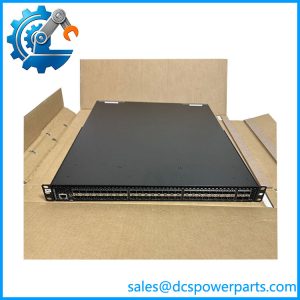
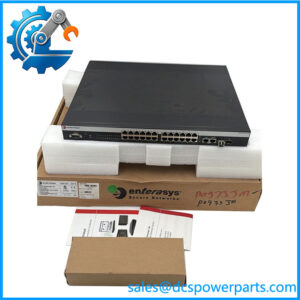
The Enterasys A4H124-24FX P0973JN is a managed Ethernet switch used as network infrastructure within industrial and enterprise Ethernet environments, including the Foxboro I/A Series control network. In the Foxboro equipment documentation, P0973JN is specifically identified as an A4-Series 24-port fiber managed switch. Its principal role is to provide managed Ethernet connectivity between control-network nodes while supporting fiber-optic links for electrically isolated or geographically separated equipment.
The A4H124-24FX provides a dense fiber interface with 24 × 100Base-FX ports using MT-RJ connectors, along with two fixed Gigabit Ethernet ports and two Gigabit SFP uplink interfaces. The switch supports full-duplex operation, VLAN configuration, port mirroring, and management through the local console and SNMP/RMON-based management applications.
For maintenance work, the exact P0973JN identification is important. Several online listings incorrectly describe this model as a modern Gigabit industrial switch with SFP fiber ports throughout, but the Foxboro documentation provides a much more specific configuration: 24 × 100Base-FX MT-RJ fiber ports + 2 fixed 10/100/1000 ports + 2 1000Base-X SFP uplinks.
Key Technical Specifications
| Parameter | Specification |
|---|---|
| Manufacturer | Enterasys Networks |
| Current Corporate Family | Extreme Networks |
| Model | A4H124-24FX |
| Foxboro Part Number | P0973JN |
| Product Type | Managed Fiber Ethernet Switch |
| Product Series | A4 Series |
| Fiber Ports | 24 × 100Base-FX |
| Fiber Connector | MT-RJ |
| Fixed Copper Ports | 2 × 10/100/1000 Ethernet |
| Gigabit Uplink | 2 × 1000Base-X SFP |
| Duplex | Full duplex |
| VLAN | Supported |
| Port Mirroring | Supported |
| Management | Local console / SNMP / RMON |
| Network Layer | Primarily Layer 2 switching |
| Mounting | Shelf / desktop / 19-inch rack |
| Redundant Power | Optional |
| Typical System | Foxboro I/A Series control network |
The Foxboro/Schneider documentation is the preferred reference for the port configuration because several reseller pages contain materially different specifications for the same model.
Application Scenarios & Engineering Considerations
The A4H124-24FX P0973JN is particularly relevant to legacy control systems where existing network architecture depends on 100Base-FX fiber connectivity.
- Foxboro I/A Series DCS networks: Used as network infrastructure for control-system nodes and associated Ethernet equipment.
- Fiber control-network links: The 100Base-FX interfaces provide fiber connectivity where copper Ethernet is unsuitable or where electrical isolation is required.
- Plant LAN segmentation: VLAN and managed-switch functions allow network traffic to be segmented and controlled.
- Control-room network infrastructure: The 19-inch rack-mount form factor makes it suitable for centralized network cabinets.
- Network diagnostics: Port mirroring and managed Ethernet functions can assist with troubleshooting network traffic and connectivity problems.
The Foxboro documentation specifically states that the switch supports VLAN configuration, full-duplex operation, local-console configuration, SNMP/RMON monitoring, and port mirroring.
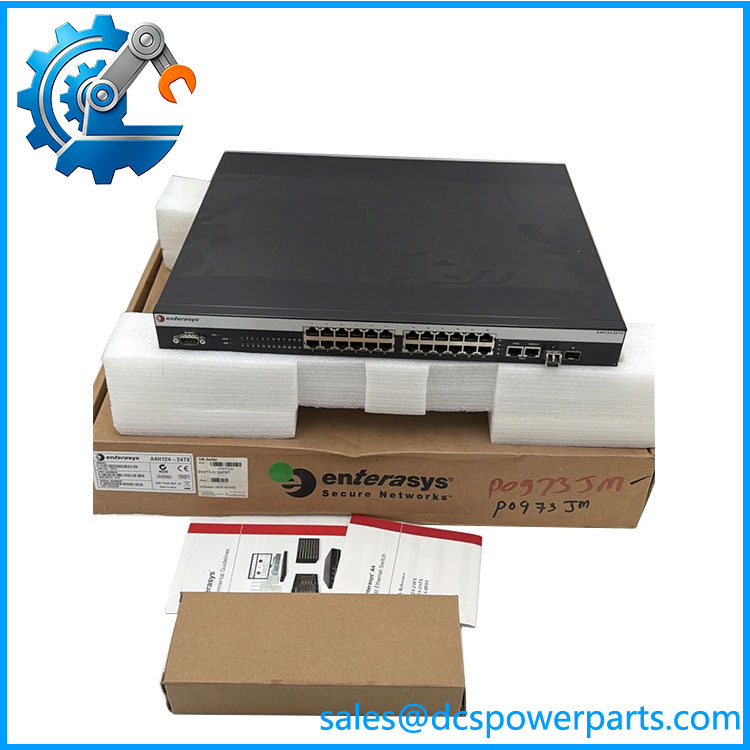
A4H124-24FX
Related Products
- Enterasys A4H124-24FX / P0973JN — Exact switch covered here.
- Enterasys A4-Series — The broader managed-switch family to which A4H124-24FX belongs.
- Enterasys A2 Series — Related SecureStack architecture. Published documentation describes A2 systems with scalable 10/100Base-T and 100Base-FX connectivity and Gigabit uplink/stacking interfaces.
- Foxboro P0973JP — Related Foxboro reference associated with a redundant-power configuration; it should not automatically be treated as identical to P0973JN.
- P0973JX — Redundant power-supply reference identified in the Foxboro control-network documentation.
The Engineer’s Guide: Field Pitfalls to Avoid
⚠️ Do not assume all 26 network interfaces are Gigabit.
The important distinction is that the primary fiber ports are 100Base-FX, not Gigabit Ethernet. The switch has separate Gigabit interfaces for fixed Ethernet and SFP uplink functions.
How to avoid it: Before replacement, document which ports are connected to the 100Base-FX plant network and which are being used as Gigabit uplinks.
⚠️ Check the fiber connector type.
The documented fiber interfaces use MT-RJ connectors. A visually similar switch using LC or SC fiber connectors is not a direct physical replacement.
How to avoid it: Match both the optical standard and physical connector before approving substitute hardware.
⚠️ Do not confuse with a generic A4-series switch.
Foxboro documentation specifically assigns to this 24-port fiber configuration. Other A4 models can have substantially different port arrangements.
How to avoid it: Specify together on the purchase order.
⚠️ Check configuration before replacing a managed switch.
A replacement may physically operate but still disrupt the DCS network if VLANs, spanning-tree parameters, management addresses, port settings, or other switch configuration data are not restored.
How to avoid it: Back up the existing switch configuration before removal whenever the original unit remains accessible.
Frequently Asked Questions
What is ?
It is an Enterasys A4-Series 24-port fiber managed Ethernet switch referenced by Foxboro as .
How many fiber ports does it have?
The Foxboro documentation specifies 24 × 100Base-FX fiber ports with MT-RJ connectors.
Does it have Gigabit Ethernet?
Yes. It has two fixed 10/100/1000 Ethernet ports and two 1000Base-X SFP uplink ports in addition to the 24 fiber ports.
Is it used with Foxboro I/A Series?
Yes. appears in Schneider Electric’s Foxboro Evo control-network Ethernet equipment documentation as the A4-Series 24-port fiber managed switch.
Is a PLC or DCS I/O module?
No. It is a managed Ethernet network switch. Its role is network connectivity rather than process I/O or controller execution.
What should I verify before purchasing?
Verify:
- 24 × 100Base-FX configuration
- MT-RJ fiber connectors
- Two fixed Gigabit ports
- Two 1000Base-X SFP uplinks
- Power-supply configuration
- Existing VLAN settings
- Spanning-tree/network configuration
- Console and management access
- Fiber type and optical budget
- Existing Foxboro network topology