Description
Product Overview
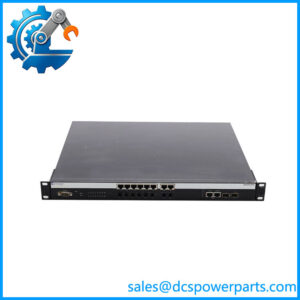
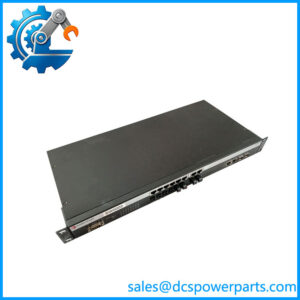
The Enterasys A4H124-24FX P0973JN is a managed Ethernet switch from the SecureStack A4 family, designed to provide high-density Fast Ethernet connectivity with management and stacking/uplink functions. The A4H124-24FX provides 24 Ethernet access ports and Gigabit-capable interfaces that can be used for uplink or stacking, making it suitable for networks where multiple controllers, operator stations, servers, and industrial communication nodes need to share a managed Layer 2/Layer 3 infrastructure. Published technical data specifies approximately 12.8 Gbps switching capacity and 9.5 Mpps forwarding performance for the individual switch.
Within an industrial automation environment, the Enterasys A4H124-24FX P0973JN can function as a network aggregation point rather than a PLC or DCS controller. Its feature set includes VLAN support, Rapid Spanning Tree, link aggregation, IGMP snooping, QoS, SNMP, RMON, Telnet, HTTP, TFTP, and SSH management functions. The A4 architecture also supports stacking multiple units, although the exact stacking arrangement depends on the selected ports and system configuration. This makes the unit relevant to legacy control-system networks where deterministic segmentation, redundant paths, and centralized switch management matter more than raw Gigabit bandwidth.
The Enterasys A4H124-24FX P0973JN should be evaluated as legacy networking hardware. Some current web listings incorrectly describe it as a modern 24-port SFP/10G industrial switch, with specifications such as 336 Gbps switching capacity. Those figures do not match the older A4H124-24FX documentation and should not be used for procurement.
Key Technical Specifications
| Parameter | Value |
|---|---|
| Manufacturer | Enterasys Networks |
| Model | |
| Part Number | P0973JN |
| Product Family | SecureStack A4 |
| Product Type | Managed Ethernet Switch |
| Access Ports | 24 × 10/100 Ethernet |
| Uplink / Stacking Ports | 2 × 10/100/1000 Ethernet |
| Switching Capacity | 12.8 Gbps |
| Forwarding Rate | 9.5 Mpps |
| MAC Address Table | 16,000 entries |
| VLAN Capacity | Up to 4,096 VLAN IDs |
| Jumbo Frames | Up to 9,216 bytes |
| Management | SNMP, RMON, Telnet, HTTP, TFTP, SSH |
| Switching Features | VLAN, STP, RSTP, LACP, QoS, IGMP Snooping |
| Link Aggregation | IEEE 802.3ad LACP |
| Console Interface | DB9 console interface |
| Input Voltage | 100–240 VAC |
| Input Frequency | 50–60 Hz |
| Maximum Input Current | 1.0 A |
| Power Consumption | Approx. 65.7 W |
| Operating Temperature | 0°C to 50°C |
| Operating Humidity | 5–95% non-condensing |
| Operating Altitude | Up to 10,000 ft |
| Dimensions | Approx. 17.4 × 14.5 × 1.7 in |
| Weight | Approx. 10.8 lb |
The electrical and environmental values above are supported byable technical references.
Important port-configuration warning: The product suffix 24FX has generated conflicting descriptions in secondary catalogs. Some sources describe 24 × 100Base-FX fiber ports, while other technical records id the as 24 × 10/100 Ethernet access ports with Gigabit uplink/stacking interfaces. For an actual replacement, the physical front-panel port arrangement and original equipment documentation should be treated as the final authority.
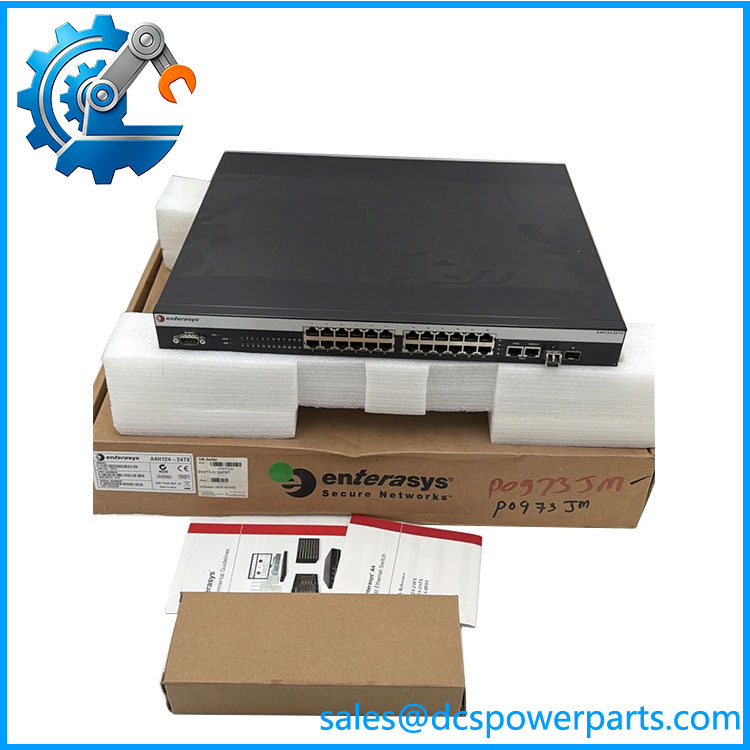
A4H124-24FX
Related Products
- Enterasys -24 — Closely related A4-series switch with 24 × 10/100 access ports and Gigabit-capable uplink/stacking interfaces. Useful where fiber connectivity is not required.
- Enterasys A4H124-24P — 24-port A4 switch with PoE capability. The PoE function changes its intended deployment, so it is not a direct substitute where the original installation uses t-PoE configuration.
- Enterasys -48 — Higher-density A4 model providing 48 Fast Ethernet access ports. It can serve a larger network segment but has different physical and port requirements.
- Enterasys -48P — 48-port PoE version of the platform. Useful for larger powered endpoint networks, but not a drop-in replacement for P0973JN.
- Enterasys A4H254-8F8T — A related A4-series model with a mixed fiber/copper port arrangement. It can be useful where both optical and copper connections are required.
- Enterasys SecureStack A2 Series — Closely related stackable switch family. The A2 platform supports 10/100 copper, 100Base-FX, and Gigabit uplink configurations, but exact port architecture differs by model.
- Foxboro I/A Series plant network equipment The P0973JN appears in Foxboro-related spare-part references. For a DCS installation, the actual network topology and switch configuration should be checked before substitution.
Frequently Asked Questions
1. What isasys used for?
It is a managed Ethernet switch used to connect multiple network devices through a centrally managed switching infrastructure.
In an industrial installation, it may sit between:
- DCS controllers
- Operator workstations
- Engineering stations
- Servers
- Remote network nodes
- Other managed switches
Its 24-port access capacity makes it appropriate for network aggregation rather than direct process I/O.
2. Can I replace with another switch?
Only after checking the exact port and configuration requirements.
Compare:
- Front-panel port arrangement.
- Copper versus fiber interfaces.
- Uplink/stacking ports.
- Power configuration.
- Firmware version.
- VLAN database.
- Stack membership.
- Existing network management configuration.
The A4H124-24P, for example, adds PoE and therefore should not be selected simply because the model numbers look similar.
Does support firmware v3.1?
The model number alone does not establish firmware compatibility.
For a legacy network replacement, record the existing firmware/software revision and configuration before removing the switch. This is particularly important when the switch participates in a stack or has manually configured VLAN, QoS, SNMP, RSTP, or LACP settings.
4. Can I ho the ?
Do not assume so.
This is a powered network switch, not a hot-swappable PLC I/O module. Removing it can immediately interrupt network paths serving controllers or operator stations.
Before replacement:
- Identify affected network nodes.
- Back up the switch configuration.
- Confirm redundant network paths.
- Schedule the maintenance window.
- Replace the unit.
- Restore configuration.
- Verify VLAN and management functions.
- Test all affected control-system connections.
5. Will replacing the switch cause me to lose my DCS configuration?
The switch does not contain the DCS application logic, but it can contain important network configuration.
Back up the switch configuration before replacement, including:
- VLAN assignments
- IP address
- Subnet configuration
- Default gateway
- SNMP settings
- RSTP configuration
- LACP groups
- QoS policies
- Port settings
- Management credentials/configuration
The DCS application itself is normally stored and managed separately.
6. Is a fiber-only switch?
This is the specification that deserves the most caution.
Available sources conflict: some identify the with 24 × 100Base-FX fiber ports, while other A4 technical documentation identifies the model as having 24 × 10/100 access ports plus Gigabit uplink/stacking interfaces.
Do not order solely from the “24FX” suffix. Match the physical port layout and the original Foxboro/Enterasys documentation.
7. How should I verify a Nplus ?
For a legacy network switch, I would verify:
- Exact front-panel marking
- part number
- Port count and physical connector type
- Power-supply configuration
- Console port
- MAC address label
- Serial number
- Firmware/boot version
- Power-up self-test
- Port link/traffic test
- Configuration retention
- VLAN and management functions
The biggest procurement risk with this model is misidentification from conflicting secondary specifications. The exact physical port arrangement should be confirmed before purchase.