Description
Product Overview
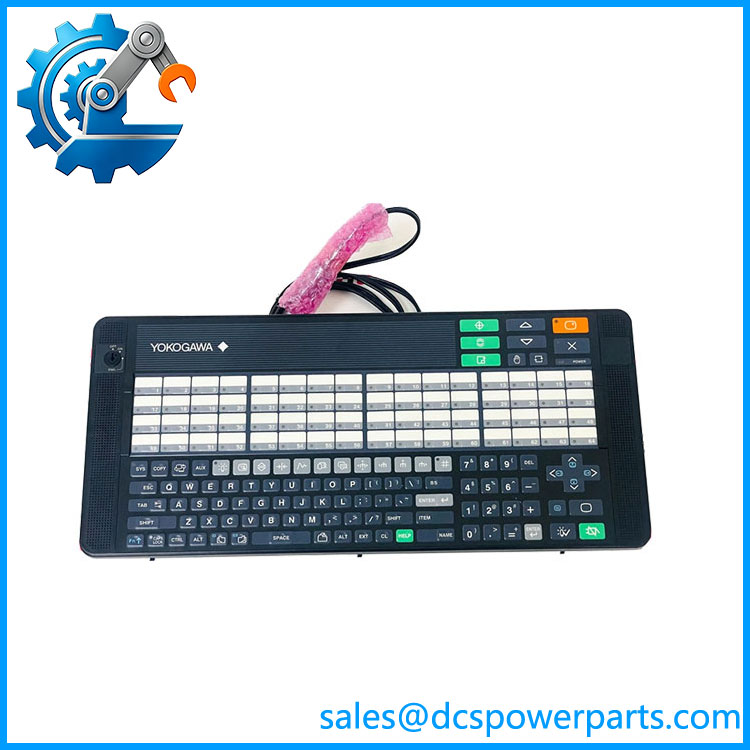
The Yokogawa AIP830-111 is a dedicated operation keyboard for single-loop operation on Yokogawa Desktop Type Human Interface Stations. It is not a PLC input module or DCS controller; its role is at the operator interface layer, providing physical keys for process operation while communicating with the host HIS through USB. Yokogawa’s own general specifications identify the AIP830 as a flat keyboard with an independent USB speaker, with the keyboard function using USB 2.0 full-speed and the sound function using USB 1.1 full-speed.
The Yokogawa AIP830-111 configuration includes the mode-selection switch and Type B operation confirmation key according to Yokogawa’s suffix-code definition. The keyboard is powered directly from the PC’s USB port at 5 V ±5%, with maximum current consumption specified at 1 A. Two USB Type-A connectors are provided, and Yokogawa specifies that both connectors should be connected directly to the computer.
In a Yokogawa CENTUM VP environment, the AIP830 functions as an operator-facing accessory for the Desktop Type HIS rather than as a standalone control device. Yokogawa documentation also lists AIP830 under the operation-keyboard equipment associated with CENTUM VP installation guidance. The practical value is straightforward: operators retain dedicated physical controls for single-loop operation instead of depending entirely on mouse or touchscreen interaction. For a legacy HIS replacement, matching the exact suffix is important because the mode-selection switch and confirmation-key configuration can affect the operator interface and intended workflow.
Product Introduction
Operators working with a mouse-only HIS interface lose the tactile confirmation and dedicated controls available during rapid loop adjustments. Yokogawa AIP830-111 addresses that requirement with a purpose-built single-loop operation keyboard and integrated USB audio function.
The unit uses two USB Type-A connections and receives 5 V ±5% directly from the host PC, making it a peripheral for the Desktop Type HIS rather than a separately powered DCS I/O device.
Key Technical Specifications
| Parameter | Value |
|---|---|
| Manufacturer | Yokogawa Electric Corporation |
| Model | AIP830-111 |
| Product Type | Operation Keyboard for Single-Loop Operation |
| Application | Desktop Type HIS |
| Control Platform | Yokogawa CENTUM VP / compatible HIS environment |
| Keyboard Type | Flat keyboard |
| Mode Selection | With mode-selection switch |
| Operation Confirmation | Type B confirmation key |
| PC Interface | 2 × USB Type-A |
| Keyboard Interface | USB 2.0 Full-Speed, bus-powered |
| Sound Interface | USB 1.1 Full-Speed, bus-powered |
| Sound Function | Independent USB speaker |
| Input Voltage | 5 V ±5% |
| Maximum Current | 1 A |
| Operating Temperature | 5 to 40 °C |
| Storage/Transport Temperature | -20 to 60 °C |
| Ambient Humidity | 20–80% RH, non-condensing |
| Weight | Approx. 2.0 kg without VESA bracket; approx. 2.5 kg with bracket |
| Installation Category | IEC 61010-1 Class I |
| Chassis Color | Black, equivalent to Munsell N1.5 |
| Mounting | Desktop; VESA bracket option |
| Condition | New Surplus, subject to inspection and testing |
Yokogawa specifies the 5–40 °C operating range, 20–80% RH non-condensing humidity range, USB interfaces, power requirements, and weight in its AIP830 general specifications.
Related Products
- AIP830-110 — Same single-loop operation keyboard family with a different suffix configuration. The exact mode-selection and confirmation-key arrangement should be checked before substitution.
- — Related configuration. Suffix differences can affect the operator-control arrangement, so it should not be treated as an automatic replacement.
- AIP831 — Yokogawa operation keyboard intended for eight-loop simultaneous operation, making it functionally different from the single-loop . Yokogawa documentation lists and AIP831 as separate operation-keyboard models.
- AIP830-111/EIM — -111 configuration supplied with an English instruction manual. The
/EIMdesignation adds documentation rather than changing the core keyboard model. - Desktop Type HIS — The host Human Interface Station for which the was designed. Compatibility should be confirmed at the HIS hardware/software level.
- CENTUM VP HIS — Yokogawa DCS operator-station environment where the can provide dedicated physical operation controls.
- CENTUM CS 3000 HIS — Legacy Yokogawa HIS environment associated with deployment in secondary documentation. For an older system, verify the specific HIS hardware and supported keyboard revision before replacement.
AIP830-111
Frequently Asked Questions
What isawa used for?
The is a dedicated operation keyboard for single-loop operation on a Desktop Type HIS. It provides physical operator controls rather than performing DCS control logic or field I/O processing. Yokogawa identifies specifically as an “Operation Keyboard for Single-loop Operation.”
It belongs to the HIS/operator-interface layer of the control system.
Is compatible with Yokogawa CENTUM VP?
Yes, the is documented as an operation keyboard associated with Yokogawa Desktop Type HIS equipment, and Yokogawa’s technical-information documentation lists under CENTUM VP installation guidance.
For an existing installation, verify the Desktop HIS model, operating environment, USB support, and installed system software before replacing an older keyboard.
What is the differenceen and other suffixes?
The suffix carries actual configuration information.
For , Yokogawa’s model code identifies:
- -1: With mode-selection switch
- 1: Operation confirmation key Type B
- 1: Always 1
That means suffix matching matters when replacing a keyboard in an established operator station.
Can ect through a USB hub?
Yokogawa’s specification explicitly states that both USB connectors must always be connected directly to the computer.
For a plant HIS, I would therefore avoid inserting a generic USB hub between the keyboard and the workstation unless the specific HIS installation documentation explicitly permits it.
oes require an external power supply?
No separate power adapter is specified for the keyboard. The unit receives 5 V ±5% from the PC’s USB port and has a maximum consumption of 1 A.
The sound function also uses USB bus power.
Can Iwap ?
From a hardware perspective, it is a USB peripheral rather than a live DCS I/O module, but do not assume that it can be disconnected during active process operation without consequence.
The keyboard itself does not execute the control strategy, but removing it may eliminate dedicated operator controls. For a live plant, replacement should be coordinated with the HIS operator and site maintenance procedure.
Will ing affect my DCS control logic?
No—the keyboard is an operator-interface peripheral, not the controller executing the DCS strategy.
Replacing it should not erase CENTUM control logic. The important checks are instead:
- Verify the exact suffix.
- Connect both USB plugs directly to the HIS computer.
- Confirm keyboard recognition.
- Test the mode-selection function.
- Test the Type B confirmation key.
- Verify the USB speaker/alarm function.
- Confirm all dedicated operator keys respond correctly.
The control application remains on the HIS/DCS system rather than being stored as control logic inside the keyboard.
How should I verify a Nelus ?
For this type of operator accessory, functional testing is more useful than simply checking whether the housing looks unused.
Recommended inspection:
- Confirm nameplate.
- Verify the mode-selection switch.
- Verify Type B operation-confirmation key.
- Inspect both USB cables/connectors.
- Test keyboard recognition on the intended HIS.
- Test every dedicated operation key.
- Verify the integrated USB speaker.
- Inspect key legends and mechanical response.
- Check the VESA bracket if supplied.
- Record the condition of the housing and cable assemblies.
Yokogawa’s specification also states that an with VESA bracket must be mounted where the mounting surface can support at least 10 kg, so the mounting arrangement should be checked during installation.