Description
Product Introduction
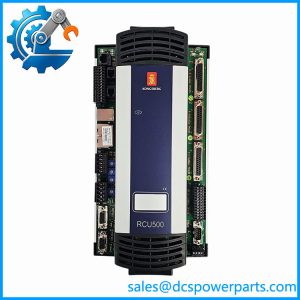
The Kongsberg RCU510 Remote Controller Unit is a real-time process-control computer designed to execute control applications, handle field I/O, and connect different communication and remote I/O subsystems. Its MPC8245 PowerPC processor runs at 400 MHz, supported by 32 MB of SDRAM and 16 MB of flash memory. Rather than functioning as a simple communication converter, the RCU510 combines application execution, I/O handling, and bus interfacing in one controller. Its published interfaces include dual 10/100 Mbps Ethernet, multiple RS-232/422/485 serial ports, and an SPBus interface for remote I/O. The documentation also identifies CAN bus and PROFIBUS connectivity, with the relevant interface configuration requiring confirmation for the installed system.
In marine automation, replacing an RCU510 is a configuration-sensitive maintenance task. The controller may be tied to a vessel-specific application, I/O allocation, communication topology, and commissioning baseline. A replacement unit with the same model designation is not, by itself, proof that the original application and system configuration will operate correctly. Before procurement, verify the article number, hardware condition, firmware or software compatibility, connector arrangement, and availability of the original configuration files. For an operational vessel or other process-critical installation, arrange a controlled replacement and functional test plan before removing the existing controller.
Key Technical Specifications
| Parameter | Specification |
|---|---|
| Model | RCU510 |
| Manufacturer | Kongsberg Maritime |
| Article number | 601418 |
| Processor | MPC8245 PowerPC, 400 MHz |
| Memory | 32 MB SDRAM; 16 MB flash |
| Power input | 24 VDC ±20% |
| Power consumption | Maximum 20 W plus loop power |
| General-purpose I/O | 32 channels, with mixed signal functions |
| Serial interfaces | 7 RS-232/422/485 interfaces; 2 are isolated |
| Ethernet | 2 × 10/100 Mbps |
| SPBus | 1 interface; RS-485 multidrop, optically isolated |
| CAN bus | 2 interfaces listed; adapter requirements apply |
| PROFIBUS | 2 interfaces listed; adapter requirements apply |
| Operating temperature | 0°C to 70°C |
| Storage temperature | −25°C to 70°C |
| Relative humidity | Up to 98%, non-condensing |
| Protection rating | IP20 |
| Dimensions (H × W × D) | 355 × 158 × 87 mm |
| Weight | 1.35 kg |
| Mounting | Confirm the mounting arrangement against the original installation |
Specification note: The controller’s individual I/O channels support different signal types, including current, voltage, PT100 or potentiometer inputs, potential-free or NAMUR digital inputs, and high-side digital outputs. Channel assignment and signal capability must be checked against the original wiring and application documentation.
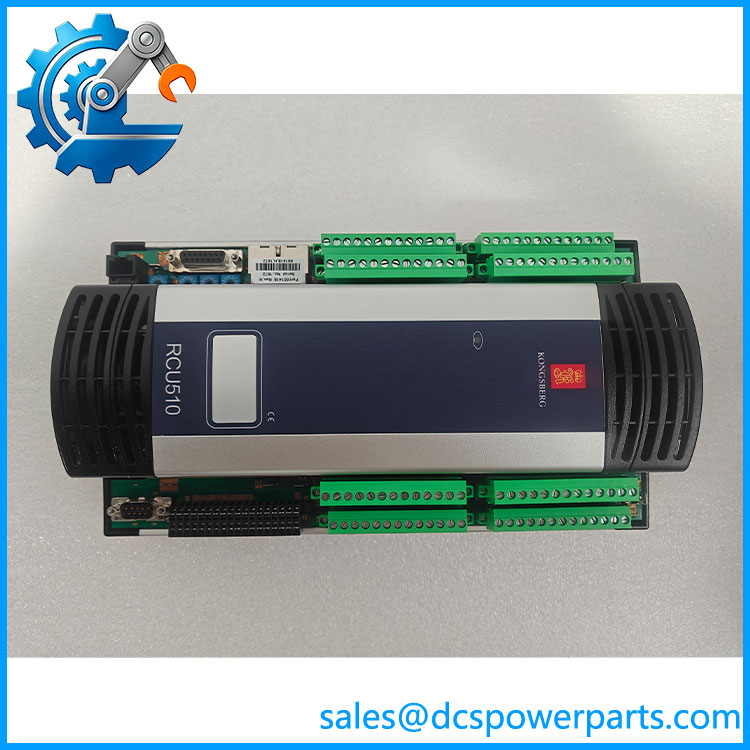
RCU510
Application Scenarios and Pain Points
- Marine process control: Executes controller applications and coordinates connected field I/O. Verify the vessel’s installed system version before ordering a replacement.
- Remote I/O communication: Uses SPBus to communicate with remote I/O equipment. Incorrect bus configuration or wiring can prevent connected I/O from being recognized.
- Serial equipment integration: Connects supported devices through RS-232/422/485 interfaces. Check the required electrical standard, baud rate, isolation, and pin assignment for each connection.
- Ethernet-based system communication: Provides dual Ethernet interfaces. Confirm the network topology and assigned addresses rather than assuming that the original configuration will transfer automatically.
- Maintenance of existing installations: May be required when an installed controller fails or becomes unreliable. The main procurement risk is receiving a physically compatible unit without a usable application or verified configuration.
Related Products and Compatibility
These are related product families or system components to investigate when maintaining a Kongsberg-based installation. They are not confirmed drop-in replacements for the RCU510.
| Product or family | Relationship |
|---|---|
| Kongsberg RCU500 | Related remote controller; verify hardware and application compatibility |
| Kongsberg RCU501 | Related controller model; not automatically interchangeable |
| Kongsberg RCU400H | Another remote controller in the manufacturer’s range |
| Kongsberg RDi-16 | Remote digital input equipment; verify system-specific compatibility |
| Kongsberg RDo-8 | Remote digital output equipment; verify system-specific compatibility |
| Kongsberg RAi-16 | Remote analog input equipment; verify system-specific compatibility |
Engineer’s Guide: Field Pitfalls to Avoid
1. Do not assume the same model means the same configuration. Record the full nameplate information and article number, and compare the hardware revision with the installed unit where applicable.
2. Protect the application and I/O configuration before removal. Confirm whether the original program, parameters, and commissioning files are available. A replacement controller may power up normally but still fail to run the required process application.
3. Check the electrical and environmental conditions. Confirm the 24 VDC supply, grounding, terminal wiring, ventilation, and cabinet conditions. The RCU510 is rated IP20, so it requires appropriate enclosure protection against water and conductive contamination.
Frequently Asked Questions
Q1: What is the Kongsberg used for?
It is a remote controller unit for process control, application execution, field I/O handling, and communication with connected automation equipment.
Q2: What is the article number for the ?
The published article number is 601418. Confirm the label on the existing unit before ordering.
Q3: What power supply does the require?
The published specification is 24 VDC ±20%, with maximum power consumption of 20 W plus loop power.
Q4: Does the support Ethernet and serial communications?
Yes. Its documentation lists dual 10/100 Mbps Ethernet and seven RS-232/422/485 serial interfaces, including two isolated interfaces.
Q5: Can an RCU500 replace an ?
Do not assume so. Compare hardware, interfaces, application requirements, firmware or software versions, and system approvals before considering a substitution.
Q6: What should be checked when buying a used or refurbished ?
Request clear nameplate photographs, confirmation of the article number, a report of the unit’s functional testing, and disclosure of any known faults. Ask separately whether application software or configuration files are included; their availability should not be assumed.
Q7: What information helps confirm suitability before purchase?
Provide the existing unit’s nameplate details, installed system or vessel application, hardware revision, known fault symptoms, and any available configuration documentation. These details help reduce the risk of ordering an incompatible controller.