Description
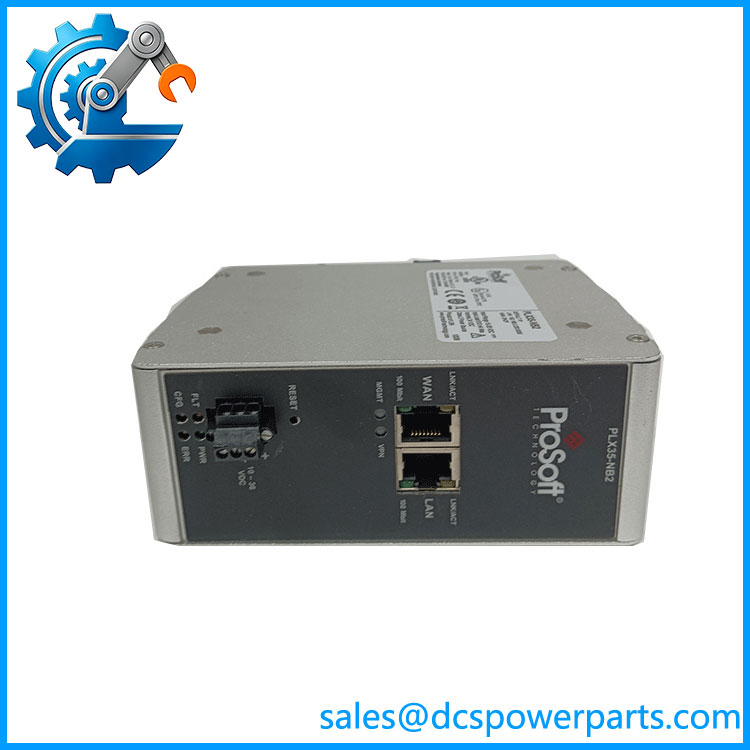
ProSoft Technology PLX35-NB2 Network Bridge
Key Technical Specifications
| Parameter | Specification |
|---|---|
| Manufacturer | ProSoft Technology |
| Model | PLX35-NB2 |
| Product Type | Network Bridge |
| Ethernet Ports | 2 × 10/100Base-T, RJ45 |
| Remote Connectivity | VPN through ProSoft Connect / Belden Horizon |
| EtherNet/IP Function | Local VPN access control through MSG instruction |
| External Power | 10–30 VDC |
| Peak Power Consumption | < 6 W |
| Operating Temperature | -30 to +70°C |
| Relative Humidity | 5–95%, non-condensing |
| Enclosure | Extruded aluminum with DIN clip |
| Dimensions | 140.1 × 52.4 × 110.9 mm (H × W × D) |
| Shock | 20G operational; 30G non-operational |
| Vibration | 10G, 10–150 Hz |
| SD Card | Supported, maximum 32 GB |
| Installation | DIN rail / panel applications |
The current user manual specifies 24 VDC nominal, with 10–36 VDC allowed, while the product datasheet lists 10–30 VDC as the external power specification. For a replacement or new installation, use the applicable revision of the installation documentation rather than assuming every published document has identical electrical limits.
Product Introduction
The ProSoft Teogy is a standalone industrial Network Bridge designed to provide authorized remote access to automation equipment for commissioning, troubleshooting, maintenance, and network service work. It provides two 10/100Base-T Ethernet ports: one connects to the local automation network and the other provides the external network connection. Remote connections are established through ProSoft’s remote-access platform rather than treating the unit as a conventional PLC communication card.
The ProSoft Teogy is particularly useful where engineers need access to an installed PLC or automation network without installing a separate PC at the machine. It is important, however, to classify the device correctly: this is a remote-access network bridge, not a Modbus gateway, EtherNet/IP I/O adapter, or general-purpose Ethernet router. The distinction matters when determining network architecture, cybersecurity controls, and replacement requirements.
PLX35-NB2
Application Scenarios & Field Pitfalls — The Engineer’s Perspective
Engineering Pain Point
Remote troubleshooting becomes difficult when the PLC, drive, HMI, or other controller is installed at a remote plant or machine and an engineer must travel simply to inspect software diagnostics. The addresses this maintenance problem by placing a controlled remote-access bridge at the automation network, allowing authorized personnel to connect remotely during commissioning or service activities.
Typical Applications
- Remote PLC commissioning — Provides remote network access during startup and programming work.
- Industrial troubleshooting — Allows engineers to reach connected automation equipment during an equipment fault.
- OEM machine support — Useful for machines installed at customer facilities where remote technical assistance is required.
- Legacy automation maintenance — Can provide a practical remote-access layer around existing Ethernet-based control equipment without replacing the PLC itself.
Technical Pitfalls
1. It is not a protocol-conversion gateway.
Do not purcthe when the actual requirement is EtherNet/IP-to-Modbus, PROFINET-to-EtherNet/IP, or another protocol conversion. Its primary function is network access and remote connectivity.
2. Network topology needs to be checked before installation.
The two Ethernet ports have defined roles: one connects to the local network requiring remote access, while the other connects toward the Internet/external network. The installation should be planned so that the bridge does not unintentionally expose unrelated control assets.
3. Local control of remote access is an important feature.
The supports local control of VPN access through an EtherNet/IP MSG instruction. This can be useful when the PLC program needs to determine when remote connectivity is permitted.
4. Firmware revision matters.
ProSoft’s current product documentation lists firmware and release-note resourcesthe . When replacing an installed unit, record the firmware version and existing configuration before commissioning the replacement.
5. Do not assume the power specification from one document applies universally.
The datasheet specifies 10–30 VDC, while the newer user manual states 24 VDC nominal with 10–36 VDC allowed. Follow the documentation applicable to the hardware revision and installation.
6. Limited availability should be considered during spare planning.
ProSoft currently identithe as having limited availability. For plants that depend on this unit for remote maintenance, maintaining a tested spare can be more practical than waiting for an unplanned replacement during a production outage.
Related Products
- — Two-port standalone Network Bridge for remote automation access.
- ProSoft PLX31-EIP-MBS4 — Protocol gateway architecture; intended for EtherNet/IP and Modbus TCP/serial integration rather than remote-access bridging.
- ProSoft PLX32-EIP-MBTCP — EtherNet/IP to Modbus TCP/IP gateway for protocol integration.
- ProSoft PLX31-EIP-PND — EtherNet/IP to PROFINET I/O gateway.
- ProSoft PLX32-EIP-PND — EtherNet/IP to PROFINET gateway family.
- ProSoft PLX51-DL-232 — Data-logging gateway rather than a remote-access bridge.
- ProSoft PLX51-DLplus-232 — Expanded data-logging platform for serial applications.
- ProSoft PLX51-PBM — PROFIBUS DP Master/Slave gateway, serving a different integration requirement.
Procurement Note
For a replacement, verify the complete model number, firmware/configuration, Ethernet cabling, power supply, and intended network topology. If purchasing used or surplus equipment, request photographs of the product label and Ethernet/power connectors and, where possible, confirm that the unit boots correctly and can establish the required management connection. A visually clean unit is not enough for remote-access hardware; configuration retention and firmware compatibility can determine whether it is immediately usable.