Description
Product Overview
In marine automation, a controller may have to process machinery signals, exchange data with navigation or propulsion equipment, and maintain deterministic control behavior while operating continuously. The Kongsberg RCU602 is a general-purpose real-time process control computer developed for Kongsberg Maritime system applications in onshore and offshore installations. Its embedded PowerPC P2041 processor operates at 1.5 GHz, supported by 2 GB of RAM and 256 MB of flash memory allocated for application use. These resources support control execution, communications, and application-specific processing within the configured automation system.
The RCU602 is designed to interface with a range of marine automation equipment through Ethernet, PROFIBUS, CAN, and serial communication channels. Its documented functions include four opto-isolated digital inputs, four opto-isolated digital outputs, a watchdog output, and up to 24 serial lines through RSER200 interface modules. Ethernet connections serve process, field, and redundancy networks, depending on the configured installation. Applications may include machinery monitoring, propulsion control, dynamic positioning support, alarm systems, and integrated vessel automation. Actual responsibilities depend on the loaded application and system architecture; the controller should not be assumed to provide every function in every installation.
For maintenance teams, the Kongsberg RCU602 offers documented support for single-unit and redundant configurations, built-in diagnostics, watchdog monitoring, and redundant power inputs. Those features can help maintenance personnel identify controller or communication faults, but redundancy only works as intended when the complete configuration—including the standby unit, network paths, power sources, and application settings—has been engineered and tested correctly. Before replacing a failed controller, verify the article number, hardware revision, firmware or system release, network assignments, and application backup. The published article number is 383962, but the installed nameplate and applicable Kongsberg documentation should govern procurement.
Product Introduction (Non-Templated)
When a marine controller fails, restoring communication alone is not enough; the replacement must also run the correct application and match the system’s network configuration. The Kongsberg RCU602 uses a 1.5 GHz PowerPC P2041 processor, 2 GB RAM, and 256 MB of application flash for real-time process control.
For a legacy vessel automation repair, verify article number 383962, the installed firmware or system release, and the interface configuration before installation. Redundant power inputs and support for redundant controller arrangements can assist availability planning, but the approved system design determines the actual recovery procedure.
Key Technical Specifications
| Parameter | Value |
|---|---|
| Manufacturer | Kongsberg Maritime |
| Model | RCU602 |
| Article Number | 383962 |
| Product Type | Real-time remote controller unit |
| Processor | PowerPC P2041 |
| Processor Clock | 1.5 GHz |
| RAM | 2 GB |
| Application Flash | 256 MB |
| Input Supply Voltage | 24 V DC |
| Permitted Supply Range | 18–31.2 V DC |
| Maximum Nominal Current Consumption | 0.75 A |
| Maximum Startup Current | 2.8 A |
| Maximum Power Consumption | 20 W |
| Power Inputs | Redundant inputs with alarm monitoring |
| Process Network | 2 × RJ45 Ethernet, 10/100 Mbps |
| Field Network | 2 × RJ45 Ethernet, 10/100 Mbps |
| Redundancy Network | 2 × RJ45 Ethernet, 100/1000 Mbps |
| Digital Inputs | 4 × opto-isolated |
| Digital Outputs | 4 × opto-isolated, maximum 30 mA per output |
| Watchdog Output | 1 × opto-isolated, maximum 30 mA |
| Serial Interfaces | 24 serial lines through RSER200 modules |
| Serial Protocols | RS232, RS422, RS485, NMEA 0183 through the applicable interface modules |
| PROFIBUS | 2 × opto-isolated 9-pin D-sub interfaces |
| CAN Interfaces | 2 × CAN interfaces; protocol and speed depend on configuration |
| Mounting | Vertical DIN rail, 35 mm |
| Dimensions (H × W × D) | 355 × 158 × 87 mm |
| Weight | Approximately 1.34 kg |
| Operating Temperature | −15°C to +70°C |
| Storage Temperature | −25°C to +70°C |
| Humidity | Up to 95% RH, subject to specified conditions |
| Protection Rating | IP20 |
| Condition | Verify new-surplus, used, or refurbished status |
Specifications are based on published RCU602 technical data. Confirm connector assignments, protocol configuration, and environmental conditions against the documentation for the exact hardware revision.
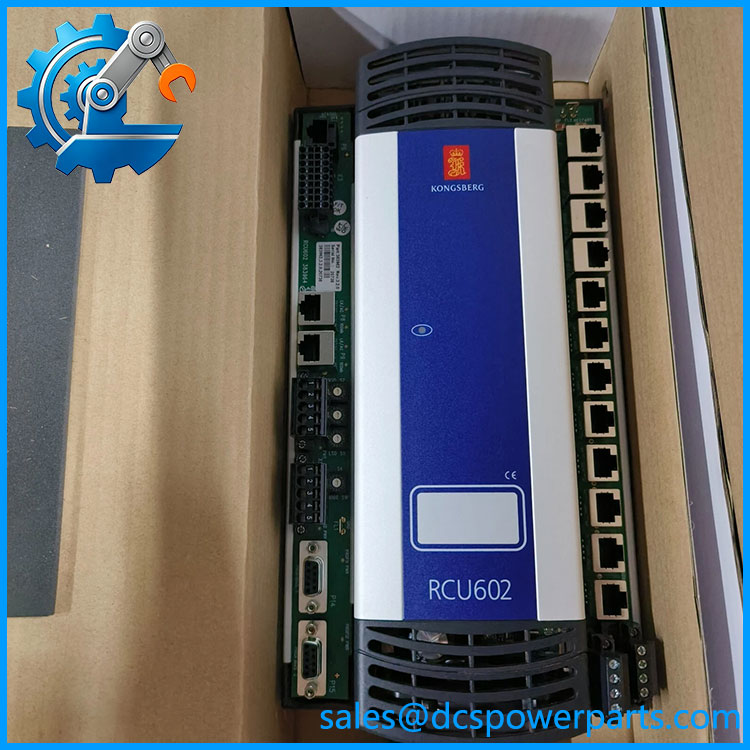
RCU602
Related Products
The following components and systems are relevant when maintaining an installation. They have different functions and are not automatically interchangeable with the controller.
- RSER200 — Serial interface module family used to provide serial channels for equipment such as devices using RS232, RS422, RS485, or NMEA 0183. Verify the exact variant and channel allocation required by the existing application.
- K-Chief 700 — Kongsberg vessel automation system family. Relevant when identifying the automation platform hosting the controller; compatibility must be confirmed for the installed system release.
- K-Chief 600 — An earlier vessel automation system family that may be relevant to legacy equipment investigations. Do not assume that every K-Chief 600 configuration supports the .
- K-Safe — Kongsberg marine safety-system family. Useful when identifying the wider safety architecture, but safety-related functions must be matched to the specific approved hardware and application.
- cJoy — Kongsberg manoeuvring-control system family. Relevant for vessels with integrated manoeuvring functions; confirm the controller’s designated role within the actual configuration.
- redundant controller — A second may be used in supported redundant architectures. The standby unit requires the appropriate hardware, application configuration, network setup, and system validation.
- Kongsberg remote I/O modules — Used to acquire field signals or control outputs at distributed locations. Select the specific I/O hardware based on signal type, channel count, electrical ratings, and supported bus architecture.
- Kongsberg process-network equipment — Switches and associated network components may form part of the Ethernet infrastructure. Check network topology, redundancy design, and configuration requirements before replacing network hardware.
- Kongsberg power-distribution components — Relevant to maintaining the controller’s redundant 24 V DC supply arrangement. Verify input limits, protection, alarm wiring, and the site’s approved power design.
These are system-level comparison points, not a confirmed replacement list. The controller’s installed project documentation should determine the approved component selection.
Frequently Asked Questions (FAQ)
1. Is the Kongsberg compatible with my existing marine automation system?
Compatibility depends on the controller’s role, the system generation, and the installed application. The is documented for Kongsberg process-control applications, including marine automation systems.
Before ordering, verify:
- The installed controller’s model and article number.
- The host system and software release.
- The configured network interfaces and connected I/O.
- The approved replacement procedure and application-restoration requirements.
A matching model number is necessary, but it does not establish compatibility with every vessel configuration.
2. Can I hot-swap the while the vessel is operating?
Hot replacement may be supported in certain redundant configurations, but it should not be assumed safe for every installation.
Check the approved maintenance procedure, standby-controller status, power arrangement, and network topology. Confirm that the healthy controller can maintain the required functions throughout the replacement. Follow the vessel’s operating restrictions and obtain authorization from the responsible automation engineer before removing hardware.
3. Does the support Modbus TCP, PROFIBUS, and CAN?
The published technical information lists Modbus, NMEA 0183, PROFIBUS/PROFIsafe, and CAN among the supported protocol families. It also documents Ethernet, serial, PROFIBUS, and CAN interfaces.
The important distinction is that a physical interface does not guarantee that every protocol is enabled in every installation. Confirm the loaded software, interface module requirements, network configuration, and specific protocol implementation before connecting third-party equipment.
4. Will replacing the erase the original application or network configuration?
Do not assume that the replacement will automatically inherit the original application, address assignments, or controller role.
Before replacement, obtain an authorized application backup and record the existing hardware identification, network settings, redundancy assignments, and diagnostic status. Confirm the supported restoration method and required software versions. After installation, validate controller operation, communications, I/O behavior, alarms, and redundancy before returning the system to service.
5. How can I verify a new-surplus Kongsberg is genuine?
The term new surplus describes the claimed stock condition; it does not independently prove authenticity or functionality.
Request photographs of the actual module, the model and article-number label, serial or traceability information where available, and packaging details. Ask for inspection records, available test evidence, disclosure of previous repairs, and written warranty terms.
For vessel-critical applications, the evidence should satisfy the operator’s maintenance and safety-management requirements.
6. What should I check if the will not start or communicate?
Use the system’s approved troubleshooting procedure rather than immediately replacing the controller.
- No startup: Check both supply inputs, voltage at the terminals, protective devices, and status indicators.
- Controller fault: Record Run/Error LED indications and available diagnostic messages.
- Network failure: Check the correct Ethernet port, link status, cabling, network configuration, and redundancy path.
- Serial or fieldbus failure: Verify the interface module, channel assignment, protocol settings, and connected-device configuration.
Isolate power before working on wiring, and avoid changing network or application settings without a backup and an approved recovery plan.
7. What warranty and testing should I require when buying an ?
Ask for written warranty duration, coverage, return terms, and confirmation of the supplied unit’s condition. A useful inspection record should identify the module and document the tests actually performed.
Where appropriate, request verification of startup behavior, power-input operation, Ethernet connectivity, available interface functions, diagnostics, and the intended redundant configuration. A basic power-on test does not establish that the controller will run the vessel’s application correctly.