Description
Product Introduction
Legacy GE Fanuc Genius I/O networks remain installed in many industrial facilities because of their long service life and dependable remote I/O architecture. When troubleshooting these systems, engineers often need direct access to field I/O blocks without connecting a programming workstation. The GE Fanuc IC660HHM501 provides this capability as a dedicated handheld maintenance interface for Genius communication networks.
The GE Fanuc IC660HHM501 allows technicians to configure Genius I/O blocks, monitor real-time I/O values, review diagnostic information, clear faults, and perform controlled I/O forcing operations. It connects directly to Genius devices and can be used at different points on the network, making it useful during commissioning, troubleshooting, and preventive maintenance activities.
For GE Fanuc Genius I/O system maintenance, the GE Fanuc IC660HHM501 remains an important service tool because many older installations rely on Genius bus diagnostics that are not easily accessed through modern engineering environments. Before using a replacement unit, engineers should verify firmware revision, supported Genius device types, cable condition, and battery condition.
Technical Specifications
| Parameter | Value |
|---|---|
| Product Model | IC660HHM501 |
| Manufacturer | GE Fanuc |
| Product Series | Genius I/O |
| Product Type | Hand-Held Monitor |
| Main Function | Genius bus configuration and diagnostics |
| Display Type | LCD |
| Display Size | 4 lines × 16 characters |
| Character Height | Approx. 5 mm |
| Keyboard | 20 sealed keys with tactile feedback |
| Communication | Genius serial bus |
| Supported Baud Rates | 153.6 Kbaud standard, 153.6 Kbaud extended, 76.8 Kbaud, 38.4 Kbaud |
| Power Supply | Battery pack or external AC charger |
| Charger Input | 115/230 VAC, 47–63 Hz |
| Battery Operation | Approx. 6 hours fully charged |
| Operating Temperature | 0°C to 60°C |
| Storage Temperature | -40°C to +70°C |
| Humidity Range | 5–95% non-condensing |
| Weight | Approx. 0.6 kg without case |
| Languages | English, German, French, Italian |
| Applications | Genius I/O setup, diagnostics, maintenance |
Application Scenarios & Pain Points
The GE Fanuc IC660HHM501 is mainly used during maintenance and commissioning of Genius I/O systems where direct access to remote I/O devices is required.
Genius I/O Remote I/O Maintenance
Technicians can connect the handheld monitor directly to Genius blocks to check:
- Input and output states
- Device configuration
- Communication status
- Fault information
- Network parameters
Factory Automation Systems
Many older production lines use GE Fanuc PLC systems with Genius remote I/O. The handheld monitor provides a practical method for diagnosing field devices without disturbing running control logic.
Commissioning and Startup
During installation of Genius I/O blocks, the IC660HHM501 helps technicians assign device parameters, verify communication, and confirm correct field wiring.
Troubleshooting Aging Control Systems
In brownfield facilities, a failed remote I/O block may require immediate diagnosis. The handheld monitor helps determine whether the issue comes from:
- I/O block configuration
- Network communication
- Field wiring
- Device hardware
Field note: A packaging line using Genius remote I/O experienced intermittent communication alarms. Instead of replacing multiple I/O blocks, technicians connected an and identified incorrect device configuration settings. Restoring the correct parameters returned the network to normal operation.
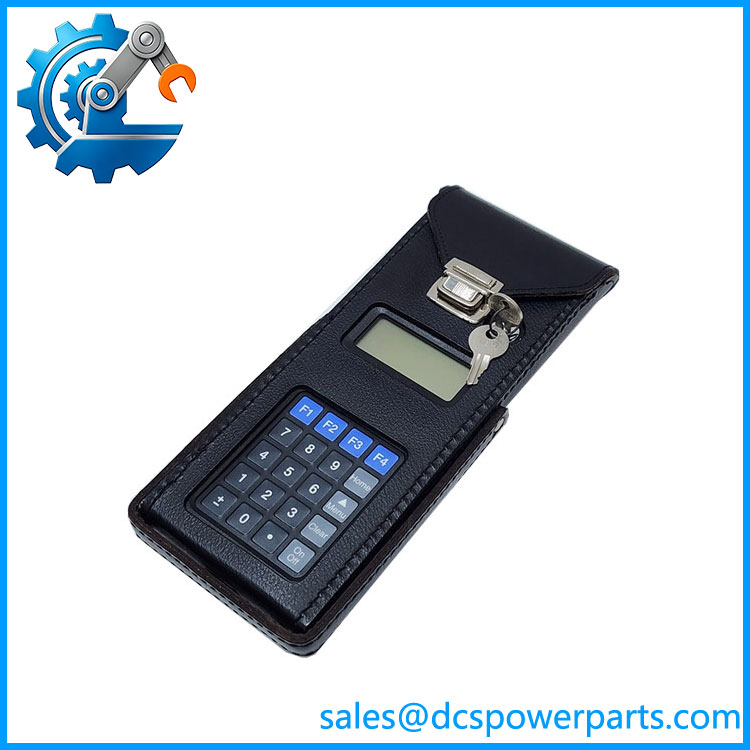
IC660HHM501
Related Products
- GE Fanuc IC660HHM500
Earlier Genius handheld monitor version. Some functions require the later revision. - GE Fanuc IC660HHC005
Connection cable used between the handheld monitor and Genius I/O blocks. - GE Fanuc IC660BPM500
Battery pack assembly for handheld monitor operation. - GE Fanuc IC660BCM501
Battery charger accessory for the . - GE Fanuc IC697BEM731
Series 90-70 Genius Bus Controller used in Genius network applications. - GE Fanuc IC693CMM301
Series 90-30 Genius Communications Module used with Genius networks. - GE Fanuc IC660 I/O Blocks
Remote I/O devices configured and diagnosed using the .
Engineer’s Guide: Field Pitfalls to Avoid
⚠️ Using an Incorrect Firmware Revision
Different Genius devices may require different handheld monitor firmware versions.
Check before deployment:
- HHM firmware revision
- Target Genius block model
- Required configuration functions
⚠️ Ignoring Battery Condition
A weak battery can cause:
- Unexpected shutdowns
- Interrupted configuration operations
- Failed field diagnostics
Recommended checks:
- Battery charging time
- Battery capacity
- Charger operation
⚠️ Assuming the HHM Can Replace a Programming Software Package
The is a field service tool, not a full PLC programming workstation.
It is intended for:
- Genius device setup
- Diagnostics
- Monitoring
- Limited configuration changes
It does not replace PLC programming software.
Frequently Asked Questions (FAQ)
What is the GE Fanuc used for?
The is a Genius I/O handheld monitor used for configuring, monitoring, and diagnosing Genius bus devices.
Is a PLC module?
No. It is a portable maintenance and configuration terminal, not a PLC CPU or I/O module.
What systems use ?
Typical applications include:
- GE Fanuc Genius I/O networks
- Series 90 PLC systems with Genius communication
- Remote I/O installations
- Industrial automation maintenance systems
What information can display?
It can display:
- I/O data
- Device status
- Diagnostic information
- Bus information
- Configuration parameters
Does require external power?
The unit can operate from its internal battery pack. The charger requires 115/230 VAC input.
Can configure all Genius devices?
Compatibility depends on the Genius device type and handheld monitor firmware revision. Engineers should confirm supported devices before field use.
Is a refurbished GE Fanuc suitable for maintenance use?
A tested refurbished unit can be suitable when the LCD display, keypad operation, communication port, firmware revision, and battery performance are verified before deployment.