Description
GE Fanuc IC698CHS117C RX7i 17-Slot Front-Mount Rack
Key Technical Specifications
| Parameter | Specification |
|---|---|
| Manufacturer | GE Fanuc |
| Model | IC698CHS117C |
| Series | PACSystems RX7i |
| Product Type | Front-mount system rack |
| Rack Capacity | 18 physical positions including power supply |
| User I/O Capacity | Up to 15 single-width modules or 8 double-width modules |
| Mounting | Front / panel mount |
| Slot 0 | RX7i power supply |
| Slot 1 | RX7i CPU |
| Slot Width | Approximately 0.8 in for standard module positions |
| Backplane | VME-based |
| Module Compatibility | RX7i, supported Series 90-70 and VME modules |
| Revision | Series C |
GE’s RX7i documentation identifies IC698CHS117 as an 18-slot front-mount CPU/system rack. Slot 0 is reserved for the power supply and Slot 1 for the CPU. The remaining positions accommodate combinations of single- and double-width modules.
Product Introduction
The GE Fanuc IC698CHS117C is the Series C version of the RX7i front-mount system rack. It provides the mechanical structure, VME backplane connections, power-supply position, CPU position, and module interconnection required by a PACSystems RX7i controller installation. It is infrastructure hardware rather than a processor, I/O module, or communication interface.
For legacy RX7i installations, the rack is a critical part of the controller assembly. A damaged backplane connector, failed rack interface, or mechanical problem can affect several modules at once, making a rack fault look like a CPU or I/O problem.
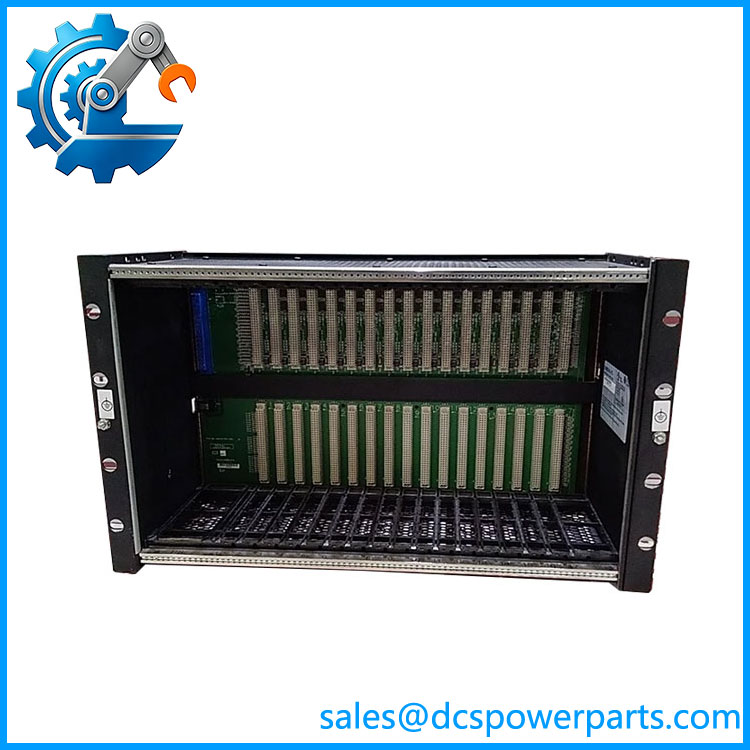
IC698CHS117C
Application Scenarios & Field Pitfalls — The Engineer’s Perspective
Engineering Pain Point
When several RX7i modules disappear from the hardware configuration at the same time, replacing individual I/O cards is often the wrong first move. The rack backplane, power distribution, module seating, and VME interconnection should be checked before condemning multiple modules.
The IC698CHS117C is especially important in older systems where repeated module insertion, cabinet vibration, contamination, or long-term thermal cycling has affected connectors and mechanical interfaces.
Typical Applications
- PACSystems RX7i PLC control cabinets
- Process-control and plant automation systems
- Legacy GE Fanuc VME-based control installations
- Systems combining RX7i and supported Series 90-70/VME hardware
Technical Pitfalls
1. Do not confuse the rack with a CPU.
IC698CHS117C contains the rack/backplane infrastructure. The RX7i CPU is installed separately in Slot 1. GE documentation explicitly defines the CPU location within the rack.
2. Slot numbering matters.
Slot 0 is the power-supply position, while Slot 1 is reserved for the RX7i CPU. CPU modules with an Ethernet daughtercard can occupy two adjacent positions, which changes the usable module layout.
3. Check single-width versus double-width modules.
The rack can accommodate up to 15 single-width modules, up to 8 double-width modules, or a combination. A replacement rack must therefore be evaluated against the actual installed module population rather than simply counting cards.
4. VME integration is not automatically universal.
The RX7i rack supports compatible VME modules, but GE provides specific guidelines for integrating VME hardware into the RX7i architecture. A generic VME card should not be assumed compatible solely because the connector fits.
5. Check cooling requirements.
Certain high-wattage RX7i configurations require the rack fan assembly. GE-family documentation specifically identifies fan assemblies for configurations involving the CPE020/CRE020 CPUs and high-wattage power supplies.
6. Enclosure requirements matter.
The RX7i rack is open equipment and should be installed inside an appropriate protective enclosure. One technical reference specifies an enclosure rated IP54 or higher for industrial use.
7. Verify the revision before substitution.
IC698CHS117C is specifically identified as Revision C. Do not remove the final revision character when documenting the spare, particularly when the plant maintains multiple rack revisions.
Related Products
- IC698CHS117 — Base RX7i 17-slot front-mount rack family.
- IC698CHS117A — Revision A version.
- IC698CHS117B — Revision B version.
- IC698CHS017 — RX7i 17-slot rear-mount rack.
- IC698PSA100 — RX7i power supply commonly used in the rack.
- IC698PSA350 — Higher-wattage RX7i power supply option.
- IC698CPE020 — RX7i CPU requiring attention to rack cooling and double-width installation.
- IC698CRE020 — RX7i redundancy CPU associated with higher-performance rack configurations.
- IC697ACC721 / IC697ACC724 / IC697ACC744 — Rack fan assemblies for 120 VAC, 240 VAC and 24 VDC installations respectively.
Procurement Note
For , verify the revision, mounting orientation, installed CPU, power supply, module widths, VME module population, and cooling arrangement before purchasing.
One important point: some online listings incorrectly identify as an Ethernet interface module or redundant CPU. Those descriptions are not credible for this catalog number. The IC698CHS117 family is the RX7i system rack, and the C suffix denotes the documented Series C revision.
For a replacement rack in an operating plant, photograph the existing rack label and backplane before ordering. Confirm whether the installation uses a standard CPU, double-width CPU with embedded Ethernet, high-wattage power supply, or VME modules. Those details determine whether the replacement rack can reproduce the existing configuration without additional mechanical or cooling changes.