Description
Product Overview
The Delta DOP-110WS is a 10.1-inch industrial human-machine interface designed to provide operators with direct access to machine status, process information, alarms, and control functions. Part of Delta’s DOP-100 series, this Advanced Narrow Frame HMI combines a 1024 × 600 TFT display with an ARM Cortex-A8 processor operating at 800 MHz. Its wide-screen format provides room for graphical process screens, equipment status indicators, parameter entry, and alarm displays without requiring multiple small operator panels.
The hardware includes 512 MB RAM and 256 MB Flash ROM, supporting HMI project storage and runtime operation. Communication options include built-in Ethernet and multiple serial interfaces, with RS-232, RS-422, and RS-485 support distributed across the COM ports. USB Host and USB Client interfaces support peripheral connection and project transfer, while an SD card slot provides additional storage flexibility. The four-wire resistive touch panel is designed for direct operator input, and the display provides 65,536 colors at 450 cd/m² typical brightness.
In an existing machine, the Delta DOP-110WS can serve as the operator interface between personnel and the underlying PLC or control system. Its Ethernet and serial communication options allow integration with supported automation devices, but compatibility depends on the PLC model, communication driver, protocol settings, and cable pinout. The panel operates from a 24 VDC supply and has a specified operating temperature range of 0°C to 50°C. Before replacing an installed HMI, verify the project file, firmware, communication configuration, panel cutout, and connector arrangement. A physically compatible display may still require project conversion or communication changes before it can operate correctly.
Product Introduction (Non-Templated)
A machine operator needs more than a display that powers on. The replacement panel must load the correct HMI project, communicate with the PLC, and reproduce the original alarm and control screens. The DOP-110WS combines a 10.1-inch resistive touchscreen with Ethernet and multiple serial interfaces for industrial operator stations.
For retrofit work, preserve the original project backup and communication settings before removing the existing panel. Confirm the software environment and PLC driver compatibility before commissioning.
Key Technical Specifications
| Parameter | Specification |
|---|---|
| Product Model | DOP-110WS |
| Manufacturer | Delta Electronics |
| Product Series | DOP-100 |
| HMI Type | Advanced Narrow Frame |
| Display Type | 10.1-inch TFT LCD |
| Display Resolution | 1024 × 600 pixels |
| Display Colors | 65,536 |
| Typical Brightness | 450 cd/m² |
| Display Area | 225.52 × 128.10 mm |
| Backlight | LED |
| Backlight Life | 30,000 hours, specified half-life at 25°C |
| Processor | ARM Cortex-A8, 800 MHz |
| RAM | 512 MB |
| Flash ROM | 256 MB |
| Touch Panel | Four-wire resistive |
| Touch Durability | More than 10 million operations |
| Ethernet | 1 × 10/100 Mbps, auto-sensing |
| COM1 | RS-232 with hardware flow control |
| COM2 | RS-232 / RS-485 |
| COM3 | RS-422 / RS-485 |
| USB | 1 × USB Host 2.0; 1 × USB Client 2.0 |
| SD Card | 1 slot |
| Supply Voltage | 24 VDC, ±15% |
| Maximum Power Consumption | 11 W |
| Operating Temperature | 0°C to 50°C |
| Storage Temperature | -20°C to 60°C |
| Cooling | Natural air circulation |
| Front Panel Protection | IP65 / NEMA 4 / Type 4X indoor use |
| Certifications | CE / UL |
Specifications are based on Delta’s DOP-100 series catalog and DOP-110WS product documentation.
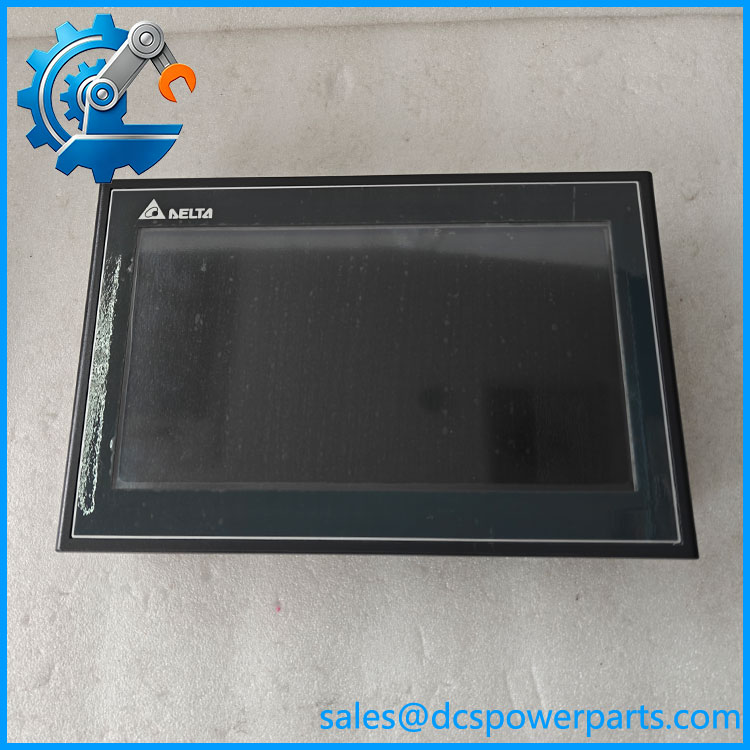
DOP-110WS
Related Products
The following models belong to Delta’s HMI product range. They are related references, not guaranteed direct replacements.
- DOP-103WQ – 4.3-inch Advanced Narrow Frame HMI with 480 × 272 resolution.
- DOP-107WV – 7-inch Advanced Narrow Frame HMI with 800 × 480 resolution.
- DOP-107EV – 7-inch Standard Ethernet HMI.
- DOP-107EG – 7-inch Standard HMI with a different display configuration.
- DOP-107CV – 7-inch Standard General Type HMI.
- DOP-112MX – 12-inch Advanced Multimedia HMI family reference.
- DOP-115MX – 15-inch Advanced Multimedia HMI family reference.
Confirm screen dimensions, communication interfaces, software compatibility, and panel cutout requirements before selecting another model.
Frequently Asked Questions
Q1: What is the Delta DOP-110WS used for?
The is an industrial HMI touchscreen used to display machine information and provide operator access to control functions. It commonly serves as the interface between an operator and a PLC-based automation system.
Q2: What PLCs can communicate with the ?
Compatibility depends on the PLC model, supported communication driver, protocol, and connection method. The panel provides Ethernet and RS-232, RS-422, and RS-485 interfaces, but the specific PLC connection must be checked against Delta’s supported driver list.
Q3: Can I hot-swap the while the machine is running?
Do not assume that live replacement is permitted. Follow the machine’s shutdown and electrical isolation procedure before disconnecting the 24 VDC supply or communication cables. Confirm that the PLC and machine are in a safe operating state.
Q4: Does the support firmware v3.1?
Firmware compatibility depends on the installed HMI firmware, DOPSoft project version, and the software environment used to create the original application. Confirm the exact firmware and project requirements before downloading or converting a project.
Q5: Can I transfer an existing HMI project to a replacement ?
Usually, the original project can be transferred if the project version, panel model, firmware, and communication drivers are compatible. Keep a backup of the original project and verify screen dimensions, PLC addresses, alarms, recipes, and communication parameters after transfer.
Q6: What power supply does the require?
The specified operating supply is 24 VDC ±15%. Maximum power consumption is 11 W. Use a suitable regulated supply and verify polarity and wiring before energizing the panel.
Q7: What should I inspect before purchasing a replacement ?
Check the display for dead pixels, touch response, backlight condition, and physical damage. Inspect the Ethernet, USB, serial, and power connectors. For used units, request a powered functional test and confirmation that the HMI can load and run a project.
Procurement note: The most important replacement risks are project compatibility and PLC communication settings. Before removing the original panel, back up the HMI project and record the PLC model, communication protocol, port assignment, and cable pinout. A matching model number alone does not confirm that the existing application will run without configuration work.