Description
Key Technical Specifications
| Parameter | Specification |
|---|---|
| Product Model | 2711P-B6C20D |
| Manufacturer | Allen-Bradley / Rockwell Automation |
| Product Family | PanelView Plus 6 |
| Terminal Size | 600 |
| Product Type | HMI / Operator Interface Terminal |
| Operator Input | Keypad + Touchscreen |
| Display | 5.7-inch color TFT |
| Resolution | 320 × 240 pixels |
| Color Depth | 18-bit color graphics |
| Touch Technology | 4-wire analog resistive |
| Function Keys | F1–F10 |
| Input Voltage | 18–30 VDC, 24 VDC nominal |
| Maximum Power | 15 W / 0.6 A at 24 VDC |
| Typical Power | 9 W / 0.375 A at 24 VDC |
| Ethernet | 10/100 Mbps, Auto-MDI/MDI-X |
| Serial Interface | RS-232 |
| USB | 1 USB host + 1 USB device |
| Storage | Hot-swappable SD card slot |
| Operating System | Windows CE 6.0 with Extended Features |
| Memory | 256 MB RAM / 512 MB nonvolatile memory |
| Backlight | White LED, 25,000-hour minimum at 25°C |
| Mounting | Panel / direct wall mounting |
| Approx. Keypad Dimensions | 167 × 266 × 98 mm |
| Cutout | 142 × 241 mm |
| Display Area | Approximately 115 × 86 mm |
| FactoryTalk View ME | Version 6.0 or later |
| Lifecycle | Discontinued September 30, 2021 |
Rockwell’s technical documentation confirms the 18–30 VDC supply, 5.7-inch display, 320 × 240 resolution, Ethernet/RS-232/USB connectivity, and FactoryTalk View ME software requirements.
Application Scenarios & Pain Points
An HMI replacement becomes difficult when the old terminal contains the only copy of the runtime application, custom communication settings, or operator configuration. The hardware may be straightforward; recovering the application and matching the communication setup is where downtime usually accumulates.
- Machine control: Provides operators with status screens, alarms, recipes, setpoints, and command functions while communicating with the underlying controller.
- Allen-Bradley PLC systems: Ethernet or RS-232 connectivity allows the terminal to interface with compatible controller architectures and existing plant networks.
- Legacy production equipment: A useful spare where an established PanelView Plus 6 application still performs the required operator-interface functions.
- PanelView migration projects: Rockwell’s migration documentation identifies the 2711P-B6C20D as a PanelView Plus 600 catalog number with a corresponding PanelView Plus 6 conversion path.
Field note: Before removing an old PanelView, capture the firmware revision, terminal configuration, communication settings, IP address, runtime application, and SD-card contents. A replacement terminal can boot normally and still fail to communicate because the application expects a different controller address or protocol configuration.
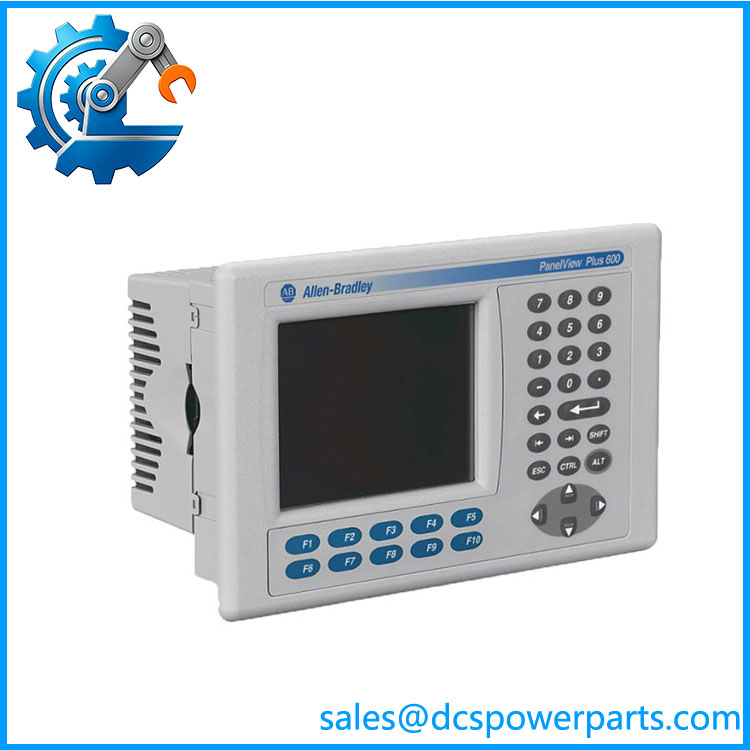
2711P-B6C20D
Related Products
- 2711P-B6C20D8 — PanelView Plus 6 600 successor/version with the same general keypad/touch, color-display, Ethernet/RS-232 architecture. Rockwell’s catalog identifies the D8 generation separately.
- 2711P-B6C20D9 — Another PanelView Plus 6 600 catalog configuration with the same 5.7-inch color/keypad-touch concept and Ethernet/RS-232 connectivity. Check revision and application compatibility before substitution.
- 2711P-B6C20A8 — PanelView Plus 6 600 keypad/touch configuration with Ethernet and RS-232; useful when comparing alternate catalog configurations.
- 2711P-B6C5D8 — 600-series keypad/touch terminal with RS-232 communication; appropriate only where Ethernet is not required or is provided through another architecture.
- 2711P-K6C20D8 — Keypad-oriented 600-series configuration. It differs from B6C20D in the operator-input arrangement and should not be treated as a direct HMI faceplate equivalent.
- 2711P-T6C20D8 — Touch-oriented 600-series terminal with Ethernet/RS-232; useful when the application calls for a touch-only operator interface.
- 2711P-RP8D — Related PanelView Plus 6 logic module family component used in applicable terminal configurations; it is not a complete operator terminal replacement.
- 2711P-RP6D — Another PanelView Plus 6 logic-module component used with selected 600-series hardware configurations.
- FactoryTalk View ME — The runtime environment used by PanelView Plus terminals. The application file and runtime version should be checked before replacing the terminal.
The Engineer’s Guide: Field Pitfalls to Avoid
Warning 1 — Do not confuse the catalog number with a generic PanelView Plus 600 description.
The communication interfaces, operator input arrangement, power requirements, and firmware/software behavior are tied to the complete catalog number.
How to avoid it: Record 2711P-B6C20D, Series, firmware revision, and terminal configuration before ordering. If an upgraded D8/D9 unit is considered, verify the application and communication requirements first.
Warning 2 — The HMI’s runtime application is often the real replacement risk.
A replacement display does not automatically contain the plant’s application. FactoryTalk View ME runtime files, terminal settings, communication paths, alarms, and recipes may need to be restored.
How to avoid it: Back up the runtime application and terminal configuration before taking the old HMI offline. Keep a known-good copy with the machine documentation.
Warning 3 — Watch the power supply.
The terminal accepts 18–30 VDC, with 24 VDC nominal operation and a maximum consumption of 15 W. An unstable 24 VDC supply can create display resets or communication problems that look like HMI hardware failure.
How to avoid it: Measure the actual voltage at the HMI terminals under load. Check the 24 VDC supply, fuse, wiring, and grounding before condemning the terminal.
Frequently Asked Questions (FAQ)
What is Allen-Bradley 2711P-B6C20D?
The 2711P-B6C20D is an Allen-Bradley PanelView Plus 6, 600-series operator terminal. It combines a 5.7-inch color TFT display with a resistive touchscreen and physical keypad, providing an HMI interface for industrial control applications.
What PLC communication interfaces does the 2711P- have?
This configuration provides Ethernet 10/100 Mbps, RS-232, one USB host port, and one USB device port. Rockwell also identifies EtherNet/IP and TCP/IP support for the platform.
What power supply does the 2711P- require?
It uses 18–30 VDC, with 24 VDC nominal. Rockwell specifies maximum consumption of 15 W, equivalent to approximately 0.6 A at 24 VDC, with typical consumption around 9 W.
Is the 2711P- discontinued?
Yes. Rockwell Automation announced discontinuation of the PanelView Plus 6 Graphic Terminal family effective September 30, 2021, and lists no planned Rockwell replacement category for the affected terminal.
For a running machine, this makes verified surplus or refurbished inventory relevant when an immediate hardware replacement is needed and the plant is not ready for a full HMI migration.
Can I replace 2711P- with 2711P-B6C20D8?
Potentially, and Rockwell’s migration documentation identifies 2711P- → 2711P-B62020D8 as a catalog conversion, although the document text contains an apparent catalog-number formatting issue. The official table should therefore be checked against the actual replacement terminal before procurement.
Do not rely on the catalog conversion alone. Verify firmware, FactoryTalk View ME runtime version, communication settings, cutout dimensions, and application compatibility.
How should I verify a refurbished 2711P-?
Ask for the actual unit’s nameplate and test evidence. At minimum, verify:
- Exact catalog number
- Series and firmware revision
- Display and backlight operation
- Touchscreen response across the entire panel
- F1–F10 and keypad operation
- Ethernet communication
- RS-232 operation where required
- USB and SD interfaces
- 24 VDC power stability
- FactoryTalk View ME runtime operation
Pay particular attention to touchscreen dead zones and uneven backlight brightness. Those faults can be intermittent and may not show up during a five-minute power-on test.
What should I confirm before purchasing this HMI?
Confirm the catalog number, Series, firmware, screen/input configuration, communication interface, panel cutout, application runtime version, controller protocol, and power supply. Also request the actual unit’s condition, testing scope, warranty, and delivery commitment.
For an obsolete PanelView, preserving the existing application can be considerably simpler than changing the entire operator interface—but only if the replacement hardware and runtime environment are verified before installation.