Description
Product Introduction
When an operator panel fails, technicians can lose access to machine status, alarms, setpoints, and manual control functions even though the PLC remains operational. The ABB CP435T 1SBP260193R1001 provides a 7-inch touchscreen interface for displaying process information and accepting operator commands in compatible industrial control applications.
For replacement planning, check the existing panel’s serial connections, communication settings, and HMI project compatibility. The standard CP435T does not include Ethernet; the CP435T-ETH is a distinct model. ABB’s lifecycle announcement also classified the CP435T as limited lifecycle in 2014, so verify current support and spare availability before planning a long-term installation.
Key Technical Specifications
| Parameter | Specification |
|---|---|
| Manufacturer | ABB |
| Model | CP435T |
| Order number | 1SBP260193R1001 |
| Product family | CP400 |
| Product type | HMI control panel |
| Display size | 7 inches |
| Display technology | TFT color touchscreen |
| Resolution | 800 × 480 pixels |
| Display colors | 64K |
| Brightness | Approximately 250 cd/m² |
| Function keys | 6 configurable keys plus menu key |
| Backlight | CCFL |
| Backlight life | Approximately 30,000 hours, per product brochure |
| Application flash memory | 8 MB |
| Data/recipe memory | 512 KB |
| USB | 2 USB 2.0 host ports and 1 device port |
| Serial interfaces | Multiple serial interfaces; verify exact pinout and supported modes in the manual |
| Ethernet | Not included on standard CP435T |
| Power supply | 24 V DC; confirm allowable tolerance from the device documentation |
| Power consumption | Less than 1 A, per product brochure |
| Front protection | IP65, per published product specifications |
| Dimensions (W × H × D) | Approximately 231 × 176 × 47 mm |
| Weight | Approximately 1.2 kg, per ABB brochure |
| Operating temperature | 0 to +50 °C |
| Storage temperature | −10 to +60 °C |
Specifications are drawn primarily from ABB’s CP400 product brochure and associated product references. Verify the nameplate and manual for installation-critical electrical and environmental limits.
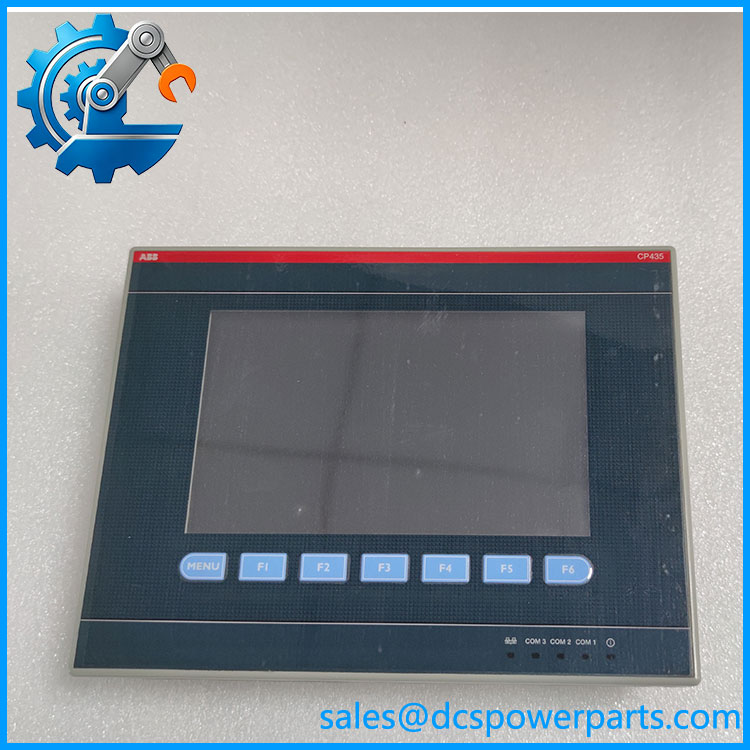
CP435T 1SBP260193R1001
Application Scenarios and Maintenance Considerations
- Machine operator stations: Displays operating states, process values, alarms, and operator controls for compatible PLC-based equipment.
- Legacy automation upgrades: Provides a replacement option when maintaining an existing CP400 installation, subject to project and communication compatibility.
- Production-line troubleshooting: Helps operators view fault messages and enter approved operating parameters without accessing the PLC programming environment directly.
- Panel replacement: Requires verification of the mounting cutout, supply wiring, serial connections, and saved HMI project before returning the machine to service.
Related Products
These ABB models are useful for CP400-series comparison. They are not all direct replacements.
- ABB -ETH — 1SBP260197R1001: Similar 7-inch HMI with Ethernet connectivity.
- ABB CP430T — 1SBP260195R1001: 5.7-inch color TFT touchscreen panel.
- ABB CP430T-ETH — 1SBP260196R1001: 5.7-inch touchscreen variant with Ethernet.
- ABB CP450T — 1SBP260188R1001: Larger 10.4-inch color touchscreen panel.
- ABB CP440C-ETH — 1SBP260187R1001: 7.5-inch color panel with Ethernet.
- ABB CP600 series: Successor product family identified by ABB for the CP400 portfolio; migration may require adapting the HMI application.
The Engineer’s Guide: Three Replacement Checks
- Do not confuse with -ETH. The Ethernet-equipped model has a different order number. A network-connected installation may need hardware and project changes if the original panel is replaced by the standard version.
- Check the HMI project and communication driver. Match the PLC protocol, serial settings, cable pinout, and project version. A panel that powers up may still fail to communicate with the controller.
- Inspect the aging display hardware. Because this is a legacy CP400-series product, check touchscreen response, backlight condition, connector wear, and internal battery status where applicable. Ask for a functional test rather than relying only on appearance.
Frequently Asked Questions
Q1: What is the ABB 1SBP260193R1001?
It is a 7-inch -series HMI control panel with a color TFT touchscreen, 64K colors, 800 × 480 resolution, and six configurable function keys.
Q2: Does the have Ethernet?
No. The standard is listed without Ethernet. The -ETH, order number 1SBP260197R1001, is the separate Ethernet-equipped variant.
Q3: What power supply does the require?
Published product references identify a 24 V DC supply. Confirm the permitted voltage tolerance and polarity against the panel’s label and installation manual before powering it.
Q4: Can be replaced with -ETH?
Not as a guaranteed drop-in replacement. The Ethernet version has a different order number and interface capabilities. Check the HMI project, PLC communication method, cabling, and configuration requirements first.
Q5: Is the still supported by ABB?
ABB’s 2014 lifecycle announcement classified the as limited lifecycle. That is a historical status, not confirmation of its current availability; check the current support position before committing to a maintenance plan.
Q6: Can the existing HMI project be reused on a replacement panel?
Often this depends on the project version, panel configuration, and software compatibility. Keep a verified project backup and document communication settings before replacing the hardware. Migrating to the CP600 family may require application adaptation.
Q7: What should be confirmed before purchasing a replacement?
Confirm the complete order number, Ethernet requirement, display and touchscreen condition, serial interfaces, power-supply requirements, HMI project compatibility, test evidence, warranty terms, and delivery lead time. For a legacy machine, validate communication with the actual PLC before releasing the equipment for production.