Description
Product Overview
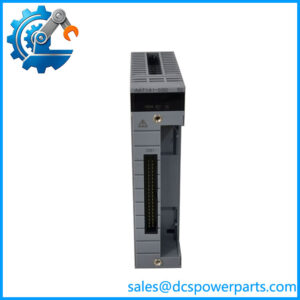
The Yokogawa ALE111-S01 is an Ethernet communication module designed to exchange data between compatible field control stations and external subsystems. In industrial distributed control system (DCS) installations, this type of interface supports data exchange with equipment such as programmable logic controllers and other supported devices. The module uses an IEEE 802.3 10BASE-T Ethernet interface, one RJ-45 port, and a specified communication rate of 10 Mbps in half-duplex mode. Its role is to provide a defined network connection within the control architecture rather than act as a standalone controller.
The Yokogawa ALE111-S01 is intended for installation in supported Yokogawa control hardware, including specified field control units and bus node units. Depending on the host system and configured communication package, the module can support subsystem data exchange with compatible devices. Yokogawa documentation describes point-to-point connections and a maximum segment length of 100 meters under the specified cable conditions. Network topology, communication drivers, subsystem configuration, and host-system limitations must be checked before integrating the module into an operating plant.
For maintenance engineers and procurement teams, the Yokogawa ALE111-S01 should be matched by its complete ordering code and hardware revision. Confirm the installed field control unit, required communication functions, network cabling, and redundancy arrangement. Yokogawa documentation for certain safety-system applications also specifies a minimum module style and revision requirement, demonstrating why the host platform and module revision must be checked rather than assuming universal compatibility.
Before purchase, verify the condition of the actual module, inspect its RJ-45 connector and status indicators, and request documented functional testing where available. If replacing a module in a running control system, follow the approved maintenance procedure and validate communication recovery after installation. Confirm warranty terms, included accessories, and whether the unit is new, used, or refurbished.
Product Introduction
Loss of subsystem communication can affect data exchange between a DCS and connected equipment. The Yokogawa ALE111-S01 Ethernet communication module provides a 10BASE-T network interface for compatible control-system configurations. Check the host unit, hardware revision, network settings, and required communication functions before selecting it as a replacement module.
Key Technical Specifications
| Parameter | Specification |
|---|---|
| Manufacturer | Yokogawa |
| Model | ALE111-S01 |
| Product type | Ethernet communication module |
| Primary function | Data exchange with compatible subsystems |
| Physical layer | IEEE 802.3 10BASE-T |
| Connector | 1 × RJ-45 |
| Number of ports | 1 |
| Transmission speed | 10 Mbps |
| Transmission method | Half-duplex |
| Connection method | Point-to-point |
| Maximum segment distance | 100 m under specified conditions |
| Cable specification | 100-ohm twisted-pair cable, as specified in the module documentation |
| Media access control | CSMA/CD |
| Current consumption | 0.5 A |
| Approximate module weight | 0.3 kg |
| Installation | Supported Yokogawa field control or bus node hardware |
| Redundancy | Dual-redundant arrangements may require two compatible modules and supported system configuration |
| Hardware revision | Verify against the applicable host-system manual |
| Condition | Confirm per unit |
| Warranty | Confirm with supplier |
Specifications are based on Yokogawa’s ALE111 documentation. Verify the applicable manual and host platform before using these values for engineering approval.
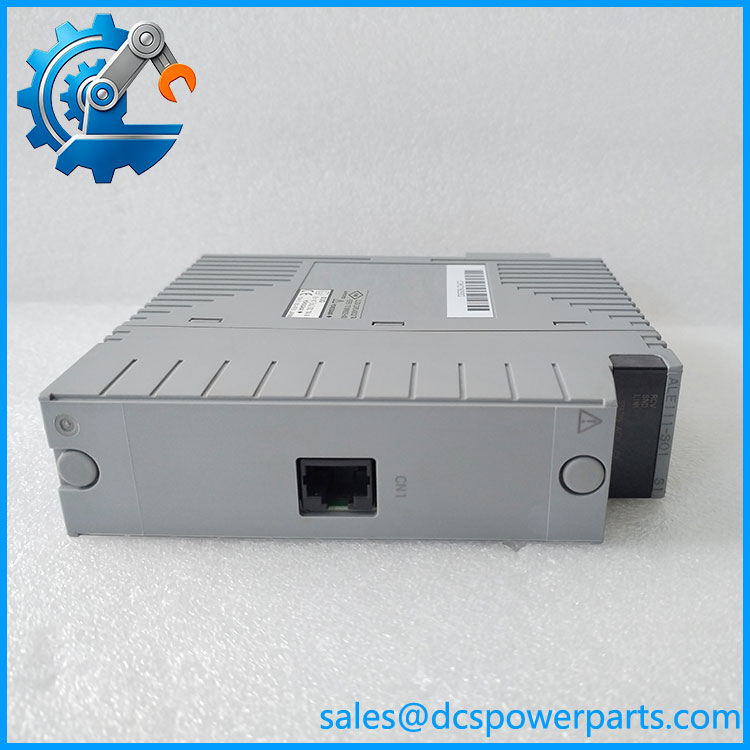
ALE111-S01
Related Products
These Yokogawa communication modules serve related control-system functions, but their interfaces and roles differ.
- — Base model for the Ethernet communication module family.
- ALR111 — Serial communication module for RS-232C interfaces.
- ALR121 — Serial communication module for RS-422/RS-485 interfaces.
- ALP111 — PROFIBUS-DP communication module.
- ALF111 — FOUNDATION Fieldbus communication module.
- A2LP131 — PROFINET communication module for supported N-IO/FIO configurations.
- ANB10 — ESB bus node unit used in supported Yokogawa control architectures.
- ANB11 — Optical ESB bus node unit for compatible configurations.
- ANR10 — ER bus node unit that supports specified communication modules.
- AFV30 — Yokogawa field control unit family; module compatibility depends on the specific configuration.
The communication-module distinctions and supported host hardware are described in Yokogawa documentation. These related products are not direct substitutes for the -S01.
Frequently Asked Questions
Q1: What is theawa used for?
It provides an Ethernet interface for data exchange between compatible Yokogawa control stations and external subsystems, including supported PLC-based equipment.
Q2the be hot-swapped while the DCS is running?
Do not assume live replacement is supported. Check the host-system manual and plant maintenance procedure. Even where hardware replacement is permitted, communication may be interrupted unless the system has a supported redundant arrangement.
Q3: What network speed and cable distance does it support?
The documented interface is 10BASE-T at 10 Mbps, half-duplex, with a maximum segment distance of 100 meters under the specified cabling conditions. Verify cable and topology requirements before installation.
Q4: How do I verify hardware revision compatibility?
Read the model and revision markings on the module, then compare them with the manual for the installed control platform. Certain Yokogawa safety-system applications specify revision requirements, so the model number alone is not sufficient to establish compatibility.
Q5: Does replacing the module preserve the communication configuration?
Not necessarily. Host configuration, subsystem settings, network parameters, and application-level communication definitions may reside elsewhere in the control system. Back up relevant settings and validate communication after replacement.
Q6: How can I verify the module’s condition and authenticity?
Inspect the label, full part number, revision markings, connector, and status indicators. Request photographs of the actual unit and a test report identifying the checks performed. Confirm whether the unit is new, used, or refurbished.
Q7: What should I confirm before purchasing?
Confirmull code, host-system compatibility, revision requirements, 10BASE-T connection, required communication package, unit condition, testing scope, warranty, and return terms. For redundant systems, verify the complete redundancy design rather than relying on the module specification alone.