Description
Key Technical Specifications
| Parameter | Specification |
|---|---|
| Product Model | 8446-1019 |
| Manufacturer | Woodward |
| Product Family | RP-3000 Remote Panel |
| Compatible System | easYgen-3000 |
| Supported Controllers | easYgen-3100/3200; easYgen-3400/3500 |
| Power Supply | 12/24 VDC |
| Supply Range | 8–40 VDC |
| Maximum Consumption | 12 W |
| CAN Interface | Isolated CAN bus |
| RS-232 Interface | Isolated RS-232 |
| CAN Baud Rate | Up to/configured at 250 kBd in documented easYgen application |
| Relay Outputs | Potential-free |
| Relay Rating | 2 A AC @ 250 VAC; 2 A DC @ 24 VDC |
| Housing | easYpack |
| Dimensions | Approx. 282 × 217 × 67 mm |
| Weight | Approx. 1.3 kg |
| Front Protection | IP54 with clamp fastening; IP66 with screw kit |
| Rear Protection | IP10 |
| Operating Temperature | -20 to +70°C |
| Storage Temperature | -30 to +80°C |
| Marine Approval | Lloyd’s Register; ABS design assessment |
Woodward’s own 37413E RP-3000 installation manual explicitly lists 8446-1019 among the RP-3000 part numbers. The same document identifies the unit as a remote panel and provides the electrical, environmental, mounting, and communication specifications.
The documented RP-3000 architecture uses isolated CAN and RS-232 interfaces. The standard technical data specifies a 12/24 VDC supply with an 8–40 VDC operating range and maximum intrinsic consumption of 12 W.
Product Introduction
The Woodward 8446-1019 is an RP-3000 remote panel designed to provide a remote operator interface for compatible easYgen-3000 generator controllers. It allows operators to view generator operating data, alarms, event information, and configuration parameters without being physically located at the main genset controller. Woodward’s installation documentation identifies the 8446-1019 as one of the RP-3000 part-number variants.
This is an operator-interface device, not a standalone engine governor or generator controller. Its value is in extending the easYgen control interface to another location, such as a control room, switchgear area, bridge, or generator-room entrance. The distinction is important because several third-party listings incorrectly classify 8446-1019 as a power board, digital governor, or I/O expansion module. Those descriptions do not agree with Woodward’s RP-3000 documentation.
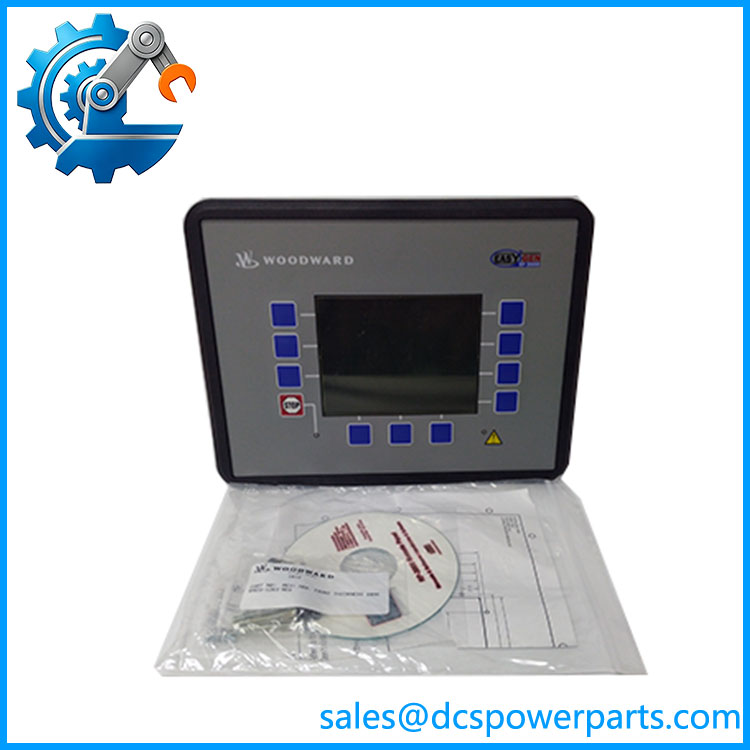
8446-1019
Application Scenarios & Field Pitfalls
Engineering Pain Point
The primary maintenance issue with 8446-1019 is compatibility with the easYgen controller software generation and communication configuration.
The RP-3000 is not simply a generic HMI with a CAN port. Woodward specifies particular easYgen controller families and software versions for RP-3000 operation. A replacement panel can therefore be electrically correct yet fail to communicate if the controller-side configuration is wrong.
Typical Applications
- Standby generator systems — Remote viewing and operation from a building control room.
- Industrial power generation — Generator monitoring where the genset controller is installed inside a dedicated electrical or engine enclosure.
- Marine generator systems — Remote operation from bridge or deck locations; Woodward documents marine approval considerations for the RP-3000.
- Critical-power installations — Remote access to generator status, alarms, measurements, and selected control parameters.
Technical Pitfalls to Avoid
1. Verify the easYgen software version.
Woodward documents compatibility with easYgen-3100/3200 at V1.15xx and easYgen-3400/3500 at V1.17xx or higher. V1.13xx has more restricted compatibility and supports only Package P2 devices.
2. Do not assume CAN wiring alone is sufficient.
The documented configuration uses specific CAN node IDs, baud rates, COB-IDs, and data protocols. Woodward gives 250 kBd as the documented CAN baud rate in the easYgen-3200/3500 configuration example.
3. Do not use the remote panel as the primary emergency-stop device without reviewing the application.
Woodward explicitly notes that the RP-3000 stop-button response can be slower than the corresponding easYgen-3200/3500 stop button in some screens and recommends an external emergency-stop arrangement where necessary.
4. Check the panel cutout before installation.
The documented housing is approximately 282 × 217 × 67 mm, with a plastic-housing panel cutout of approximately 249 × 183 mm. A replacement project should verify the existing door/cabinet cutout rather than relying on a generic “RP-3000” dimensional listing.
Related Products
- 8446-1014 — RP-3000 variant with different power-supply/technical-data provisions; Woodward specifically separates this part number into Appendix B of the installation manual.
- 8446-1018 — Another RP-3000 part-number variant; verify hardware revision and exact application before substitution.
- 8446-1042 — RP-3000 variant included in the same Woodward installation documentation.
- easYgen-3100 — Compatible generator controller family; package and software version must be checked.
- easYgen-3200 — Common host controller for RP-3000 remote operation.
- easYgen-3400 — Higher-function easYgen-3000 controller supported by RP-3000 at the specified software level.
- easYgen-3500 — Higher-end compatible controller family for generator applications.
- RP-3000XT — Newer-generation remote-panel family; not automatically a drop-in replacement for the legacy RP-3000.
Procurement Check
For Woodward 8446-1019, the critical identification is RP-3000 Remote Panel, not “digital governor,” “power board,” or “I/O expansion module.” Woodward’s own manual confirms the part number and defines the unit’s role, interfaces, environmental limits, and compatible easYgen controller families.
Before approving a replacement, verify 8446-1019, the connected easYgen model, software version, CAN configuration, panel cutout, and front-panel protection requirement. If the supplier cannot provide a clear nameplate photograph showing the part number and revision, I would treat the unit as requiring additional identification before installation.