Description
Key Technical Specifications
| Parameter | Specification |
|---|---|
| Manufacturer | Reliance Electric |
| Model | 57C554 |
| Alternative Part Number | 0-57554 |
| Product Series | AutoMax PLC |
| Product Type | Shark Remote I/O Interface Module |
| Application | AutoMax Remote I/O Network |
| Rack Compatibility | Shark Remote I/O Rack |
| Installation Position | First slot immediately to the right of the power supply |
| Logic Supply | +5 VDC from rack backplane |
| Network Driver Supply | +24 VDC from rack supply, regulated internally to +12 VDC |
| Processor | Onboard microprocessor |
| Network Connector | 9-pin female D-sub connector |
| Status Indicators | CPU OK and COM OK |
| Address Configuration | 16-position rotary drop-number selector |
| Valid Drop Numbers | 1–7 and 9–F |
| Backplane Interface | Two rear connectors |
| Instruction Manual | J-3606-1 / applicable AutoMax Remote I/O documentation |
| Product Status | Discontinued |
The module operates as an I/O scanner in a remotely located Shark XL II rack. It replaces the processor module when that rack operates as a drop on the AutoMax Remote I/O network.
Product Introduction
Reliance Electric 57C554 AutoMax Shark Interface Module
The Reliance Electric 57C554 is a Shark Remote I/O Interface Module designed for AutoMax PLC installations. It connects a remote Shark rack to the AutoMax Remote I/O network, allowing the main controller to exchange I/O data with distributed rack modules. An onboard microprocessor handles backplane timing and communication functions.
Its practical value is extending an existing AutoMax installation without requiring a separate processor in the remote Shark rack. The module provides dedicated network status indicators and configurable drop addressing, making it an important spare for maintaining legacy distributed-control systems.
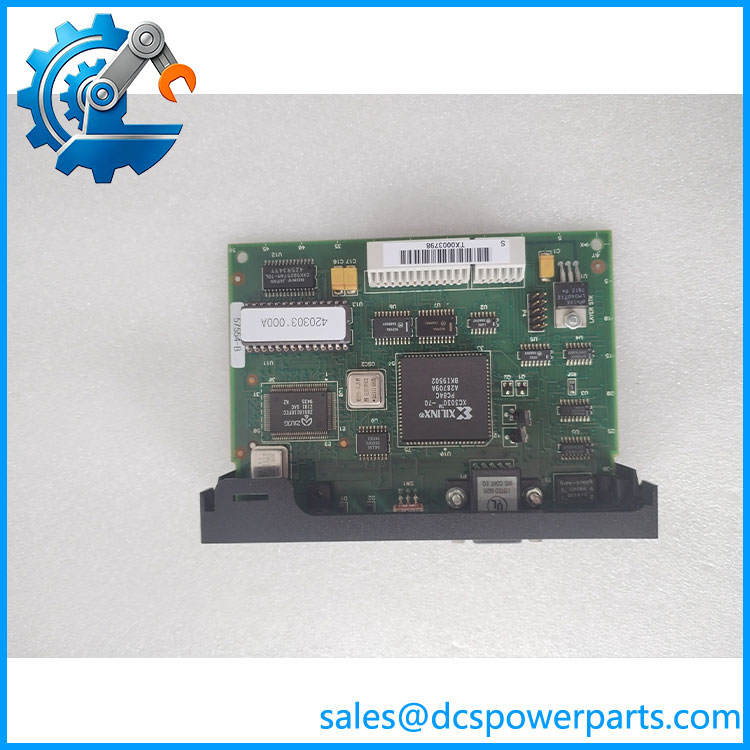
57C554
Application Scenarios & Field Pitfalls
Engineering Pain Point
A remote production line suddenly disappears from the AutoMax controller’s I/O network. The local Shark rack still has power, but the main controller cannot access its distributed inputs and outputs.
In this situation, the 57C554 deserves attention. It provides the interface between the Shark rack backplane and the AutoMax Remote I/O network. However, replacing the card without checking the drop address, network cable, and rack power can leave the original communication fault unresolved.
Typical Applications
- Steel Manufacturing: Connecting remote Shark I/O racks controlling rolling mill auxiliary equipment and material-handling systems.
- Automotive Manufacturing: Transferring distributed machine I/O signals between production cells and centralized AutoMax controllers.
- Industrial Drive Systems: Connecting remote control racks used for coordinated motor and drive operation.
- Process Manufacturing: Maintaining distributed I/O communication in legacy AutoMax-based production facilities.
Technical Pitfalls to Avoid
1. Incorrect Drop Number Configuration
The 57C554 uses a 16-position rotary switch to configure the remote rack’s drop number.
Valid selections include 1–7 and 9–F. The switch position is read during power-up.
This is important. Changing the rotary switch while the rack is energized does not update the active drop address. If the address must change, power-cycle the rack after setting the correct position.
A flashing COM OK indicator can indicate an invalid drop number.
2. Misinterpreting CPU OK and COM OK LEDs
The two green indicators serve different diagnostic purposes.
- CPU OK: Indicates successful power-up diagnostics.
- COM OK: Indicates communication with the AutoMax Remote I/O network.
- COM OK flashing: Can indicate an invalid drop-number selection.
If CPU OK is illuminated but COM OK is not, investigate the network cable, drop configuration, and remote I/O communication path before condemning the module.
3. Incorrect Power Supply Assumptions
The module uses two different supply paths:
- +5 VDC for onboard logic circuitry.
- +24 VDC for the remote I/O network driver, regulated internally to +12 VDC.
Do not assume that a working +5 VDC backplane supply proves the network driver supply is healthy.
Check both supply paths and their connections during troubleshooting.
4. Unsafe Hot-Swapping
Do not remove or install this legacy interface board under power.
The replacement procedure requires stopping the application, disconnecting rack and field power, and carefully handling the board’s rear connectors.
Electrostatic discharge and damaged backplane contacts can create additional faults.
Field recommendation: Photograph the original drop-number switch setting before removing the card. Record both LED states and the network cable arrangement. After replacement, verify communication with the AutoMax controller and confirm that the remote I/O addresses are being updated correctly.
Related Products
The following Reliance Electric components belong to the AutoMax and Shark control architecture. They perform different network and rack functions and should not be treated as direct substitutes.
| Model | Product Description | Compatibility and Application |
|---|---|---|
| 57C416 | AutoMax Remote I/O Communications Module | Interfaces a conventional AutoMax/DCS 5000 remote rack with the Remote I/O network. Different rack architecture from the Shark interface. |
| 57C328 | AutoMax Remote I/O Head | Provides an interface between the AutoMax Remote I/O network and AutoMate rail I/O systems. |
| 57C330 | AutoMax Remote I/O Head | Alternative remote I/O head configuration for distributed AutoMate I/O applications. |
| 57C329 | AutoMax Remote Drive Interface Head | Connects compatible remote drive equipment to the AutoMax Remote I/O architecture. |
| 57C554 | Shark Remote I/O Interface Module | Main component covered in this product description; operates as the scanner in a remote Shark rack. |
| 57C328A | Remote I/O Head variant | Verify the exact hardware designation and supported rail configuration before considering replacement. |
| 45C988 | Shark Remote Master Module | Coordinates remote I/O communication for compatible Shark systems. |
| 45C989 | Shark Remote Target Module | Provides remote rack addressing and communication for compatible Shark I/O installations. |
| 57C330 | AutoMax Remote I/O Head | Relevant when maintaining a distributed AutoMate rail I/O installation rather than a Shark rack. |
Procurement and Replacement Checklist
Before purchasing Reliance Electric 57C554, verify:
- Part number: 57C554 or documented equivalent 0-57554.
- System: AutoMax Remote I/O network.
- Rack type: Compatible Shark remote rack.
- Installation position: First slot to the right of the power supply.
- Drop number: Original rotary switch setting.
- Power: +5 VDC logic and +24 VDC network driver supply.
- Connector: Female 9-pin D-sub network connection.
- Diagnostics: CPU OK and COM OK LED functionality.
- Condition: New Surplus, unused, or previously operated.
- Testing: Request power-up diagnostic and remote communication test results.
Obsolete component
Final engineering note: The 57C554 is a dedicated legacy AutoMax Shark interface, not a generic serial communication card. Its drop-number configuration, backplane compatibility, and network operation must all be verified before installation. For existing AutoMax installations, retaining a tested spare can reduce the risk of prolonged downtime caused by failure of this discontinued interface hardware.