Description
Key Technical Specifications
| Parameter | Specification |
|---|---|
| Manufacturer | B&R Industrial Automation |
| Model | 5AC600.FLAP-K11 |
| Product Series | Automation PC 600 |
| Product Type | Front Interface Cover / Flap Assembly |
| Component Category | Mechanical IPC Accessory |
| Installation | Front-panel mounting |
| Operating Principle | Mechanical protection |
| Electrical Connection | None |
| Communication Protocol | Not applicable |
| Firmware | Not applicable |
| Mounting Compatibility | Specific Automation PC 600 chassis configuration |
| Material | Requires OEM confirmation |
| Dimensions | Requires OEM confirmation |
| Protection Rating | Depends on the complete host enclosure and sealing arrangement |
| Operating Temperature | Requires OEM confirmation |
Technical identification: B&R 5AC600.FLAP-K11 is a mechanical front-access cover, not an electronic interface or PLC communication module. Its exact mounting geometry should be checked against the host IPC.
Product Introduction
B&R 5AC600.FLAP-K11 Front Interface Cover
The B&R 5AC600.FLAP-K11 is a mechanical accessory for the Automation PC 600 product family. It provides a protective flap for designated front-access areas of compatible industrial computer enclosures. Unlike electronic expansion modules, this component has no processing, I/O, or communication function.
Its purpose is physical protection and access management. Replacing a damaged or missing cover helps protect exposed interface areas from dust, accidental contact, and industrial contamination. Exact chassis compatibility and gasket configuration must be confirmed before installation.
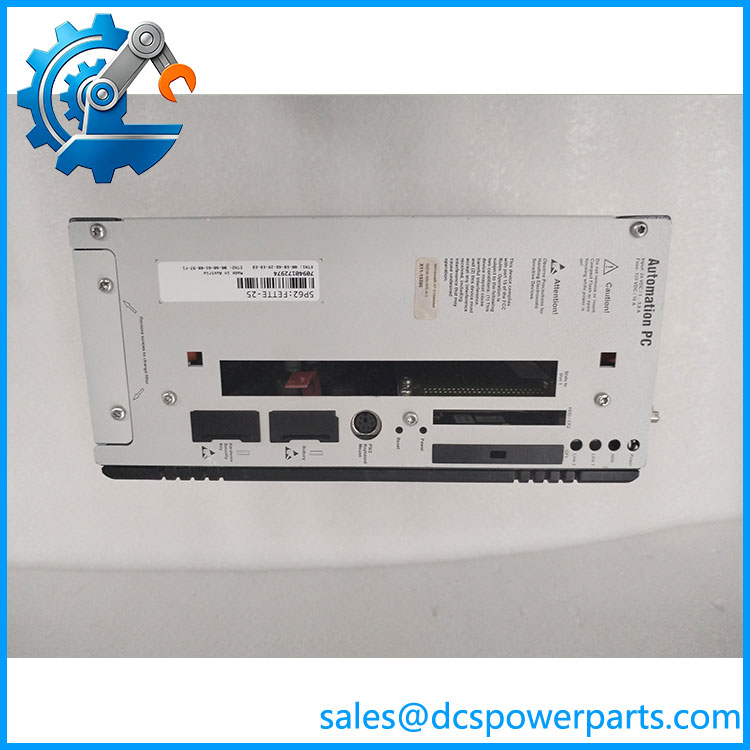
5AC600.FLAP-K11
Application Scenarios & Field Pitfalls
Engineering Pain Point
An industrial PC continues operating normally, but its front access cover has broken or gone missing after repeated maintenance work. Dust, metal particles, and moisture can then reach areas that were originally protected by the enclosure design.
The B&R 5AC600.FLAP-K11 addresses this mechanical maintenance requirement. It is a small component, but incorrect replacement can prevent proper enclosure closure and compromise the intended environmental protection of the industrial computer.
Typical Applications
- Automotive Manufacturing: Protecting front-access areas of industrial PCs installed near stamping and assembly equipment.
- Food Processing: Maintaining enclosure protection around operator-facing industrial computers in production areas.
- Packaging Machinery: Replacing damaged access flaps on machine-control computers exposed to dust and vibration.
- Pharmaceutical Manufacturing: Maintaining physical protection of industrial computer interfaces in controlled production environments.
Technical Pitfalls to Avoid
1. Incorrect Chassis Compatibility
Do not assume every B&R industrial PC uses the same front-cover dimensions.
The 5AC600.FLAP-K11 is associated with the Automation PC 600 family. Check the host computer’s exact model and front-panel arrangement before ordering.
A cover that looks similar may have different hinge positions, retaining tabs, or external dimensions.
2. Do Not Assume IP65 Protection
A replacement flap alone does not establish an IP65 enclosure rating.
The final protection level depends on the complete enclosure design, mating surfaces, gasket condition, and correct installation. Inspect the sealing arrangement before returning the IPC to a dusty or wet production environment.
3. Inspect Mechanical Retention Points
Repeated opening and closing can wear the retaining features.
Before installation:
- Inspect the hinge and mounting points.
- Check for cracks around the retaining tabs.
- Remove dirt and metal particles from the mating surfaces.
- Confirm that the flap closes without excessive force.
Field recommendation: Keep the original damaged cover until the replacement has been physically compared. Dimensions, hinge geometry, and latch position are more important than the product-family name alone.
Related Products
The following B&R products provide useful comparison points for Automation PC 600 maintenance and expansion.
| Model | Product Description | Compatibility and Application |
|---|---|---|
| 5AC600.GPIO-K05 | Automation PC 600 drive-slot accessory | Related mechanical/interface accessory. Its function differs from the protective front flap. Verify the required chassis configuration. |
| 5ACPCI.ETH3-01 | Three-port Ethernet PCI card | Adds Ethernet connectivity to compatible industrial PC expansion configurations. Not a mechanical replacement for the . |
| 5P81 Series | Automation PC 810 platform | Alternative B&R industrial PC platform for applications requiring a different computer architecture. |
| 5AP920.1505-01 | Automation Panel display | Operator-interface hardware used in compatible B&R visualization installations. |
| 5AP933.215C-00 | Automation Panel display | Alternative panel hardware for machine visualization and operator control. |
| 5AP1130.156C-000 | Automation Panel 1000 display | Provides an operator display interface for industrial automation systems. |
| 5PC910SX02-00 | Industrial PC platform designation | Related B&R industrial computing hardware; verify exact configuration and revision before considering system replacement. |
Before ordering B&R 5AC600., verify:
- Exact part number: 5AC600..
- Host computer model and hardware revision.
- Front-panel dimensions and mounting geometry.
- Hinge and latch configuration.
- Gasket inclusion and condition, if applicable.
- Physical fit against the original component.
- Product condition: New Surplus, unused, or previously installed.
Final engineering note: The 5AC600. is a mechanical spare part rather than an active automation module. Do not apply PLC electrical testing procedures to it. Physical inspection, dimensional comparison, retention checks, and enclosure-seal verification are the relevant acceptance criteria.