Description
Key Technical Specifications
| Parameter | Specification |
|---|---|
| Manufacturer | RadiSys |
| Model | SBC486DX66 |
| Product Type | Industrial Single Board Computer |
| Processor Family | Intel 486DX |
| Processor Speed | 66 MHz |
| CPU Architecture | x86 / CISC |
| Floating-Point Unit | Integrated 486DX FPU |
| System Role | Embedded computing / industrial control |
| Expansion | Configuration-dependent |
| Memory | Configuration-dependent; verify installed board revision |
| Storage | Configuration-dependent |
| Operating System | Application-dependent |
| Communication Interfaces | Configuration-dependent |
| Lifecycle | Legacy / discontinued |
The 66 MHz 486DX identification is the most consistently reported characteristic of the . Other public sources disagree substantially about maximum RAM, flash capacity, ISA/PCI or MultiBus interfaces, and onboard analog/digital I/O. Those specifications should therefore be confirmed from the actual board revision before being used for an engineering replacement decision.
Product Introduction
The is a legacy industrial single-board computer built around the Intel 486DX processor family. Unlike a conventional PLC CPU or DCS controller module, its primary function is general-purpose embedded computing: executing application software, handling local data processing, and interfacing with system-specific peripherals or expansion hardware. The 486DX architecture also includes an integrated floating-point unit, which was an important capability for embedded engineering and control applications of its generation.
In an existing industrial installation, the should be treated as a system-specific computing component rather than a commodity computer board. The operating environment, boot media, memory configuration, expansion hardware, BIOS settings, and application software can all affect whether a replacement board will operate correctly. For procurement teams maintaining obsolete equipment, preserving the exact board configuration is usually more important than simply finding another 486-class computer.
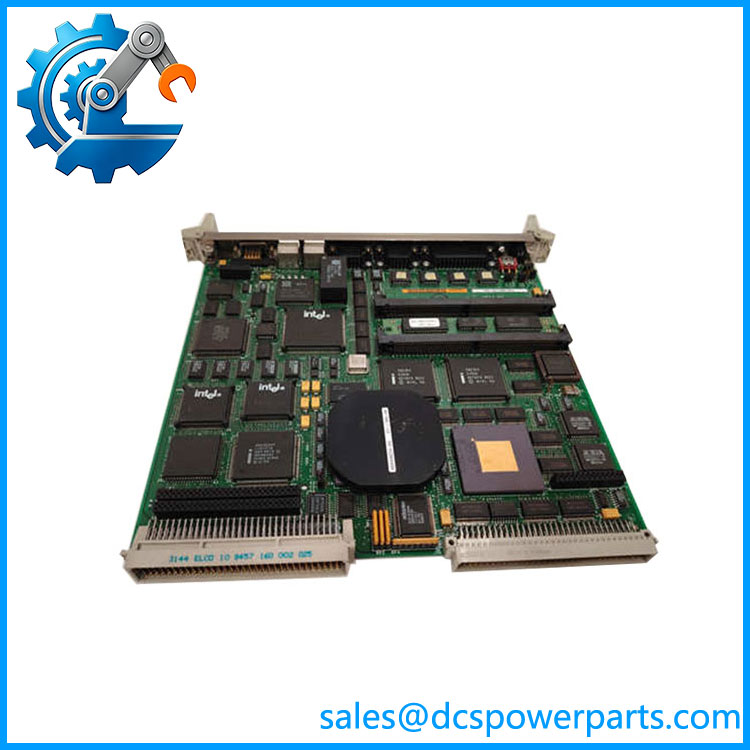
SBC486DX66
Application Scenarios & Field Pitfalls — The Engineer’s Perspective
Engineering Pain Point
A failure of an old industrial SBC can be difficult to diagnose because the symptoms may appear at the application level rather than the hardware level. A failed processor board, corrupted boot device, memory problem, or incompatible expansion card can all produce similar symptoms such as failed startup, loss of communications, frozen operator functions, or incorrect data acquisition.
The is therefore best approached as part of a complete embedded platform. Replacing the board without documenting its existing configuration can create a second problem even when the replacement hardware itself is functional.
Typical Applications
1. Legacy industrial control computers
The can serve as the computing element in older industrial equipment where dedicated x86 hardware was used instead of a conventional PLC CPU.
2. Data acquisition systems
Its computing architecture is suitable for legacy systems that collect, process, and store data through application-specific I/O or expansion hardware.
3. Embedded instrumentation
Older test, measurement, and industrial instrumentation equipment may use an SBC as the host processor for dedicated application software and peripheral interfaces.
4. System refurbishment
For equipment that remains operational but depends on obsolete computing hardware, an exact SBC replacement can preserve the existing software and hardware architecture without forcing an immediate redesign.
Technical Pitfalls
1. Do not assume every has the same memory configuration.
Public listings give conflicting values, including 8 MB, 32 MB, and substantially higher capacities. These differences may reflect different revisions or simply inaccurate catalog data. Verify the actual board before specifying RAM as a fixed product characteristic.
2. Verify the bus architecture from the board itself.
Some secondary listings associate the model with MultiBus II, while other sources describe ISA, PCI, PC/104, or different expansion arrangements. These claims should not be mixed together as though they describe one universal configuration.
3. Check the installed storage and boot method.
Legacy industrial computers may depend on specific disk, flash, EPROM, or boot-media arrangements. A mechanically compatible SBC can still fail to start the application if the expected boot environment is missing.
4. Software compatibility is often the real constraint.
A modern replacement computer may have much higher processing performance but still be unsuitable if the original application requires a legacy operating system, ISA driver, BIOS behavior, or timing characteristics.
5. Do not apply generic PLC specifications.
The is a computer board, not a conventional PLC CPU. Published claims of generic PLC communication protocols, 220 VAC operating voltage, or 30 kHz output frequency are not credible as universal specifications.
6. Board revision matters.
For legacy RadiSys hardware, inspect the PCB identification, processor marking, memory population, expansion connectors, firmware/BIOS information, and any installed daughterboards before ordering a replacement.
Related Products
- — 486DX66-based industrial single-board computer; the direct target for like-for-like replacement.
- RadiSys SBC486DX-series boards — Related legacy x86 single-board computing hardware; exact interface and software compatibility must be checked by revision.
- RadiSys industrial SBC platforms — Other embedded computing products from the same manufacturer, but not automatically interchangeable with the .
- Motorola MVME147A — Legacy VME single-board computer; different processor and bus architecture, requiring system-level redesign rather than direct substitution.
- Motorola MVME166 — VME-based embedded computer with a different hardware architecture.
- GE VMIVME-7750 — Later VME single-board computer; potentially useful in modernization studies but not a drop-in replacement.
- National Instruments GPIB-140 — GPIB fiber-optic bus extender; a communication peripheral rather than an SBC replacement.
Procurement Note
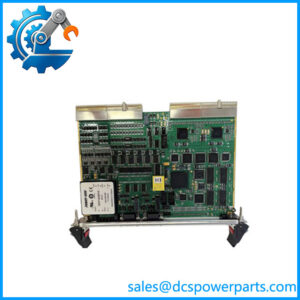
When sourcing a , request photographs of the complete board, PCB revision markings, processor marking, memory population, connectors, and installed expansion hardware. If the original system still operates, record the BIOS configuration, boot medium, operating system, application version, and peripheral assignments before replacing the board.
For this particular legacy model, an exact hardware match is preferable to a specification-only substitute. The processor designation is relatively clear, but public documentation is too inconsistent to safely assume a universal memory size, bus interface, storage configuration, or onboard I/O set.