Description
Product Overview
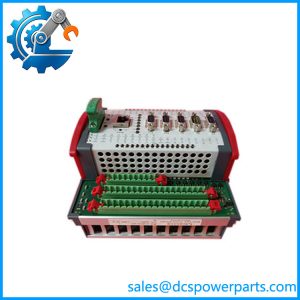
The MOOG D136-003-001 is an MSC-R ruggedized motion controller from MOOG’s M3000 automation system family. Designed for programmable industrial motion control, it executes application logic and coordinates communication with connected drives, sensors, and supervisory equipment. The controller is intended for demanding machinery where motion sequences, feedback processing, and communication with other control devices must operate within a defined application architecture. It is not simply a remote I/O module or a standalone servo drive; its role is to run the motion-control application and exchange data with the equipment under its control.
At the hardware level, the MOOG D136-003-001 uses a 32-bit PowerPC RISC processor with a floating-point unit, 128 MB of RAM, and 32 MB of Flash EEPROM. Its 24 VDC supply accepts an 18–36 VDC input range, with documented current consumption of approximately 0.3 A at idle and 0.8 A at full load. The integrated interfaces include Ethernet, USB 1.1 host, one EtherCAT master, two CAN/CANopen interfaces, and one PROFIBUS-DP slave interface. These connections support integration with compatible motion devices and higher-level automation equipment. Application programming and configuration use MOOG’s MACS development environment, which supports IEC 61131-compliant programming.
For equipment builders and maintenance teams, the MOOG D136-003-001 may be used in hydraulic or electric motion-control applications, including test systems and machinery requiring coordinated movement. The controller’s documented environmental ratings include an operating temperature range of −40°C to +70°C and IP67 protection when the required connectors or cover caps are fitted. Replacement planning must account for more than the part number: application software, PLC configuration, fieldbus assignments, connector wiring, and stored machine parameters all affect commissioning. Before installing a replacement, confirm the hardware revision, backup availability, and exact interface requirements. A controller with matching external dimensions is not necessarily a functional substitute.
Product Introduction (Non-Templated)
When a motion controller fails, restoring the machine may require more than exchanging hardware: the application program, network configuration, and feedback mapping must also match. The MOOG D136-003-001 is an MSC-R controller with a 24 VDC nominal supply, integrated EtherCAT master, dual CAN/CANopen interfaces, and PROFIBUS-DP slave connectivity.
For an MSC-R legacy replacement or motion-control upgrade, verify the complete ordering code and MACS project backup before commissioning. Hardware compatibility alone does not restore the original machine sequence.
Key Technical Specifications
| Parameter | Value |
|---|---|
| Manufacturer | MOOG |
| Model | D136-003-001 |
| Product Family | M3000 |
| Controller Type | MSC-R ruggedized motion controller |
| Processor | 32-bit PowerPC RISC with floating-point unit |
| RAM | 128 MB |
| Flash EEPROM | 32 MB |
| Data Retention | Typically 10 years, according to the product catalog |
| Nominal Supply Voltage | 24 VDC |
| Supply Range | 18–36 VDC |
| Current Consumption, Idle | 0.3 A |
| Current Consumption, Full Load | 0.8 A |
| Ethernet | 1 interface |
| USB | 1 USB 1.1 host interface |
| EtherCAT | 1 master interface |
| CAN/CANopen | 2 interfaces |
| PROFIBUS-DP | 1 slave interface |
| EtherCAT Slave | Not listed for this variant |
| Application Environment | MOOG MACS development environment |
| Programming Standard | IEC 61131-compliant programming environment |
| Digital I/O | 2 configurable digital I/O points |
| Additional Digital Output | 1 Outputs Enabled status output |
| Connection Type | M12 connectors |
| Mounting | Backing plate, powder-coated aluminum housing |
| Dimensions (W × D × H) | 161 × 105 × 57.7 mm |
| Operating Temperature | −40°C to +70°C |
| Storage Temperature | −40°C to +80°C |
| Protection Rating | IP67 with connectors installed or unused ports properly capped |
| Shock Resistance | 50 g, six directions, 3 ms |
| Vibration Resistance | 30 g, three axes, 10 Hz–2 kHz |
| Condition | Confirm unit-specific inspection and testing records |
*Specifications are based on MOOG’s MSC-R documentation and motion-controller catalog. Application and interface availability can differ across ordering codes.
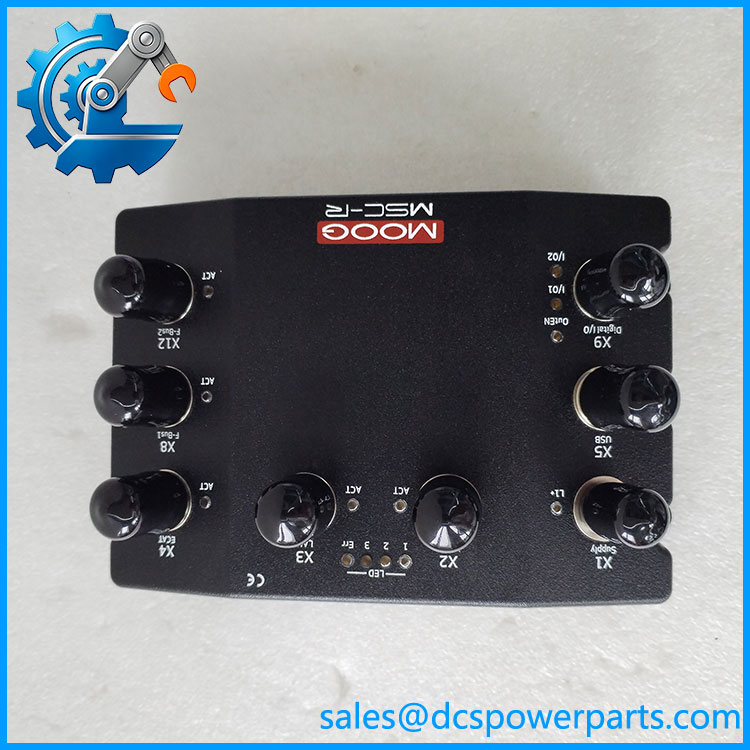
D136-003-001
Related Products
The following models belong to the same MOOG MSC-R ordering family and are useful for comparison. Their communication interfaces differ, so they should not be treated as direct substitutes without reviewing the application.
1. MOOG D136-003-002 — An MSC-R controller variant with Ethernet, USB, EtherCAT master, and dual CAN/CANopen interfaces. The catalog does not list a PROFIBUS-DP slave interface for this variant, unlike the D136-003-001.
2. MOOG D136-003-004 — An MSC-R variant with Ethernet, USB, EtherCAT master and slave, and CAN/CANopen connectivity. It is relevant where an EtherCAT slave interface is required, but it differs from the in network configuration.
3. MOOG D136-003-005 — Another MSC-R ordering variant. Its interface configuration differs from the , so consult the official model comparison before selecting it for a replacement.
4. MOOG MSC-R Controller Family — The broader ruggedized motion-controller family used in M3000 automation applications. Compare the exact order code, installed application, and available communication interfaces when planning a control-system upgrade.
5. MOOG M3000 Automation System — The automation platform associated with the MSC-R controller. Relevant when checking application software, project compatibility, and the wider system architecture during maintenance.
6. MOOG MACS Development Environment — The programming and configuration environment used to develop and manage controller applications. Access to the correct project and configuration files is important when restoring a replacement controller.
7. EtherCAT-Compatible Motion Devices — Drives and other devices connected through the controller’s EtherCAT master interface. Verify supported device profiles, network configuration, and application timing before changing connected equipment.
8. PROFIBUS-DP-Compatible Devices — Field devices or automation equipment communicating through the ‘s PROFIBUS-DP slave interface. This interface is a key consideration when assessing replacements that omit PROFIBUS-DP support.
9. CAN/CANopen-Compatible Devices — Devices communicating through the controller’s two CAN/CANopen interfaces. Confirm baud rates, node IDs, termination, and application mapping during replacement.
The model-specific interface distinctions above are documented in MOOG’s motion-controller catalog.
Frequently Asked Questions (FAQ)
1. Is the MOOG compatible with my existing PLC or DCS?
It can integrate into a larger automation system through its supported communication interfaces, but compatibility depends on the controller’s application and network configuration.
Before connecting it to an existing PLC or DCS, verify:
- The required Ethernet or fieldbus protocol.
- Whether the external controller expects PROFIBUS-DP slave communication or another interface.
- The controller’s MACS application and data mapping.
- The behavior of connected drives and feedback devices after startup.
The presence of Ethernet does not, by itself, guarantee compatibility with every industrial Ethernet protocol.
2. Can I hot-swap the while the machine is running?
Do not assume that hot swapping is supported. The MSC-R is a powered motion controller that executes machine-control logic, so removing it during operation can interrupt communication and stop or alter controlled movement.
Follow the machine’s shutdown procedure, isolate hazardous energy where required, and confirm the manufacturer’s replacement instructions. After installation, check communication status, controller outputs, and machine interlocks before returning the equipment to service.
3. Does the support firmware version 3.1?
I could not verify a specific firmware version 3.1 requirement for this ordering code from the available documentation. The relevant checks are the controller hardware revision, installed system software, MACS development environment version, and project compatibility.
For a replacement, confirm the software requirements of the original application before loading a project or changing firmware. A software mismatch may prevent an otherwise compatible controller from running the intended application.
4. Will replacing the controller erase my motion-control program?
A replacement controller does not automatically contain the application program from the original unit. The machine’s logic and configuration may need to be restored from an existing project backup.
Recommended procedure:
- Back up the original MACS project and configuration if the existing controller is still accessible.
- Record network settings, node addresses, and device assignments.
- Confirm the replacement hardware and software revisions.
- Restore the approved project and verify all connected devices.
- Test movement and safety interlocks under controlled conditions.
Do not assume that parameters or application data can be transferred directly between different MSC-R variants.
5. How can I verify that a new-surplus MOOG is genuine and functional?
Request photographs of the actual controller, its model label, serial number, and hardware revision. Ask for inspection records and functional-test results where available.
New-surplus status does not automatically mean factory-sealed condition or a current OEM warranty. A visual inspection can identify physical damage and label discrepancies, but it cannot confirm that every communication interface and application function operates correctly.
6. Can I replace the with the D136-003-002 or D136-003-004?
Not without an interface and application review.
- The D136-003-002 does not list the PROFIBUS-DP slave interface found on the .
- The D136-003-004 adds an EtherCAT slave interface and has a different CAN/CANopen configuration.
If the machine relies on PROFIBUS-DP, changing variants could require a network redesign or a different controller selection. Check the official interface matrix, project compatibility, and application requirements before ordering.
7. What warranty should I expect when buying the MOOG ?
Warranty terms depend on the supplier and the unit’s condition. New-surplus, used, and refurbished controllers may carry different coverage, and OEM warranty coverage should not be assumed.
Before purchasing, obtain written confirmation of the warranty period, covered failures, return procedure, and any functional testing included. For production-critical systems, also confirm that the correct hardware revision and required communication interfaces are available before the original controller is removed.