Description
Product Overview
The Inovance MD500-ECAT is an EtherCAT communication expansion card designed to connect compatible Inovance AC drives to an industrial EtherCAT network. Rather than functioning as a standalone PLC or general-purpose Ethernet interface, the card provides the communication link through which a supported drive receives commands and exchanges operating data with an EtherCAT master. Typical control tasks include sending speed references, issuing drive commands, and monitoring drive status within a larger machine-control system. The exact control and monitoring data available depend on the drive model, firmware, and configured process-data mapping.
The card provides two RJ45 network interfaces identified as ECAT IN and ECAT OUT. These ports support connection to the EtherCAT master or preceding slave and onward to the next slave in the network. The intended topology and port orientation must be followed during wiring. Inovance documentation also identifies a minimum synchronization cycle of 500 μs for the MD520 communication configuration. This figure should be understood as a documented communication capability, not a guarantee of identical end-to-end response time in every PLC, network, or drive application. Actual performance depends on the master configuration, network design, drive settings, and control task.
The Inovance MD500-ECAT requires careful compatibility checking because product documentation covers different drive series and revisions. Manuals for the MD500 family and the MD520 series do not necessarily describe identical installation or configuration requirements. Before purchasing a replacement card, confirm the installed drive model, the card’s hardware and software versions, and the correct device-description XML file. For commissioning, verify the EtherCAT state, process-data mapping, station configuration, command scaling, and drive fault handling. A card that fits physically may still require the correct device description and controller configuration to communicate as expected. These checks are especially important when replacing a failed card in a production machine where unexpected drive behavior can interrupt the process.
Product Introduction — Practical Field Focus
The MD500-ECAT is intended for machine builders and maintenance teams that need to integrate supported Inovance drives into an EtherCAT-controlled system. It provides a fieldbus connection without requiring the drive to operate as the network master.
During a replacement, record the original card revision, drive model, firmware information, XML device-description version, and EtherCAT network settings. Follow the drive manufacturer’s shutdown and discharge procedure before opening the drive enclosure or installing the card. After installation, confirm network communication and verify the commanded and actual drive behavior before returning the machine to service.
Key Technical Specifications
| Parameter | Specification |
|---|---|
| Product Model | MD500-ECAT |
| Manufacturer | Inovance |
| Product Type | EtherCAT communication expansion card |
| Primary Function | EtherCAT slave communication for compatible AC drives |
| Communication Protocol | EtherCAT |
| Network Ports | Two RJ45 ports: ECAT IN and ECAT OUT |
| Documented Synchronization Cycle | Minimum 500 μs in the MD520 communication guide |
| Device Description File | MD500_1Axis_V1.03.xml, as specified in the referenced guide |
| Software Version | Version 1.00 or later for the referenced communication guide; verify the applicable drive documentation |
| Installation Method | Internal installation in a compatible Inovance AC drive |
| Supported Drive Families | Drive-series support varies by manual and revision; confirm the exact model |
| External Power Supply | Confirm requirements in the applicable card and drive manual |
| Operating Temperature | Verify the applicable technical documentation |
| Protection Rating | Verify the installed drive assembly specifications |
| Application | PLC-controlled motor drives and industrial machine networks |
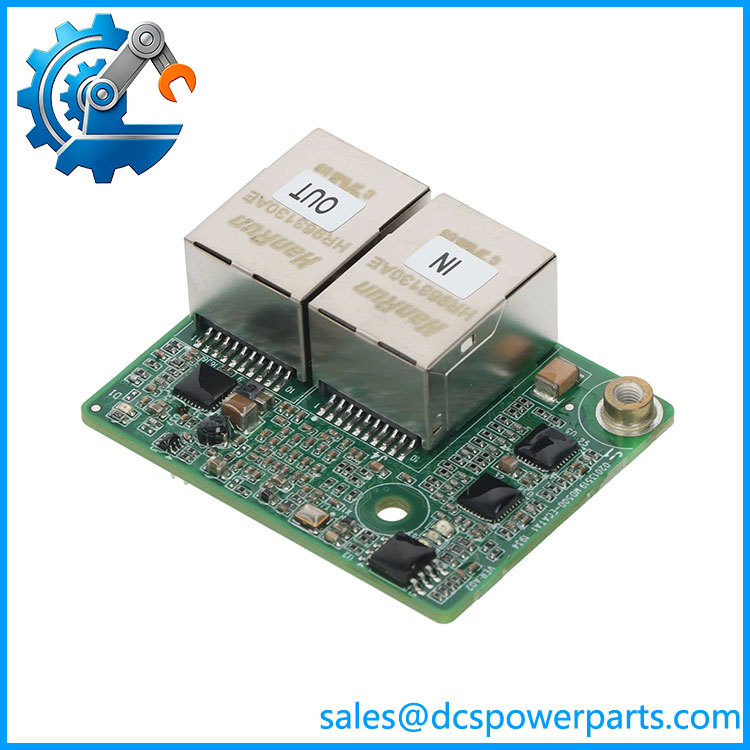
MD500-ECAT
Related Products
These products are relevant when selecting communication options for Inovance drives. They use different network protocols or serve different functions, so they are not direct substitutes for MD500-ECAT.
- Inovance MD500-PN1 — PROFINET communication expansion card.
- Inovance MD500-PN2 — Alternative PROFINET communication card; confirm the applicable controller and network requirements.
- Inovance -EN1 — Ethernet/IP communication expansion card.
- Inovance -EM1 — Modbus TCP communication expansion card.
- Inovance MD38TX1 — Serial communication card associated with Modbus RTU/ASCII applications.
- Inovance MD38CAN1 — CANlink/CANopen communication option, depending on the supported drive configuration.
- Inovance MD-SI-DP1 — PROFIBUS-DP communication card.
- Inovance MD520 AC Drive — AC drive family documented with -ECAT EtherCAT communication support.
Frequently Asked Questions
Q1. What the card do?
It adds EtherCAT fieldbus communication to a compatible Inovance AC drive, allowing an EtherCAT master such as a PLC or motion controller to exchange control commands and operating data with the drive.
Q2. Which AC drives are compatwith ?
Compatibility depends on the card revision and the applicable manufacturer documentation. The -family and MD520-series manuals describe different drive configurations. Confirm the exact drive model and obtain the corresponding installation and communication guide before ordering.
Does support EtherCAT communication at a 500 μs cycle?
The MD520 communication guide specifies a minimum synchronization cycle of 500 μs. This is a documented synchronization capability; actual network and application performance depends on the EtherCAT master, system configuration, and drive setup.
Q4. What are the two RJ45 ports used for?
The ECAT IN port connects to the EtherCAT master or preceding slave, while ECAT OUT connects to the next slave where applicable. Follow the documented port orientation and network topology when wiring.
Q5. Can the card be replaced while the AC drive is powered?
Do not install or remove the card while the drive is energized. Follow the applicable Inovance procedure, isolate power, and wait until the drive’s charging indicator is off before accessing the internal expansion-card connection.
Q6. Does a replacement card require PLC reconfiguration?
It may. Check the device-description XML version, station alias, network topology, and process-data configuration. The manufacturer’s replacement guidance emphasizes maintaining the correct XML version and station configuration where applicable.
Q7. What should procurement verify before purchasing?
Confirm the full model designation, hardware revision, intended drive series, availability of the correct device-description file, physical condition, and any applicable warranty or test records. Do not assume a visually similar EtherCAT card is interchangeable.
Q8. What should be tested after installation?
Verify that the EtherCAT master recognizes the slave, the expected network state is reached, process data updates correctly, command and feedback scaling are appropriate, and drive faults are handled as designed. Perform these checks under the approved commissioning procedure before releasing the equipment to production.