Description
Product Overview
IC660HHM501 is the Genius I/O hand-held monitor: a battery-powered terminal with a four-line LCD, a twenty-key membrane keypad and a cable that plugs into a Genius block’s HHM connector or into a standalone connector on the bus. Its job is to stand in for the PLC when the PLC cannot help you — during panel build, at first power-up, at a block that a host CPU has never seen, or on a weekend when the CPU is down and a technician needs to know whether an input is actually on.
What makes it more than a display is the permission set behind the keyswitch and the function keys. With the right access level the HHM configures a block’s I/O type and parameters, changes its device number and baud rate, forces discrete and analog circuits, clears Genius faults, selects which bus of a dual bus is being looked at, and reads the data a block exchanges with its host — including bus scan time, global data addresses and CPU memory values. Faults can be cleared and circuits forced with the bus running, or with no CPU and no bus traffic at all.
The bare catalogue number hides the part that matters commercially. IC660HHM501 is a revision family, not one product: units exist from series A through S1, and each revision carries a capability ceiling. A version 3.5 unit, the -D revision, is the minimum for configuring and monitoring later blocks, and version 4.0, the -G revision, is needed to reach the full feature set of newer block firmware; earlier units require an upgrade kit. A buyer who orders “an IC660HHM501” from a photograph can therefore receive a perfectly functional terminal that cannot configure the blocks it was bought for.
The platform behind it is long out of production. Genius I/O itself has been an end-of-life architecture for years and the HHM survives as remanufactured and used stock, which makes revision identity, battery condition and cable integrity the three things that actually decide whether the unit you receive will do the job on Monday morning.
Technical Specifications
表格
| Parameter | Value |
|---|---|
| Model | IC660HHM501 |
| Manufacturer | GE Fanuc (now GE-Emerson) |
| Product line | Genius I/O |
| Product type | Hand-held monitor / portable configuration terminal |
| Display | LCD, 4 lines × 16 characters |
| Keypad | 20-key sealed membrane: function keys F1–F4, decimal keys, operation keys |
| Access control | Keyswitch (mode select) restricting configuration and forcing |
| Display languages | English, German, French, Italian |
| Bus interface | Genius LAN, 153.6 kbaud |
| Connection | HHM cable to block HHM connector or standalone bus connector |
| Supply | Internal rechargeable battery pack, charged from 115/230 VAC, 47–63 Hz |
| Battery runtime | Up to 6 hours on a full charge; full charge approx. 6 hours |
| Operating temperature | 0 °C to +60 °C |
| Storage temperature | −40 °C to +70 °C |
| Humidity | 5 % to 95 %, non-condensing |
| Shock | 4-foot drop onto concrete |
| Dimensions / weight | 10.85 × 4.30 × 2.25 in with case; approx. 1.8 lb (0.8 kg) |
| Accessories | Battery pack IC660BPM500, charger IC660BCM501, cable IC660HHC005 |
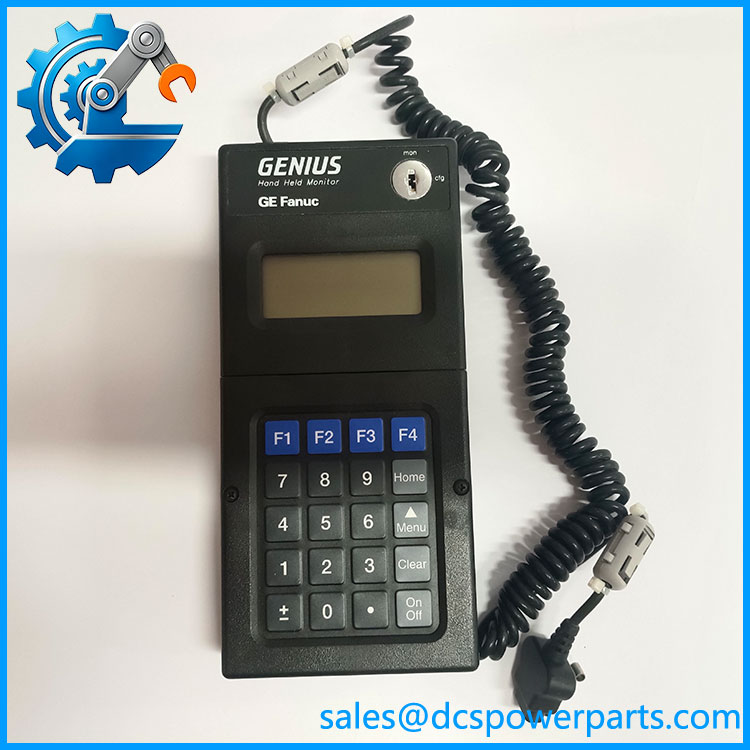
IC660HHM501
Key Features and Advantages
Works without a host: on a Genius system the CPU, the bus controller and the programming software all have to agree before anything can be configured. The IC660HHM501 needs none of them — plugged into a block it will display that block’s type, its circuits and their states, and it will write configuration into a block that has never been addressed. That is the difference between commissioning a panel in a workshop and dragging it into a plant to find a live CPU.
Forcing and fault clearing at the terminal: a discrete output that will not prove, or an input whose state is disputed between the drawing and the machine, can be settled at the block. Circuits are forced on or off and shown underlined on the display so that a forced point is never mistaken for a real one, and Genius faults are cleared from the keypad. Maintenance crews use this more than engineers do.
Revision as a specification: the -D revision corresponds to software version 3.5 and the -G to version 4.0, which is what newer blocks require for their complete feature set. Because the difference is invisible on the label unless you read the letter after the part number, matching revision to the blocks in the cabinet is the single most useful piece of knowledge about this product — and the reason a “working pull” can be the wrong purchase.
Host CPU setting that changes what you see: the HHM must be told which host family it is working with, and the same block will display valid references under one setting and asterisks under another, because the references fall outside the range of the CPU the monitor has been configured for. A screen full of * is a settings problem, almost never a failed monitor.
Built to be dropped: a sealed membrane keypad, a cased body tested by dropping four feet onto concrete, and a six-hour battery that keeps the unit alive while it is carried between cabinets. The battery is also the part that ages — a monitor that has sat in stores for years will power up on the charger and die in fifteen minutes in the field.
Access control that suits regulated plants: the keyswitch can be left in a position where forcing, configuration changes and block ID edits are unavailable, so a monitor left in a cabinet is a read-only window rather than a way to change a safety-relevant output.
Applications
Panel shops and system integrators building Genius cabinets use IC660HHM501 before a CPU exists: blocks are addressed, configured for their I/O type and range, and proved point by point on the bench, so that first power-up in the plant is a commissioning exercise rather than a debug session.
Commissioning and loop check on brownfield plants is its natural habitat — a block whose device number was set twenty years ago and never documented can be read, recorded and corrected at the block, without taking the bus down or asking the control room to release the CPU.
Troubleshooting during production: a disputed input, a Genius fault that keeps reappearing, an output that the program says is on and the field says is off — all resolved at the terminal, with the ability to force the circuit and watch the machine respond, then remove the force and clear the fault.
Retention and legacy support in plants that still run Genius I/O on Series Six, Series 90 or a PCIM host: the HHM is often the only tool on site that can read a block’s configuration, which makes a working unit with a known revision a piece of infrastructure rather than an accessory.
Training and familiarisation: because it exposes raw block data, bus scan time and global data without any software layer, the HHM is still used to teach technicians what a Genius bus is actually doing.
Related Products
IC660HHM502 — the other Genius hand-held monitor variant, used with bus controller modules and able to link to Genius I/O devices; different connectivity role from the block-level HHM. IC660BPM500 — the battery pack for ; the consumable that decides whether the monitor survives a shift in the field. IC660BCM501 — battery charger for the same monitor, required to bring a stored unit back to a full charge. IC660HHC005 — the HHM interface cable; a frayed cable produces symptoms that look like an intermittent block. IC660MPH509 — standalone HHM connector kit, giving a permanent HHM connection point on the Genius bus instead of opening a cabinet at each block. IC660BLM508 / IC660BLM506 — 75 Ω and 150 Ω Genius bus terminators, the matching hardware when an HHM connector point is added to an existing segment. IC697BEM731 — Series 90-70 Genius bus controller; the host-side device whose configuration the HHM helps verify. IC693BEM331 — Series 90-30 Genius bus controller, same relationship at the smaller PLC. IC660BBD020 / IC660BBD101 — Genius discrete source and low-leakage blocks, typical configuration and forcing targets for the monitor. IC660BSM021 / IC660BSM120 — bus switching modules, whose dual-bus behaviour the HHM can display and force during checkout.
Installation and Maintenance
Before installation: charge the battery pack before anything else and confirm the unit runs off the pack rather than only on the charger, since AC operation relies on an installed pack. Read the letter after the part number and compare it with the blocks you intend to configure — a of an earlier revision will monitor happily and refuse the newer configuration menus. Set the host CPU type and the device number before connecting, verify the keyswitch position against the access you actually need, and check the cable for continuity at the connector, because a Genius HHM cable that has been pulled by the cord is the usual cause of “the monitor cannot see the block”.
Maintenance practice: keep one spare battery pack IC660BPM500 per monitor and cycle it rather than leaving it discharged in a drawer, since deep discharge is what kills these packs. Clean the membrane keypad with a damp cloth only — solvents attack the sealed overlay and the legends. Log each monitor’s revision against the block population so a replacement is bought with the right capability, and treat the whole family as obsolete: spares are remanufactured stock, so condition, revision and battery are what you are really buying.
Warranty and Quality
Every is supplied with its revision identified and stated, because the letter after the part number is the difference between a monitor that configures current blocks and one that only reads them. Units are checked for display function, keypad response, keyswitch operation, cable continuity and battery behaviour under load before dispatch, and carry a 12-month repair, replacement or refund commitment covering the monitor and its battery pack. Support focuses on the practical questions this product raises — matching revision to the installed block population, pairing the unit with the right battery pack and charger, and diagnosing a monitor that displays asterisks or cannot see a block when the fault is in the address setting or the cable rather than the terminal itself.