Description
Product Overview
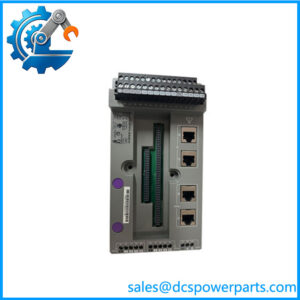
The Honeywell XSL513 is a terminal block designed for the Excel 5000 Open System distributed I/O family. It provides the physical wiring interface for compatible XFL-series analog and digital I/O modules, helping organize field connections within building automation and HVAC control panels. Unlike an active I/O module, the XSL513 is a passive termination and mounting component: it does not independently measure process signals, execute control logic, or communicate with the controller. Its role is to provide the correct connection points and mechanical support for the associated electronics module.
The Honeywell XSL513 supports the XFL521-series analog input, XFL522-series analog output, and XFL523-series digital input modules, according to Honeywell’s distributed I/O documentation. Its three terminal rows separate signal connections, signal-ground connections, protective-earth connections, and auxiliary terminals. The design uses spring-clamp terminals for field wiring, a DIN-rail mounting arrangement, and a safety latch to retain the electronics module. Mechanical coding features help prevent an incorrectly matched module from being installed in the terminal position. These details matter during maintenance because a replacement terminal base must match the installed I/O module and panel arrangement, not merely the manufacturer name.
When sourcing a Honeywell XSL513 for an existing installation, confirm the full part number and inspect the terminal layout before removing the original assembly. The XSL513 is not the same as the XSL514, which is intended for the XFL524 digital output module. Also check whether the existing panel uses a manual terminal disconnect module or other adjacent accessories that affect the physical arrangement. Since the XSL513 is a legacy component, condition, terminal integrity, latch operation, coding features, and included accessories should be verified before installation. Use the system’s wiring drawings and the applicable Honeywell documentation to confirm fit and function.
Product Introduction
Field wiring problems in legacy control panels can arise when a replacement terminal base has a different connection layout or module keying. The Honeywell provides 18 signal terminals for compatible Excel 5000 distributed I/O modules, with spring-clamp wiring and DIN-rail mounting.
For maintenance teams supporting XFL521, XFL522, or XFL523 modules, the main procurement priority is confirming terminal compatibility before replacement. Check the original base, module designation, wiring diagram, and accessory arrangement before ordering.
Key Technical Specifications
| Parameter | Value |
|---|---|
| Product Model | |
| Manufacturer / Brand | Honeywell |
| Product Type | Distributed I/O terminal block |
| System Family | Excel 5000 Open System |
| Compatible I/O Modules | XFL521-series, XFL522-series, XFL523-series |
| Signal Terminals | 18 |
| Terminal Arrangement | Three rows |
| Wiring Method | Spring-clamp terminals |
| Mounting Method | DIN rail / top-hat rail |
| Module Retention | Safety latch |
| Mechanical Protection | Coding features help prevent mismatched module installation |
| Communication Protocol | Not applicable to the passive terminal block itself |
| Operating Voltage | Determined by the connected I/O module and field circuit; verify system documentation |
| Operating Temperature | Verify the applicable system documentation; no model-specific rating confirmed here |
| Protection Rating | Not confirmed; check the product label or technical documentation |
| Condition | Legacy/discontinued model; actual unit condition must be confirmed |
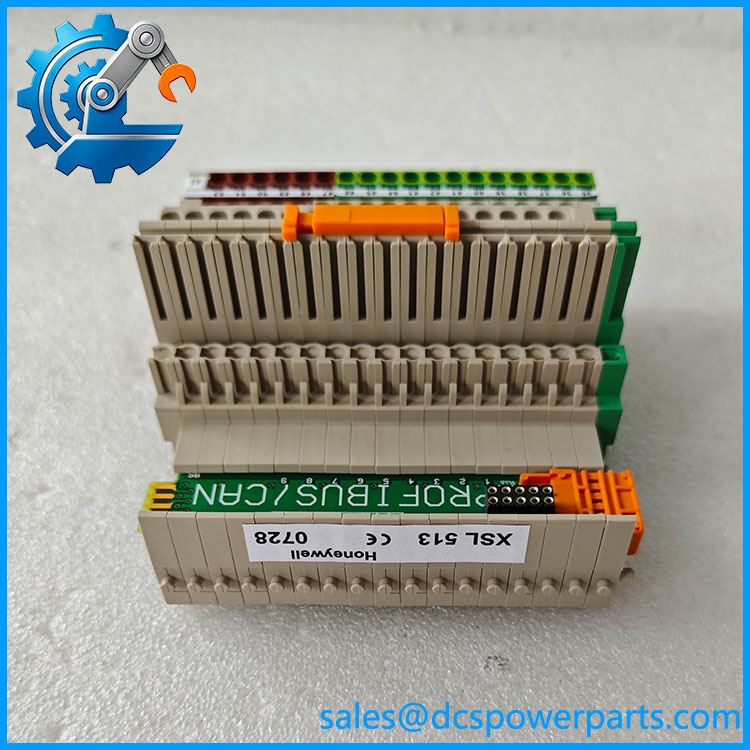
XSL513
Related Products
These components belong to the same I/O family or provide related mounting and connection functions. Confirm the exact configuration before treating any item as a replacement.
- XFL521B — Analog input module. Used for compatible sensor input applications with the terminal block.
- XFL522B — Analog output module. Provides output signals to compatible actuators; uses the terminal base.
- XFL523B — Digital input module. Used to monitor binary field states through the Excel 5000 distributed I/O system.
- XFL524B — Digital output module. Uses the XSL514, not the , as its designated terminal block.
- XSL511 — LONWORKS connector module for the distributed I/O bus connection.
- XSL512 — Manual terminal disconnect module for maintenance isolation; confirm the intended installation position and wiring arrangement.
- XSL514 — Terminal block designed for the XFL524B digital output module.
- XFR522A — Manual override module for the XFL522B analog output module.
- XFR524A — Manual override module for the XFL524B digital output module.
Frequently Asked Questions
What is the Honeywell used for?
It provides field-wiring terminals and a mounting interface for compatible Excel 5000 distributed I/O modules, specifically the XFL521-, XFL522-, and XFL523-series modules documented for this base.
Which modules are compatible with the ?
Honeywell documentation identifies the XFL521, XFL522, and XFL523 module families. Confirm the complete module suffix and the existing terminal arrangement against the applicable product documentation before installation.
Can I replace the with an XSL514?
Do not assume they are interchangeable. The XSL514 is specified for the XFL524B digital output module, while the is used with the XFL521, XFL522, and XFL523 families. The terminal layout and connected module must match.
Can I hot-swap the while the system is running?
Do not assume that replacing the terminal block itself is permitted under power. Although Honeywell documentation describes module exchange features within the distributed I/O family, that does not establish a safe live-replacement procedure for every terminal-base configuration. Follow the site’s isolation procedure and the applicable installation instructions.
Does the support firmware v3.1?
The is a passive terminal block, not a processor or firmware-bearing controller. Firmware compatibility is relevant to the associated electronics module and control system. Check the installed XFL module revision and controller configuration if firmware compatibility is part of the maintenance task.
How can I verify that a Honeywell is authentic?
Check the part marking, terminal configuration, mechanical coding, latch condition, and manufacturing labels. Request clear photographs of the actual unit and any available traceability or inspection records. Packaging alone does not establish authenticity.
Is the Honeywell available new, surplus, or refurbished, and what warranty applies?
The model appears in references as discontinued, so availability and condition depend on the individual unit. Ask the supplier to state whether it is new old stock, unused surplus, or used; clarify whether testing was performed and obtain written warranty terms. Do not assume a manufacturer warranty applies to legacy stock.
Procurement note: Before approving a replacement, compare the original terminal base with the proposed unit, including terminal positions, coding features, latch condition, and any fitted accessories. Confirm the associated XFL module and panel wiring documentation to reduce installation and commissioning risk.