Description
Product Overview
The Honeywell FS-BLIND-COM is a blind module used in the Honeywell Safety Manager control system. It is fitted into an unused COM slot in the controller chassis when an actual communication module is not required. Its purpose is mechanical and protective rather than computational: it occupies the open slot and helps maintain the chassis front’s closed, grounded electromagnetic compatibility (EMC) shield. It does not provide a communication channel, execute application logic, or replace an active communication module.
The Honeywell FS-BLIND-COM is designed for installations using Safety Manager controller hardware, where unused positions may remain after system configuration changes, maintenance, or staged expansion. Honeywell’s hardware reference identifies a wide operating temperature range of −40°C to +85°C, with no electrical power requirement. The published dimensions are 176 mm high, 35.2 mm wide, and 212 mm deep, with a listed weight of approximately 0.5 kg. These mechanical details are useful when checking the required chassis position and planning spare-parts inventory.
When sourcing a Honeywell FS-BLIND-COM, distinguish it from other blind components in the same system. The FS-BLIND-COM is intended for unused communication slots in the controller chassis; FS-BLIND-IO is specified for unused I/O chassis slots, while FS-BLIND-CHAS1HE, FS-BLIND-CHAS3HE, and FS-BLIND-CHAS4HE are chassis cover plates in different sizes. These parts serve related enclosure-management purposes but are not automatically interchangeable. Before installation, check the chassis type, slot designation, physical dimensions, and grounding arrangement against the system hardware reference. For legacy safety systems, correct mechanical fit and preservation of the enclosure’s EMC design are important even when the component has no active electronics.
Product Introduction
Unused communication slots in a safety controller chassis should not be left open if the hardware design requires a fitted blanking component. The Honeywell FS-BLIND-COM fills vacant COM positions and helps maintain the controller chassis’s closed, grounded EMC shield.
With a specified operating range of −40°C to +85°C and no power requirement, this passive component supports maintenance and configuration changes in Safety Manager installations. Confirm the chassis and slot type before ordering.
Key Technical Specifications
| Parameter | Value |
|---|---|
| Product Model | FS-BLIND-COM |
| Manufacturer / Brand | Honeywell |
| Product Type | Blind module / dummy COM module |
| System Family | Safety Manager |
| Primary Function | Fills unused communication-module slots |
| Installation Location | Unused COM slots in the controller chassis |
| Electrical Power | None required |
| Operating Temperature | −40°C to +85°C |
| Storage Temperature | −40°C to +85°C |
| Dimensions (H × W × D) | 176 × 35.2 × 212 mm |
| Weight | Approximately 0.5 kg |
| Communication Protocol | Not applicable; this is not an active communication module |
| Signal Processing | None |
| EMC Function | Helps maintain the closed, grounded chassis-front shield |
| Working Voltage | Not applicable as an active powered module |
| Protection Rating | No model-specific IP rating confirmed |
| Condition | Confirm actual stock condition and inspection status |
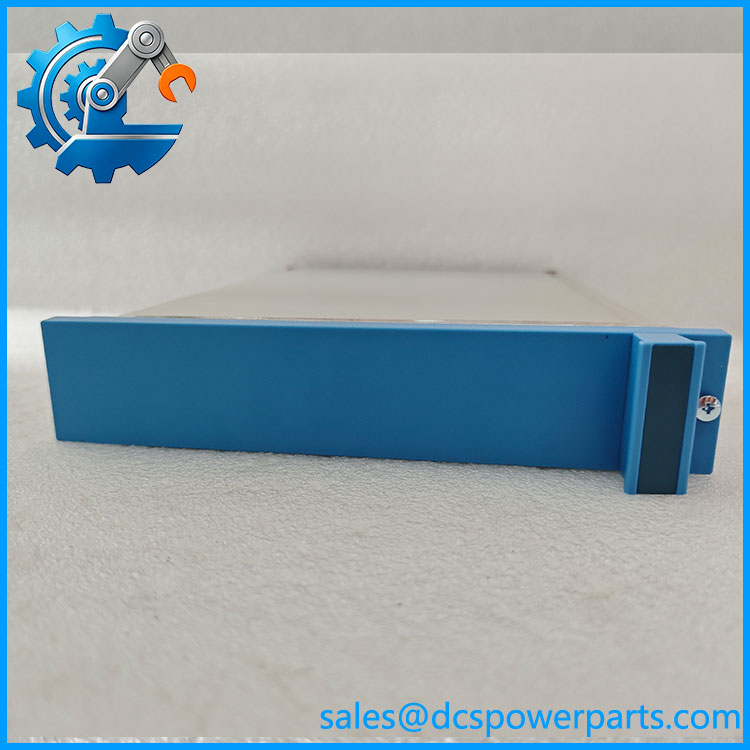
FS-BLIND-COM
Related Products
The following components serve related chassis, controller, or communication functions in Honeywell Safety Manager installations. Confirm slot and chassis compatibility before substitution.
- FS-USI-0001 — Universal Safety Interface module; an active module option for supported controller communication positions.
- FS-USI-0002 — Universal Safety Interface variant used in Safety Manager configurations; verify the intended communication function and hardware revision.
- FS-BLIND-IO — Blind component for unused I/O chassis slots; not a direct substitute for the COM-slot version.
- FS-BLIND-CPS — Blind component for an unused controller power-supply slot; verify the exact chassis application.
- FS-BLIND-CHAS1HE — Chassis cover plate for a 1-HE opening.
- FS-BLIND-CHAS3HE — Chassis cover plate for a 3-HE opening.
- FS-BLIND-CHAS4HE — Chassis cover plate for a 4-HE opening.
- FS-CPCHAS-0001 — Safety Manager control-processor chassis; confirm the required chassis version and slot layout.
- FC-QPP-0002 — Enhanced-performance quad processor pack used in compatible Honeywell safety-system configurations; an active processor component rather than a blanking module.
Frequently Asked Questions
What is the Honeywell FS-BLIND-COM used for?
It fills an unused communication-module slot in a Safety Manager controller chassis. It is a passive mechanical component that helps close the chassis opening and preserve the intended grounded EMC shield.
Is the FS-BLIND-COM an active communication module?
No. It does not provide a communication interface, process data, or require electrical power. An active module such as a compatible FS-USI variant is required when the slot needs to perform a communication function.
Can I use FS-BLIND-IO instead of FS-BLIND-COM?
Do not assume they are interchangeable. FS-BLIND-COM is specified for unused communication slots in the controller chassis, while FS-BLIND-IO is intended for unused I/O chassis slots. Verify the chassis and slot designation before ordering.
Can I remove or install the FS-BLIND-COM while the safety system is running?
The part has no electrical power connection, but that alone does not establish that live chassis access is permitted. Follow the site’s approved maintenance procedure and Honeywell safety-system instructions. Do not disturb adjacent active modules or compromise chassis protection during maintenance.
Does the FS-BLIND-COM support firmware v3.1?
Firmware does not run on this passive blind module. Firmware compatibility applies to the active controller and communication hardware installed in the chassis. Check the system configuration and hardware documentation if the maintenance task involves a firmware upgrade.
How can I verify the authenticity and condition of an FS-BLIND-COM?
Check the part number and manufacturer marking, inspect the housing for cracks or deformation, and verify that the mounting features fit the intended slot. Request photographs of the actual item and available traceability or inspection records. A generic blanking plate should not be assumed equivalent without confirming the EMC and mechanical requirements.
Is the FS-BLIND-COM available as new surplus, and what warranty applies?
Availability and condition depend on the specific unit. Ask the supplier to identify whether it is unused stock or previously installed, confirm that the mounting features are intact, and provide written warranty terms. Do not assume a manufacturer warranty applies to legacy inventory.
Procurement note: Specify the complete part number FS-BLIND-COM and the intended Safety Manager controller chassis. Do not substitute an I/O-slot blank or chassis cover plate based on appearance alone; the correct part must fit the designated position and preserve the chassis’s intended enclosure and EMC arrangement.