Description
RH102AN Product Page
Product Overview
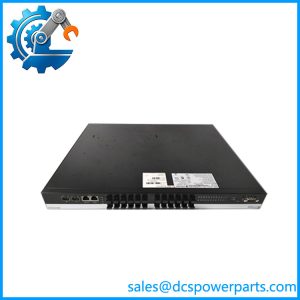
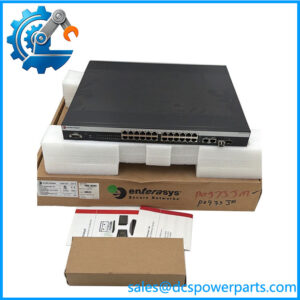
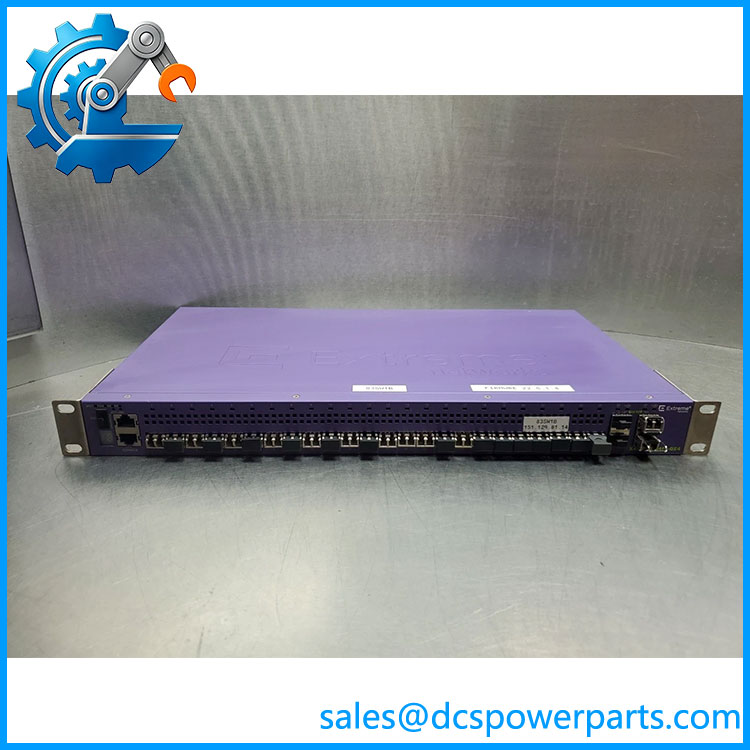
The RH102AN is a 24-port fiber Ethernet switch designated for use in Foxboro DCS control-network infrastructure. Its hardware platform is the Extreme Networks X440-G2-24fx-GE4. The switch provides 24 100Base-FX fiber access ports using LC connectors and four 1000Base-X SFP uplink ports, giving the installation a total of 28 active network ports. It is intended for managed Layer 2 Ethernet switching, connecting compatible control-system network devices across fiber-optic links in industrial environments.
The fiber interfaces are useful where electrical isolation, resistance to electromagnetic interference, or longer cable runs are important. The four SFP uplinks support compatible 1000Base-X optics; the specific transceiver must match the required fiber type, connector, wavelength, and link distance. The switch supports full-duplex communication, VLAN and switching functions associated with its software platform, and network monitoring through SNMP/RMON-based management. Exact software capabilities depend on the installed ExtremeXOS release and the network configuration approved for the control system.
For maintenance teams supporting a Foxboro DCS, the RH102AN is a network-infrastructure component rather than a controller or I/O module. A failure can affect communication between connected control-network nodes, so replacement planning should include port mapping, fiber polarity, VLAN configuration, spanning-tree settings, uplink topology, and management access. Do not assume a factory-default switch can be installed directly into a live control network. Confirm the existing configuration and firmware requirements before deployment, and validate each fiber link after replacement. The RH102AN designation is particularly relevant when matching the switch against Foxboro system documentation and installed equipment records.
Product Introduction — Network Maintenance Perspective
A fiber switch replacement can disrupt multiple control-system connections if port assignments, VLANs, or uplink settings are not restored correctly. The RH102AN maps to the Extreme Networks X440-G2-24fx-GE4 platform, with 24 LC-connected 100Base-FX access ports and four 1000Base-X SFP uplinks.
For Foxboro DCS maintenance, confirm the hardware identity, transceiver types, firmware compatibility, and saved network configuration before installation. Treat the switch as part of the control-network architecture, not as an unmanaged plug-and-play replacement.
Key Technical Specifications
| Parameter | Specification |
|---|---|
| Part number | RH102AN |
| Hardware model | X440-G2-24fx-GE4 |
| Manufacturer | Extreme Networks |
| System designation | Foxboro / Schneider Electric control network |
| Product type | Managed Layer 2 Ethernet switch |
| Fiber access ports | 24 × 100Base-FX |
| Access-port connectors | LC |
| Access fiber | Multimode fiber as specified for the installed interface |
| Uplink ports | 4 × 1000Base-X SFP |
| Total active ports | 28 |
| Duplex mode | Full duplex |
| Network standards | IEEE 802.3u; IEEE 802.1w Rapid Spanning Tree Protocol |
| Management | Local console; SNMP/RMON-compatible monitoring |
| Operating system | ExtremeXOS family; verify installed software release |
| Power | Internal power supply; verify input rating on the unit label |
| Redundant power | Optional external redundant power supply support |
| Mounting | Shelf, desktop, or 19-inch rack, as configured |
| Typical use | Foxboro DCS and industrial control-network connectivity |
RH102AN
Related Products
- RH102AM — X440-G2 copper switch: A related managed switch variant with 24 tri-speed 10/100/1000Base-T RJ45 ports and four SFP uplinks.
- RH102AP — X440-G2 mixed copper/fiber switch: Provides 12 copper ports, eight 100Base-FX fiber ports, and four SFP uplinks.
- RH102AL — 100/1000Base-TX SFP transceiver: A copper SFP option for compatible uplink ports; confirm exact transceiver compatibility.
- RH102BK — 100Base-FX SFP transceiver: A fiber transceiver option listed for compatible X440-G2 SFP ports.
- P0973JE — 100Base-FX transceiver option: Listed in Foxboro network equipment documentation for compatible fiber-switch applications.
- Foxboro FCP270 — P0917YZ: A DCS control processor that may communicate over the control network; it is not a switch replacement.
- Foxboro FBM233 — P0926GX: An Ethernet I/O interface module used in supported Foxboro architectures; it serves a different function from the .
These items are related by network role or control-system connectivity. They are not direct substitutes for the unless the intended function, interface requirements, and system architecture have been checked.
Frequently Asked Questions
Q1. What is the used for?
The is a managed fiber Ethernet switch designated for Foxboro DCS control-network applications. It connects compatible network devices through fiber access ports and Gigabit SFP uplinks.
Q2. How many fiber ports does the have?
It has 24 100Base-FX access ports with LC connectors, plus four 1000Base-X SFP uplink ports. The SFP ports require compatible transceivers selected for the intended fiber and link characteristics.
Q3. Is the same hardware as -24fx-GE4?
Foxboro network equipment documentation identifies with the Extreme Networks -24fx-GE4. When purchasing a replacement, check the complete hardware model, power configuration, software version, and any Foxboro-specific configuration requirements.
Q4. Can I replace with RH102AM?
Not as a direct like-for-like replacement. RH102AM is the copper-port variant, while provides 24 fiber access ports. A substitution would require an approved network redesign or confirmation that the changed physical interfaces meet the installation requirements.
Q5. Can the switch be replaced while the DCS is running?
A live replacement may interrupt communications through the affected switch and can impact multiple connected nodes. Whether the wider control system remains operational depends on network redundancy and topology. Follow the site’s change-control procedure, confirm redundant paths, and coordinate the work with operations before disconnecting links.
Q6. Does require configuration after replacement?
Usually, yes. The switch may require restoration of VLANs, port settings, spanning-tree behavior, management addressing, SNMP settings, and uplink configuration. Use a known-good configuration compatible with the installed hardware and software rather than relying on factory defaults.
Q7. What should procurement verify before ordering ?
Request photographs of the model and hardware labels, confirm the exact variant, and establish whether the unit is new, surplus, or refurbished. For used equipment, ask for functional-test evidence, confirmation of port operation, software information, and a written warranty.
Q8. Which SFP transceivers should be used with ?
The four uplink ports accept compatible 1000Base-X SFP modules. Select transceivers according to the required fiber type, wavelength, optical budget, connector, and distance. Do not assume a transceiver designed for 100Base-FX access links is suitable for a Gigabit uplink.