Description
Key Technical Specifications
| Parameter | Value |
|---|---|
| Manufacturer | FOXBORO / Invensys |
| Model | A2H124-24FX |
| Part Number | P0973BJ |
| Product Type | Managed Fiber Ethernet Switch |
| Network Layer | Layer 2 Managed Switch |
| Fiber Ports | 24 × 100BASE-FX fiber ports |
| Uplink Ports | 2 × Gigabit Ethernet RJ45 ports + SFP expansion ports (configuration dependent) |
| Ethernet Speed | 10/100 Mbps Fast Ethernet |
| Fiber Interface | Multimode fiber MT-RJ interface |
| Switching Capacity | Model/configuration dependent |
| Network Management | Web/SNMP/CLI management functions |
| Protocol Support | IEEE 802.3 / 802.3u Ethernet standards |
| Power Supply | 100–240 VAC, 50/60 Hz (configuration dependent) |
| Mounting | Rack mounting / industrial cabinet installation |
| Application | Foxboro I/A Series control network infrastructure |
Product Introduction
FOXBORO A2H124-24FX P0973BJ Overview
The FOXBORO A2H124-24FX P0973BJ is a managed fiber Ethernet switch used as a communication infrastructure component within industrial automation networks. It is commonly associated with Foxboro I/A Series environments, where reliable communication between controllers, operator stations, engineering tools, and supervisory systems is required.
Unlike an I/O module or controller component, the FOXBORO A2H124-24FX P0973BJ does not execute control logic. Its function is to provide network switching, traffic management, and communication connectivity for distributed automation systems. The fiber-based port design allows longer-distance connections and helps reduce communication issues caused by electrical noise in industrial facilities.
The FOXBORO A2H124-24FX P0973BJ is typically installed in control system cabinets, network racks, and communication panels supporting process automation applications. Typical connections include Foxboro control processors, operator workstations, application servers, and other Ethernet-based automation equipment. When replacing this switch, engineers should verify fiber type, port assignment, network topology, VLAN settings, IP configuration, and redundancy arrangement before returning the control network to operation.
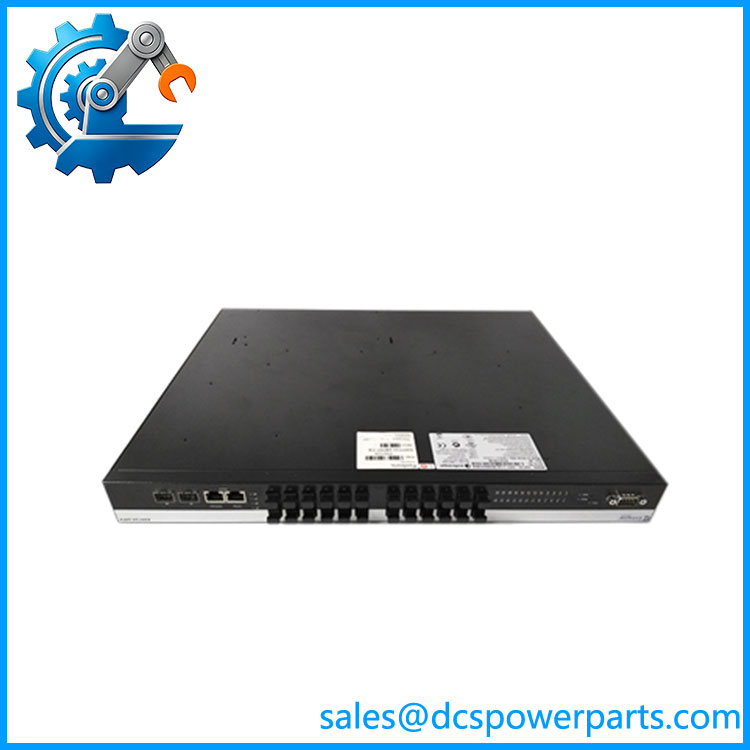
A2H124-24FX P0973BJ
Application Scenarios & Field Pitfalls (The Engineer’s Perspective)
Engineering Pain Point
A DCS network experiences intermittent communication loss, slow operator screen updates, or controller communication alarms. The switch may appear functional, but network infrastructure problems can be difficult to isolate.
The troubleshooting path should include:
- Fiber optic link status
- Port diagnostics
- Network topology verification
- Switch configuration backup
- VLAN settings
- Controller communication statistics
- Power supply stability
The FOXBORO A2H124-24FX P0973BJ is part of the communication layer, so a network fault does not always indicate a failed switch.
Typical Applications
Foxboro I/A Series DCS Networks
Used for:
- Controller-to-server communication
- Operator station connectivity
- Engineering workstation access
- Control network expansion
Oil and Gas Facilities
Applied in:
- Refinery automation networks
- Compressor control systems
- Pipeline monitoring systems
Chemical Processing Plants
Used for:
- Process control communication
- Historian connections
- Supervisory system networking
Power Generation
Applied in:
- Plant control networks
- Auxiliary system monitoring
- Distributed automation communication
Technical Pitfalls to Avoid
1. Verify Fiber Compatibility
Before replacement, confirm:
- Fiber type (multimode/single-mode)
- Connector style
- Transmission distance
- Existing fiber patch panel arrangement
Fiber mismatch can create communication failures even when the switch powers up normally.
2. Backup Network Configuration
Before removing the switch, record:
- IP address settings
- VLAN configuration
- Port assignments
- Network management parameters
A replacement switch may require manual configuration before it can communicate correctly.
3. Check Network Redundancy Design
Verify:
- Ring topology settings
- Redundant communication paths
- Connected switch configuration
- Network recovery behavior
4. Evaluate the Complete Network
Common causes of communication issues include:
- Aging fiber cables
- Poor fiber connections
- Incorrect configuration changes
- Power supply interruptions
- Network congestion
Replacing the switch without checking the network design may not resolve the original problem.
Related Products
- FOXBORO FBMSSW P0926JM
Network-related module used within Foxboro I/A Series system architectures. - FOXBORO FCP270
Field Control Processor used in Foxboro distributed control systems. - FOXBORO FCP280
Field Control Processor for newer Foxboro control platforms. - FOXBORO CP60 / CP270 Series Controllers
Control processors used in Foxboro automation environments. - Enterasys A2H124-24TX
Related A-Series managed Ethernet switch with copper Ethernet ports. - Foxboro I/A Series DCS Network Components
Communication hardware supporting distributed process automation systems.