Description
Product Introduction
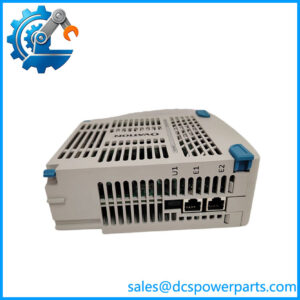
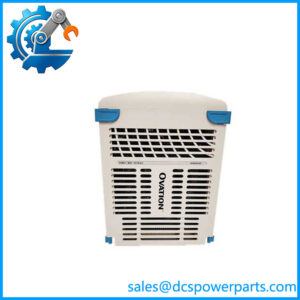
When a control-system network switch fails, the impact can extend beyond lost communications: operator visibility, controller data exchange, and maintenance diagnostics may all be affected. Emerson KJ1611X1-FB1 is identified in available listings as an RM100 base module associated with an 8-port DeltaV smart-switch configuration. For replacement planning, matching the installed hardware matters more than choosing a switch that merely has the same number of Ethernet ports.
For plant maintenance teams, the priority is to confirm the full part number, physical interface arrangement, uplink configuration, and existing network design before installation. Emerson KJ1611X1-FB1 should be treated as a specific DeltaV network spare—not as a generic Ethernet switch—until compatibility with the target assembly and system revision has been verified.
Key Technical Specifications
| Parameter | Details |
|---|---|
| Product Model | KJ1611X1-FB1 |
| Manufacturer | Emerson |
| System Family | DeltaV |
| Product Identification | RM100 base module / industrial Ethernet switch assembly |
| Port Configuration | Listed as 8 Ethernet ports with 2 uplink ports; verify exact arrangement on the unit |
| Primary Function | Industrial network switching |
| Network Role | Connects compatible devices within an industrial control network |
| Installation | Verify mounting and connection requirements against the existing assembly |
| Power Requirements | Confirm from the unit label and matching technical documentation |
| Environmental Rating | Confirm for the exact hardware revision |
| Firmware / Configuration | Verify switch configuration and management requirements before replacement |
| Product Lifecycle | Confirm current support and spare-part availability with the supplier |
The available references support the product identification, but do not establish every electrical and environmental specification for the exact KJ1611X1-FB1 variant. Those values should not be inferred from a similar model.
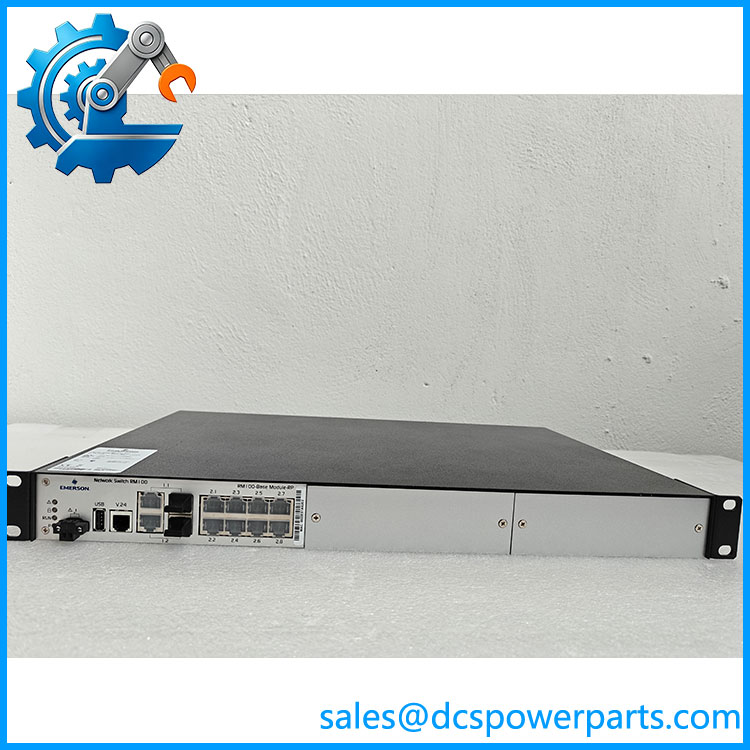
KJ1611X1-FB1
Application Scenarios & Pain Points
A network-switch fault can be difficult to isolate because the symptoms may resemble a controller, cable, or upstream network problem. Replacing the hardware without checking the fault path can create additional downtime.
- DeltaV network maintenance: Keep a verified spare available for planned maintenance or recovery from a failed network component.
- Ethernet communication faults: Check port status, link indicators, cabling, and upstream connectivity before condemning the switch.
- Control-system expansion or restoration: Confirm that the port and uplink arrangement matches the existing network design.
- Obsolete or hard-to-source hardware: Verify the complete part number and revision before purchasing a replacement from surplus inventory.
Field note: If only one segment is affected, first determine whether the fault follows a particular port, cable, connected device, or switch. That simple isolation step can prevent replacing a functioning module.
Related Products
The following models are related DeltaV network hardware or accessories. They are not confirmed drop-in replacements for KJ1611X1-FB1.
- KJ1611X1-DA1 — Listed as a spare for a specified VE6043S2C1 smart-switch configuration. Verify the installed assembly before considering it.
- KJ1611X1-DA2 — Listed as a spare for a specified VE6043S2C2 configuration; do not assume interchangeability with FB1.
- KJ1611X1-DB1 — Switch module and backplane spare for specified VE6043S4/S6 C1 configurations.
- KJ1611X1-DB2 — Corresponding spare for specified VE6043S4/S6 C2 configurations.
- KJ1611X1-EA1 — Gigabit uplink module for specified DeltaV smart-switch configurations.
- KJ1611X1-EA2 — Extended-specification gigabit uplink module for specified smart-switch configurations.
- KJ1611X1-MA1 — Terminal access cable used for setup or service access on supported DeltaV smart switches. It is an accessory, not a switch replacement.
- VE6041 — DeltaV smart-switch model identified in the manufacturer’s switch documentation; confirm its intended network role and specifications before comparison.
Engineer’s Guide: Field Pitfalls to Avoid
1. Assuming similar part numbers are interchangeable
DeltaV network hardware can use different switch assemblies, uplink options, and specification grades. A shared model-family prefix is not enough to establish compatibility.
Avoid it: Photograph the installed label, record the complete model and revision, and compare connector placement and port configuration with the replacement before ordering.
2. Replacing hardware without documenting the network configuration
A physical replacement may not restore communications if the switch has configuration settings or network connections that differ from the failed unit.
Avoid it: Record the existing cabling and port assignments. Confirm the supported setup and configuration procedure for the specific switch and DeltaV version before returning the segment to service.
3. Ignoring handling and commissioning checks
Static discharge, loose connectors, and incorrect reconnection can turn a straightforward spare replacement into a longer outage.
Avoid it: Follow site ESD procedures, use the correct power-isolation process where required, label each cable before removal, and verify link status and expected communications after installation.
Frequently Asked Questions
Q1: What is Emerson KJ1611X1-FB1 used for?
It is identified in available product listings as an RM100 base module associated with an 8-port industrial Ethernet switch configuration for DeltaV network applications. Confirm the exact assembly and intended network role from the unit label and matching documentation.
Q2: Can replace another DeltaV smart switch?
Not automatically. Port count alone does not establish compatibility. Compare the complete part number, switch assembly, uplink configuration, physical connections, and system requirements before approving a substitution.
Q3: Does support gigabit uplinks?
The available references do not conclusively establish the uplink speed and exact configuration for the FB1 variant. Verify the installed hardware and its documentation rather than relying on specifications for other KJ1611X1 models.
Q4: Is this part new, refurbished, or discontinued?
That depends on the specific inventory offered. Ask for the condition classification, clear photographs of the actual unit and label, and confirmation of any testing performed. Do not treat a listing as proof of manufacturer warranty or current lifecycle status.
Q5: What should I provide when requesting a quotation?
Provide the complete model , the label or revision details, the installed switch configuration, required quantity, and delivery destination. If replacing a failed unit, include the observed fault and the existing port arrangement where possible.
Q6: What testing should be requested before shipment?
Ask for a visual inspection, confirmation of the model and connectors, power-up and status-indicator checks where feasible, and documented port or communications testing appropriate to the hardware. A visual inspection alone does not demonstrate operational performance.
Q7: What is the expected lead time and warranty?
Lead time and warranty depend on the supplier’s actual stock, condition, and commercial terms. Obtain written confirmation of availability, dispatch timing, warranty duration, return conditions, and whether the quoted unit is the exact FB1 variant before placing the order.