Description
Technical Specifications
| Parameter | Specification |
|---|---|
| Manufacturer | ABB |
| Model | PP886 |
| Order Number | 3BSE092980R1 |
| Product Type | HMI operator panel |
| Display Type | TFT/LED touchscreen |
| Display Size | 15.4 in. |
| Resolution | 1280 × 800 |
| Aspect Ratio | 16:10 |
| Brightness | 450 cd/m² |
| Touch Interface | Resistive |
| Processor | ARM9, 1 GHz |
| Main Memory | 1 GB |
| Storage | 2 GB SSD; 1.5 GB application storage |
| Supply Voltage | 24 VDC nominal, 18–32 VDC |
| Power Consumption | 31.2 W |
| Ethernet | 2 × 10/100 Base-T, shielded RJ45 |
| USB | 2 × USB 2.0, 500 mA |
| Serial Ports | 1 × RS-232, 1 × RS-422/485, and 1 × RS-485 when COM 2 is configured for RS-485 |
| Front Protection | IP65; NEMA 4X/12 and UL Type 4X/12 |
| Rear Protection | IP20 |
| Operating Temperature | −10°C to +60°C |
| Storage Temperature | −20°C to +70°C |
| Dimensions (W × H × D) | 410 × 286 × 61 mm |
| Panel Cutout | 394 × 270 mm |
| Weight | Approximately 3.85 kg |
| Mounting | Panel mount; VESA 75 × 75 support |
Source: ABB’s PP886 product data and technical datasheet.
Product Overview
The ABB PP886 3BSE092980R1 is an industrial human-machine interface (HMI) panel from the Panel 800 family. It provides a touchscreen interface between plant personnel and compatible automation systems, allowing operators to view process information, monitor equipment status, acknowledge alarms, and interact with configured control applications. Its 15.4-inch widescreen display is designed for industrial control cabinets where a larger operator interface is useful for presenting process graphics, trends, alarm lists, and equipment controls.
The PP886 uses an ARM9 processor running at 1 GHz, 1 GB of main memory, and a 2 GB solid-state drive, with 1.5 GB available for application storage. Its resistive touchscreen supports operation through direct touch input and is suited to industrial panel applications where a resistive interface is specified. The display has a resolution of 1280 × 800 pixels and a rated brightness of 450 cd/m².
For system integration, the panel provides two 10/100 Base-T Ethernet ports, two USB 2.0 ports, and serial communication interfaces. The actual protocol support and controller connectivity depend on the configured application, the Panel Builder software version, and the target automation system. Physical availability of an interface does not guarantee compatibility with every PLC or DCS protocol.
The PP886 3BSE092980R1 operates from a nominal 24 VDC supply, with a specified input range of 18–32 VDC. Its front panel is rated IP65, while the rear is rated IP20, so cabinet design must protect the rear of the unit from dust, liquids, and accidental contact. Before replacing an installed panel, verify the existing application project, software compatibility, communication settings, panel cutout, and mounting requirements. A replacement panel may require application transfer or configuration work before it can resume its original operator functions.
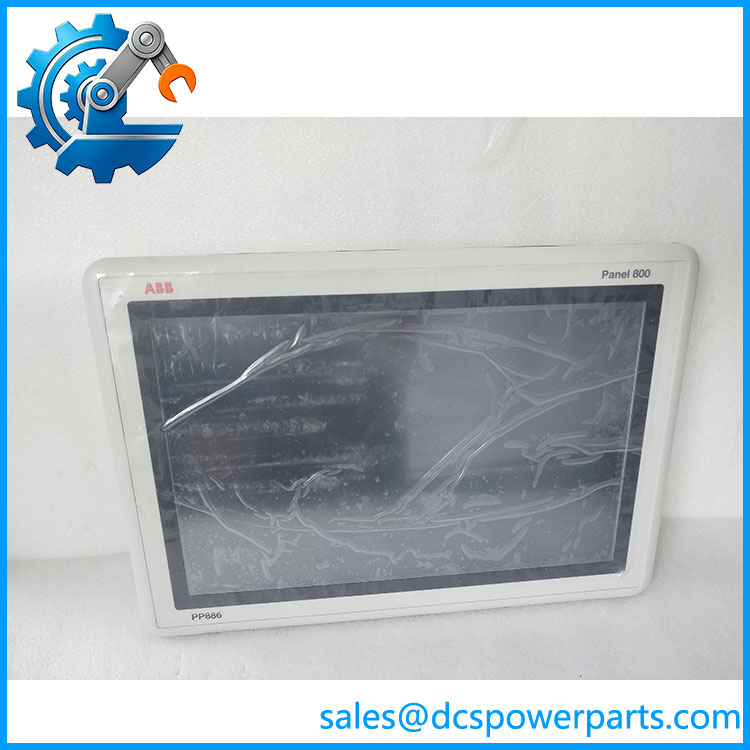
PP886 3BSE092980R1
Major Features and Advantages
1. Large 15.4-inch widescreen display
The PP886 provides a 1280 × 800 display with a 16:10 aspect ratio. This screen format supports process overview graphics, equipment faceplates, alarm lists, and trend displays in applications configured for the panel. The 450 cd/m² brightness rating provides a defined reference for assessing visibility in the intended control-room or industrial environment.
2. Resistive touchscreen operation
The resistive touchscreen provides direct operator input through the display. This technology is useful where the project specifically requires a resistive panel interface. Touch response and screen condition should be checked during inspection, particularly on used equipment.
3. Multiple communication interfaces
Two Ethernet ports support network connectivity, while USB and serial interfaces provide additional connection options. Protocols and port assignments must be verified against the actual application and software version. Do not assume that every serial protocol or controller driver is enabled in the installed project.
4. Defined processing and storage resources
The ARM9 1 GHz processor, 1 GB RAM, and 2 GB SSD are the published hardware configuration for this model. The available application storage is 1.5 GB. When planning a replacement, confirm that the intended application, graphics, logs, and other stored data fit the available storage capacity.
5. Industrial power input
The specified 18–32 VDC input range accommodates a nominal 24 VDC industrial supply. Verify polarity, supply capacity, grounding, and wiring protection before energizing the panel. The published power consumption is 31.2 W.
6. Defined front and rear protection
The front of the carries an IP65 rating, while the rear is rated IP20. This distinction matters during cabinet design: the front protection rating does not mean that the rear electronics can be exposed to the same environment.
7. Configurable operator applications
ABB’s Panel Builder environment is used to configure Panel 800 applications. Existing graphics, alarms, communication drivers, and operator functions should be checked for compatibility before replacing a panel or transferring an application.
Typical Applications
- DCS operator stations: Displaying process variables, alarms, trends, and equipment status in supported automation architectures.
- PLC machine interfaces: Providing operator controls and diagnostic screens for compatible programmable controllers.
- Process monitoring: Presenting configured process graphics and equipment status to plant personnel.
- Industrial equipment control: Supporting operator interaction for pumps, drives, packaged equipment, and production machinery where the application is designed for the panel.
- Maintenance and troubleshooting: Displaying diagnostic messages, alarm history, and operating conditions when supported by the configured project.
- Legacy HMI replacement: Replacing an existing after verifying the project, firmware/software environment, communication configuration, and physical installation.
These applications depend on the engineering project and compatible controller interface. The panel is an operator interface; it does not independently provide the PLC or DCS control logic.
Related Products
| Model | Relationship |
|---|---|
| — 3BSE092980R1 | Standard 15.4-inch Panel 800 touchscreen panel. |
| PP886M — 3BSE092984R1 | Black version of the family with a different hardware configuration. |
| PP886R — 3BSE092985R1 | Rugged Panel 800 variant with different operating and hardware specifications. |
| PP887H — 3BSE092986R1 | Related Panel 800 model with a high-brightness display configuration. |
| PP881 | Another Panel 800 operator panel; display size and hardware differ. |
| PP883 | Related Panel 800 HMI model. |
| PP895 | Larger Panel 800 family member for applications requiring a different display configuration. |
These products belong to the same broader HMI family, but their dimensions, storage, environmental ratings, and software compatibility can differ. Confirm the full order number before selecting a substitute.
Installation and Maintenance
Before installing an ABB 3BSE092980R1, confirm the panel cutout, mounting depth, DC supply, application software, and communication requirements.
- Verify identification: Check the rear label for the complete model and part number.
- Inspect the cabinet opening: Confirm the 394 × 270 mm cutout and available depth, including rear clearance.
- Check the power supply: Confirm a stable 24 VDC supply within the specified 18–32 VDC range and adequate current capacity.
- Review the application: Verify the compatible Panel Builder version, application project, and required controller drivers.
- Check network and serial wiring: Confirm Ethernet addressing, serial interface type, pinout, and communication parameters.
- Inspect the display: Check touch response, screen condition, connectors, and mounting seals.
- Test before handover: Verify screen navigation, process data, alarm handling, and operator commands under the approved commissioning procedure.
Back up the existing application and settings before replacing a working panel. Do not assume that a new or refurbished unit will contain the correct project or firmware for the installation.
Product Assurance
For procurement, confirm the ABB 3BSE092980R1 part number and request a clear nameplate photograph. For used or refurbished units, ask for the display condition, touchscreen test results, interface checks, and confirmation of whether the application storage has been tested. A powered-on screen alone does not establish that Ethernet, serial ports, touch input, or application execution work correctly.
Before accepting a replacement, compare the hardware specification, panel cutout, supply requirements, and project compatibility with the installed unit. Verify the front sealing condition and rear protection requirements for the actual cabinet environment.
Procurement recommendation: The ABB 3BSE092980R1 is a 15.4-inch Panel 800 HMI. Confirm application compatibility and hardware condition before ordering, and plan for project transfer and commissioning if the panel is replacing an existing operator interface.