Description
Technical Specifications
| Parameter | Specification |
|---|---|
| Product Model | AIP831-101 |
| Manufacturer | Yokogawa Electric Corporation |
| Product Type | Eight-loop operation keyboard |
| Compatible System | CENTUM VP Desktop Type HIS |
| Keyboard Design | Flat keyboard |
| Loop Control Keys | 8 |
| Touch Sensor | Barehand touch detection |
| Additional Keys | Alphanumeric, function, window-call, and operation keys |
| User-Defined Function Keys | 64 |
| PC Interface | 2 × USB Type-A |
| Keyboard Interface | USB 2.0 Full-speed, bus-powered |
| Sound Interface | USB 1.1 Full-speed, bus-powered |
| Input Voltage | 5 V DC ±5% |
| Maximum Current | 1 A |
| Audio Functions | Independent USB speaker and electronic buzzer |
| Weight | Approx. 2.0 kg without VESA bracket; 2.5 kg with bracket |
| Operating Temperature | 5°C to 40°C |
| Storage Temperature | -20°C to 60°C |
| Operating Humidity | 20–80% RH, non-condensing |
| Chassis Color | Black, Munsell N1.5 |
| Installation Category | IEC 61010-1 Class I |
These specifications are documented in Yokogawa General Specification GS 33K50C33-50E.
Product Introduction
Yokogawa AIP831-101 CENTUM VP Operator Keyboard
The Yokogawa AIP831-101 is a dedicated flat keyboard designed to improve multi-loop operation from a CENTUM VP Desktop HIS. Its eight touch-sensitive loop-control keys support instrument faceplate highlighting, while 64 user-definable function keys provide additional access to process-control and plant-monitoring operations.
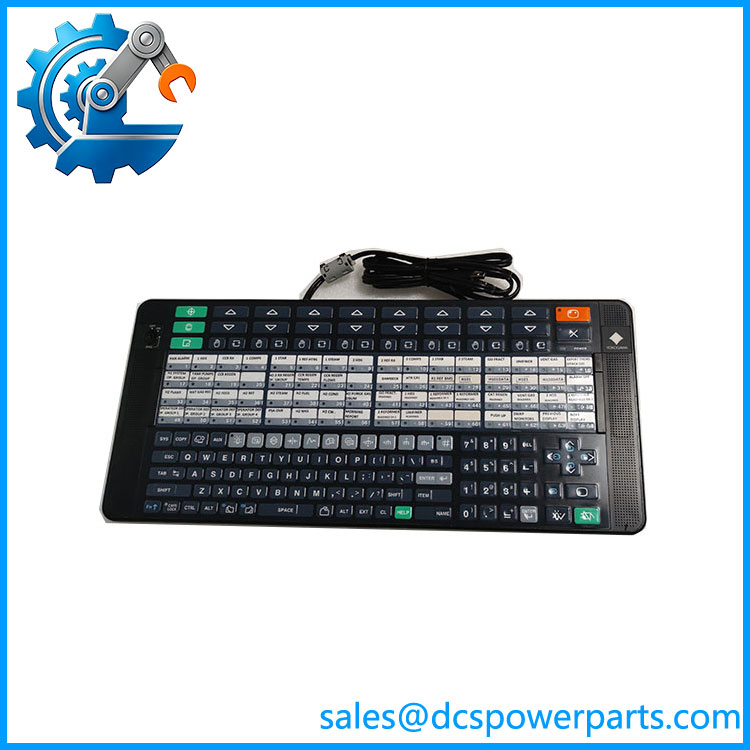
AIP831-101
The keyboard connects directly to the HIS computer through two USB cables. Its independent USB speaker and electronic buzzer provide audible notifications, making it an operator-interface component rather than a conventional computer keyboard.
Application Scenarios & Field Pitfalls
The AIP831-101 is intended for control rooms where operators need to interact with several process loops without repeatedly navigating between individual instrument faceplates. Its value depends heavily on the correct CENTUM VP software package and Desktop HIS configuration. A physically functional keyboard may still fail to provide its eight-loop functions if the required software license is missing.
Typical applications
- Oil and gas control rooms: Simultaneous access to multiple pressure, flow, and temperature control loops.
- Chemical processing: Operator interaction with several reactor, vessel, and pipeline control loops.
- Power generation: Multi-loop monitoring and adjustment from a compatible CENTUM VP workstation.
- Continuous process operations: Dedicated hardware access to loop selection, instrument faceplate highlighting, and operator functions.
Engineering checks before installation
- Verify software prerequisites. Yokogawa specifies the LHS1140 Eight-Loop Simultaneous Operation Package for the documented CENTUM VP configuration. Standard Operation and Monitoring Function LHS1100 or LHM1101, version R5.03 or later, is also required.
- Check HIS compatibility. The AIP831 is designed for Desktop Type HIS. It is not compatible with the LHS1120 or LHS1130 console support packages.
- Connect both USB cables directly. Yokogawa specifies that both USB connectors must be connected directly to the PC. Do not assume an external USB hub is an approved substitute.
- Confirm touch-sensor operation. The loop-control touch sensors detect barehand contact. Gloves or other covering materials may prevent the expected faceplate-highlighting response.
- Verify the mounting arrangement. If supplied with a VESA bracket, confirm that the mounting structure can support at least 10 kg.
- Check the complete suffix code. Confirm the mode-selection switch and operation-confirmation key configuration against the original keyboard before ordering.
These compatibility requirements are specified in Yokogawa’s official AIP831 documentation.
Related Products
| Model / Package | Function Difference | Application |
|---|---|---|
| Base eight-loop operation keyboard model | CENTUM VP Desktop HIS operation | |
| LHS1140 | Eight-loop simultaneous operation software package for | Required software option for the documented R5.03-era configuration |
| LHS1100 | Standard Operation and Monitoring Function | CENTUM VP Desktop HIS software |
| LHM1101 | Alternative Standard Operation and Monitoring Function | Compatible HIS software configuration |
| VP6H1140 | Eight-loop simultaneous operation software package for in the Release 6 documentation | CENTUM VP Release 6 integration |
| VP6H1100 | Standard Operation and Monitoring Function for Release 6 | CENTUM VP workstation operation |
These are associated hardware and software references, not direct hardware replacements. Confirm the installed CENTUM VP release and license package before selecting a software version.
Procurement note: When purchasing -101, request photographs of the complete model label, keyboard layout, USB connectors, and any VESA mounting accessories. Also verify the required eight-loop software license. A replacement keyboard alone does not guarantee that the workstation will support eight-loop simultaneous operation.