Description
Product Introduction
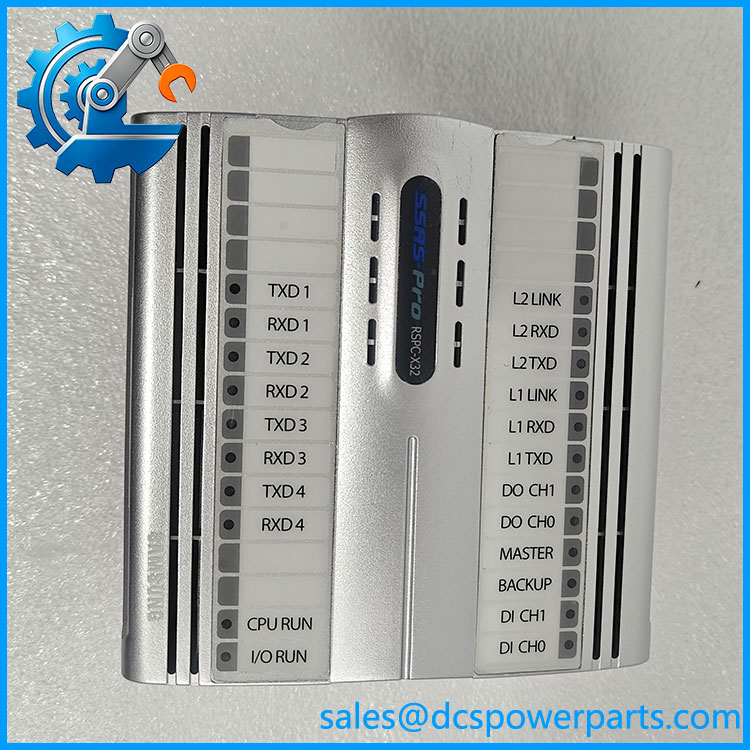
The Samsung RSPC-X32 is the CPU card used in the SSAS-Pro alarm and monitoring system. Built around a 32-bit MPC860 processor running at 50 MHz, it executes the configured monitoring and control logic and exchanges information with the system’s operator workstation and connected I/O modules. The documented hardware includes 16 MB of main memory, 2 MB of EPROM, 4 MB of data flash, and a DS1243 real-time clock/NVRAM device. Its communication interfaces include two redundant Ethernet ports and four optically isolated serial ports supporting RS-232, RS-422, or RS-485, depending on the connected equipment and configuration.
In marine service, the RSPC-X32 may be part of an alarm-monitoring installation responsible for presenting equipment status, alarm conditions, and process values to operators. Replacement work requires more than matching the card’s external appearance. The installed application program, firmware or boot environment, baseboard compatibility, communication configuration, and connected I/O arrangement must all be considered. Before removing a failed CPU card, preserve the available application files and configuration records, document the Ethernet and serial connections, and confirm whether the replacement has been tested with the relevant SSAS-Pro system version.
Key Technical Specifications
| Parameter | Specification |
|---|---|
| Model | RSPC-X32 |
| Manufacturer | Samsung Heavy Industries |
| System family | SSAS-Pro |
| Product type | CPU card |
| Processor | MPC860, 32-bit, 50 MHz |
| Input power | +24 VDC |
| Internal power rails | +24 V, +5 V, +3.3 VDC |
| Main memory | 16 MB |
| EPROM | 2 MB |
| Data flash | 4 MB |
| RTC/NVRAM | DS1243 |
| Ethernet | 2 ports, redundant configuration |
| Serial communications | 4 optically isolated ports; RS-232/422/485 |
| Local digital inputs | 4 |
| Local digital outputs | 2 |
| Backplane interface | 48-pin DIN connector |
| Power consumption | 14 W, including 2 W for the baseboard |
| Operating temperature | 0°C to 70°C |
Important clarification: The “X32” designation refers to the controller’s 32-bit processor architecture in the available service documentation. It does not establish that the CPU card itself has 32 physical I/O channels. The documented local I/O count is four digital inputs and two digital outputs.
RSPC-X32
Application Scenarios and Pain Points
- Marine alarm monitoring: Executes alarm and monitoring logic for shipboard equipment and displays relevant status information at operator workstations.
- Engine-room supervision: Processes data received from associated digital and analog I/O modules.
- Redundant communications: Provides two Ethernet ports for the system’s configured communication arrangement.
- Serial equipment integration: Connects compatible equipment through isolated serial interfaces.
- Legacy system maintenance: Supports continued operation of existing SSAS-Pro installations when a compatible CPU card is needed.
The key operational risk is replacing the CPU without restoring the correct application and system configuration. A card that starts correctly may still fail to communicate with the workstation or recognize connected I/O if its software, baseboard, or communication settings differ from the original.
Related Products
These modules are associated with the SSAS-Pro hardware family. They are companion components, not direct substitutes for the RSPC-X32 CPU card.
| Model | Function |
|---|---|
| SPDI-24(16) | Digital/pulse input module |
| SPRDO-16 | Relay-based digital output module |
| SPAI-16 | Analog input module |
| SPAO-8 | Analog output module |
| SPRI-16 | Pt100 RTD input module |
| SPIRU-16 | Mixed digital, analog, and RTD I/O module |
| RSPC-X32 baseboard | Baseboard associated with the CPU card |
| SPBUS-F | Bus interface component listed in SSAS-Pro system documentation |
Engineer’s Guide: Field Pitfalls to Avoid
1. Preserve the application program. Confirm the availability and version of the original SSAS-Pro application before changing the CPU. Do not assume a replacement card contains the correct vessel-specific logic.
2. Verify the baseboard and connector. The RSPC-X32 uses a 48-pin DIN bus interface. Check the associated baseboard, connector condition, power rails, and revision compatibility before installation.
3. Test all communication paths and alarms. Validate both Ethernet connections, the required serial ports, workstation communication, and representative alarm and I/O points. A successful power-up alone is not a complete functional test.
Frequently Asked Questions
Q1: What is the Samsung used for?
It is the CPU card for the Samsung SSAS-Pro alarm and monitoring system, executing configured logic and coordinating communications with operator workstations and associated I/O hardware.
Q2: What processor does the use?
The service documentation specifies a 32-bit MPC860 processor operating at 50 MHz.
Q3: What is the power requirement?
The documented input is +24 VDC. Power consumption is listed as 14 W including the 2 W baseboard contribution.
Q4: Does the have 32 I/O channels?
The available service manual lists four local digital inputs and two local digital outputs. The X32 designation should not be interpreted as 32 physical I/O channels.
Q5: Which communication interfaces are available?
The documented interfaces are two redundant Ethernet ports and four optically isolated serial ports supporting RS-232/422/485, subject to configuration.
Q6: Can a used be installed directly?
Not without compatibility checks. Confirm the hardware revision, baseboard, software environment, application program, and system configuration. Functional testing should be completed before the system returns to service.
Q7: What should be checked when purchasing a replacement?
Request clear nameplate photographs, confirmation of the exact model and hardware revision, the unit’s condition and test results, and clarification of whether the application program or configuration files are included. For a vessel operating on a legacy SSAS-Pro installation, configuration and commissioning support may be as important as the physical card.