Description
Product Introduction
The Woodhead SST-PFB3-VME-2-E is an industrial PROFIBUS interface card designed to connect a VMEbus host computer or controller to a PROFIBUS field network. It belongs to the SST family of intelligent fieldbus interface products, which handle communication between the host application and connected field devices. The related SST VME interface documentation describes PROFIBUS DP master and slave operation, along with FDL messaging. The exact protocol modes and driver support available for the -2-E variant should be confirmed against its hardware and software documentation before integration.
For maintenance engineers, the primary concern is compatibility with the host chassis, software driver, and existing PROFIBUS configuration. A card that fits the VME slot may still fail to communicate if its address settings, driver interface, firmware, or fieldbus configuration differ from the original. This model is listed as discontinued by industrial parts suppliers, so procurement may involve used or refurbished stock. Before authorizing a replacement, verify the complete part number, board revision, host-system requirements, and availability of the original configuration tools.
Key Technical Specifications
| Parameter | Specification |
|---|---|
| Manufacturer | Woodhead / SST; associated with Molex |
| Model | SST-PFB3-VME-2-E |
| Product type | PROFIBUS interface card |
| Host interface | VMEbus |
| Fieldbus protocol | PROFIBUS; verify supported modes for this exact variant |
| PROFIBUS channels | Listed as 1 channel by a parts supplier |
| Master/slave operation | Supported in the broader SST VME interface family; confirm exact variant behavior |
| Data rate | Related SST VME documentation specifies standard rates up to 12 Mbaud; verify against the exact card manual |
| Host form factor | VMEbus card; verify chassis and slot requirements |
| Power supply | VME backplane supply; confirm the exact electrical requirements in the hardware manual |
| Configuration | Depends on host driver, configuration software, and card revision |
| Lifecycle | Listed as discontinued by some suppliers |
| Weight | Approximately 0.53 lb (0.24 kg), per supplier listing |
Specification caution: The detailed electrical and environmental values published for other SST-PFB3-VME variants should not automatically be applied to the SST-PFB3-VME-2-E. Confirm the channel count, connector type, backplane power requirements, isolation rating, and supported baud rates from documentation matching the exact board.
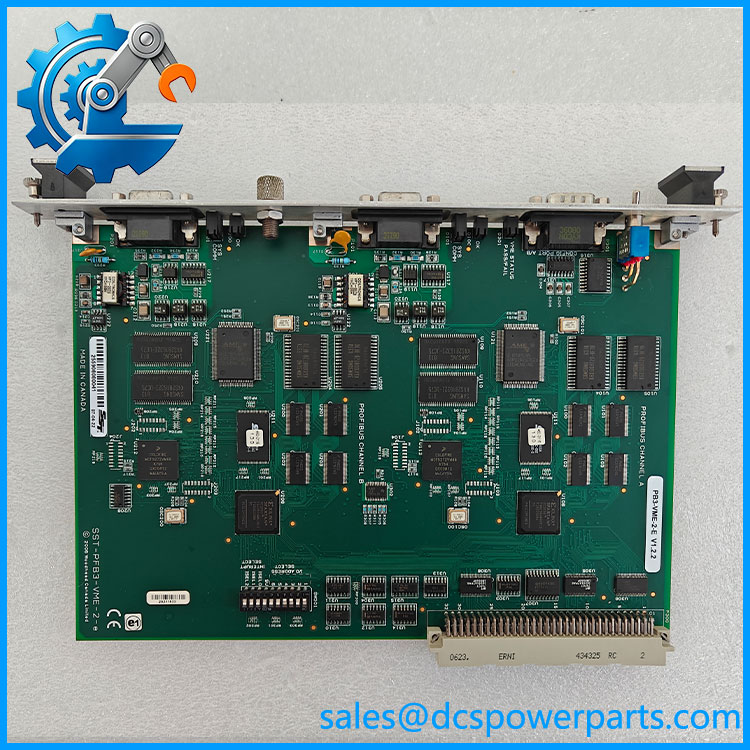
SST-PFB3-VME-2-E
Application Scenarios and Pain Points
- Legacy VME-based control systems: Provides a fieldbus connection between the host processor and PROFIBUS devices.
- PLC and DCS communications: Enables exchange of process data with supported PROFIBUS DP devices where the host software and driver are compatible.
- Industrial equipment integration: Supports installations where existing controllers rely on VME-based interface cards rather than newer Ethernet gateways.
- Maintenance of existing machinery: May be needed to restore a legacy fieldbus connection without redesigning the entire controller architecture.
Typical problems include incorrect host addressing, unsupported driver versions, PROFIBUS baud-rate mismatches, improper bus termination, and incompatible replacement hardware. A successful host boot does not confirm that the card is communicating correctly with PROFIBUS devices.
Related Products
The following products are related to the SST PROFIBUS and fieldbus interface ecosystem. They are not confirmed drop-in replacements for SST-PFB3-VME-2-E.
| Model | Relationship |
|---|---|
| SST-PB3-VME-1 | Related SST VME PROFIBUS interface card |
| 5136-PFB-VME | SST PROFIBUS VME interface card documented for DP and FDL communications |
| SST-PB3-CLX-RLL | PROFIBUS interface product for a different host platform |
| SST-PB3-REM | Remote PROFIBUS interface product |
| PLX51-PBM | ProSoft PROFIBUS gateway product; requires an application-level migration assessment |
| PLX51-PBS | ProSoft PROFIBUS slave gateway product; not a direct VME card replacement |
Engineer’s Guide: Field Pitfalls to Avoid
1. Confirm the exact board variant. Do not confuse SST-PFB3-VME-2-E with SST-PB3-VME-1 or 5136-PFB-VME. Similar naming does not guarantee matching hardware or software behavior.
2. Preserve host configuration and drivers. Record the VME address settings, interrupt configuration, driver version, and fieldbus configuration before removing the card. Legacy configuration software may be harder to obtain than the hardware itself.
3. Validate the PROFIBUS network before returning to service. Check bus termination, cable shielding, node addresses, baud rate, and master/slave configuration. Test communication with representative field devices instead of relying only on the card’s power or status indicators.
Frequently Asked Questions
Q1: What is the SST-PFB3-VME-2-E used for?
It is a VMEbus-based PROFIBUS interface card used to connect a host controller or computer to a compatible PROFIBUS network.
Q2: Who manufactured the ?
It is associated with Woodhead/SST and Molex industrial automation products.
Q3: Does this card support PROFIBUS DP master operation?
The broader SST VME interface family documents DP master and slave functions. Confirm the exact operating modes supported by the -2-E variant and its driver before designing or repairing the system.
Q4: How many PROFIBUS channels does it have?
A parts listing identifies the as a single-channel interface. Verify this against the physical board and matching hardware manual before ordering.
Q5: Is the discontinued?
Yes, it is listed as discontinued by some industrial parts suppliers. Remaining stock may be available, but condition, revision, and test status should be verified individually.
Q6: Can a newer ProSoft gateway replace it?
Possibly, but not as a simple card-for-card substitution. A gateway replacement may require new host communication logic, data mapping, configuration work, and validation of the PROFIBUS network.
Q7: What should be checked before purchasing a used card?
Request photographs of the actual board and its labels, confirm the complete part number and revision, and ask for a functional test report. Also confirm that the required host drivers, configuration files, and technical documentation are available.