Description
Product Overview
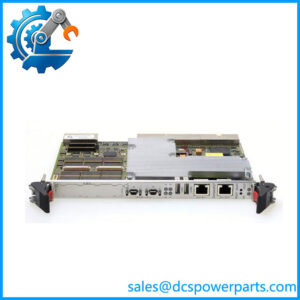
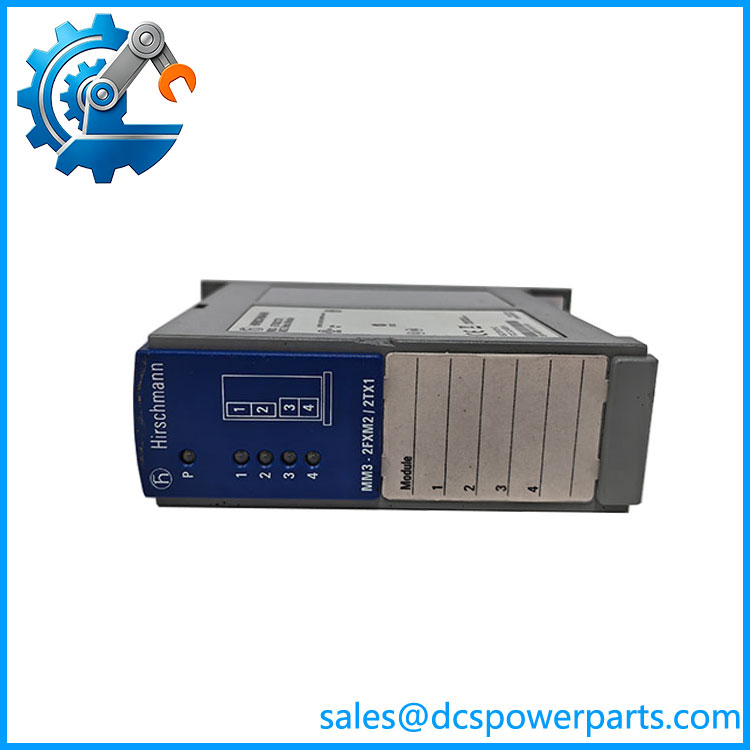
MM3-2FXM2/2TX1 is a media module for Hirschmann’s MICE modular industrial Ethernet switches — not a switch, and not something that does anything on its own. It is the physical-layer interface card that occupies one slot of a basic module and turns that slot into four ports: two 100BASE-FX multimode fiber ports on SC sockets and two 10/100BASE-TX copper ports on RJ45. The CPU, the management software, the IP stack and the power supply all live in the basic module; the media module contributes optics, magnetics and connectors, and is recognised by the switch backplane when it is plugged in.
The type code is a specification in miniature, and that is the first thing worth learning. MM3 means a media module in the large (full-height) housing, as opposed to MM2 in the small housing. 2FXM2 means two Fast Ethernet fiber ports, multimode, with SC sockets — the “2” at the end of the port group is the connector family, which is why M4 would be ST and M3 would be MT-RJ, and why S2 marks the singlemode variant. 2TX1 means two twisted-pair ports, 10/100 Mbit/s, RJ45. Reading the code tells you the whole port map before you touch the hardware.
Physically, the module is a 38 × 134 × 118 mm card weighing 180 g, mounted on the backplane and rated IP20, which is exactly as much protection as a device that lives inside a switch housing needs. It draws 3.8 W from the backplane and produces 13 BTU/h, so it adds almost nothing to the cabinet’s thermal budget. The stated MTBF is 79.9 years at 25 °C per MIL-HDBK 217F, and the module carries CE, cUL508 and DNV shipbuilding approval, with UL listing as an accessory for Class I Division 2 Groups A–D when installed with a listed MS-series switch.
The lifecycle status is the part a buyer has to face. Belden’s own data sheet marks the type as Passiv — passive, i.e. no longer actively marketed — with a last order date of 31 December 2023 and a last delivery date of 30 June 2024. Hirschmann’s modular switch line has moved to the MSP30/MSP40 platform with MSM-series modules. So MM3-2FXM2/2TX1 is now a spare for installed MS20, MS30, MS4128 and MICE 2000/3000/4000 switches — used to extend an existing port count, replace a failed slot, or hold a fiber ring together — rather than a part for new design. For a plant with MICE switches in service, that is a real and recurring need.
Technical Specifications
| Parameter | Value |
|---|---|
| Model / part number | MM3-2FXM2/2TX1 / 943 761-101 |
| Manufacturer / series | Hirschmann (Belden), MICE media modules, MM3 large-housing series |
| Product type | Media module for MS20, MS30, MS4128 and MICE 2000/3000/4000 switches |
| Optical ports | 2 × 100BASE-FX, multimode, SC sockets, 1300 nm |
| Copper ports | 2 × 10/100BASE-TX, RJ45, auto-crossing, auto-negotiation, auto-polarity |
| Multimode reach, 50/125 µm | 0–5000 m, 8 dB link budget at 1300 nm, assumed 1 dB/km, 3 dB reserve, 800 MHz·km |
| Multimode reach, 62.5/125 µm | 0–4000 m, 11 dB link budget at 1300 nm, assumed 1 dB/km, 3 dB reserve, 500 MHz·km |
| Power supply / consumption | Via the MICE switch backplane, Class 2, no external supply; 3.8 W, 13.0 BTU/h |
| Dimensions / weight | 38 × 134 × 118 mm; 180 g |
| Mounting / protection | Backplane slot of the basic module; IP20 |
| Operating temperature | 0 to +60 °C standard; storage and transport −40 to +70 °C; 10–95 % RH non-condensing |
| Approvals / EMC | CE; cUL508; DNV shipbuilding; UL accessory for Class I Div 2 A–D; EN 55032 Class A; ESD 6 kV contact / 8 kV air; 10 V/m field; 15 g / 11 ms shock |
MM3-2FXM2 2TX1
Key Features and Advantages
Two media types in one slot: MM3-2FXM2/2TX1 puts fiber and copper on the same card, which is the practical case in most cabinets — two long or noisy runs go out on fiber, two local devices (an HMI, a PLC, a scale head) stay on copper. The alternative is two separate modules consuming two slots, and slots are the scarce resource on an MS20-1600 or an MS30 backplane.
Fiber where copper fails: 100BASE-FX at 1300 nm over multimode is the answer for a run that crosses a drive hall, a welding bay or a substation busbar. The module’s immunity is not a marketing claim but a datasheet figure — 10 V/m field immunity, 6 kV contact ESD, 2 kV surge on the power line — and more importantly the link itself is galvanically isolated by glass, so a ground potential difference between two cabinets stops being a network problem.
Reach you can plan with: 8 dB link budget on 50/125 µm and 11 dB on 62.5/125 µm at 1300 nm. The 5 km and 4 km maxima assume 1 dB/km fiber attenuation with 3 dB held in reserve, so a real installation with patch panels and splices lands shorter — plan against the budget, not the headline number, and the link will work first time.
Copper ports that do not need a crossover cable: auto-crossing, auto-negotiation and auto-polarity on both RJ45 ports means straight or crossed patch cords both work, and a miswired pair does not produce a dead link. On a service call where the field technician has one cable in the van, that is worth having.
No external wiring, no separate power: the module is fed from the switch backplane as a Class 2 load and needs no terminal block, no fuse and no 24 V drop of its own. Pull a slot, push the module, and the switch detects it and applies port defaults — the management interface lists it under Modules with its type, version and port count, so you can see what is physically installed without opening the door.
Ring topology ready: a pair of SC fiber ports on one module is the natural shape for a HIPER-Ring or RSTP ring across cabinets, and the datasheet’s port settings for ring ports (100 Mbit/s, autonegotiation off, full duplex) are the ones the switch applies when the ring DIP switch is set. For a fiber ring carrying PLC-to-PLC traffic between three or four enclosures, this is the module that makes the ring physically possible.
Distinction worth knowing before ordering: this is the standard module, not the -RT version. The MM3-2FXM2/2TX1-RT is the realtime variant supporting IEEE 1588 PTP v2, required from MICE software release 5.0. If the application needs time synchronisation across the network — motion, distributed sequencing, event timestamping — the plain module will not do it, and the difference is one suffix.
Applications
Substation and utility auxiliary networks: fiber between protection and control buildings over distances that exceed copper’s 100 m, with the module’s DNV and Class I Div 2 listings covering the marine and hazardous-area variants of the same network design. Two fiber ports for the ring, two copper ports for the local gateway or engineering laptop.
Water and wastewater treatment: pump stations spread along a site where each cabinet holds a small managed switch, and the inter-station link is multimode fiber because the run crosses wet, corrosive or high-interference ground. The copper ports take the local flow meter, VFD or panel HMI.
Tunnel, metro and transport infrastructure: a linear topology of cabinets, each switch passing the ring through a fiber pair, with copper reserved for the local access point or camera. The 0–+60 °C rating and IP20 construction are appropriate inside a sealed roadside or tunnel cabinet, not in the open.
Machine cells and production lines: a cell whose PLC network is copper but whose connection to the line backbone is fiber. Two TX ports serve the cell switch or the line controller, two FX ports run to the plant backbone — one module replacing a media converter and its power supply, with the management visibility that a converter does not have.
Oil, gas and chemical plant: fiber across pipe racks and between process units where a copper segment would pick up noise from large VFDs or bring a ground loop into the network. The module’s EMC figures are the reason it survives there, and the switch’s own diagnostics show which port lost its link.
Brownfield expansion of an existing MICE switch: the commonest real use today. A cabinet built around an MS30 needs two more fiber drops and two more copper ports; there is no new switch in the budget and no appetite for a network redesign. MM3-2FXM2/2TX1 is the slot-level answer — and the reason stock of a passive-status module still matters.
Related Products
MM3-2FXS2/2TX1 — singlemode SC version of the same module; same two copper ports, but for links beyond multimode reach. MM3-1FXM2/3TX1 — one multimode SC fiber port plus three copper ports, when the fiber run is single and copper count is higher. MM3-4FXM2 — four multimode SC fiber ports and no copper, for an all-fiber node. MM3-2FXM4/2TX1 — same port count with ST instead of SC connectors, for sites whose fiber plant is ST-terminated. — realtime variant with IEEE 1588 PTP v2 support from MICE software release 5.0; required for time-synchronised applications. MM2-2FXM2 — the small-housing (MM2) counterpart with two SC multimode ports and no copper, for a compact basic module with limited depth. MM20-Z6Z6Z6Z6 (MM3-4SFP) — four SFP slots instead of fixed optics, letting the optical type be chosen at installation; the open variant MM20-Z6Z6Z6Z6EAHH is its configurable-code form. MS20-1600 / MS30-1602 / MS4128-5 — the basic modules that accept this media module; port capacity and management features come from them, not from the module. MB20 expansion module — adds two media-module slots to MS20-1600, MS30-1602, MS3124-4 and MS4128-5 when the basic module’s slots are full. MM22-T1T1T1T1 — PoE media module for the same slots, the alternative when the requirement is powered devices rather than fiber.
Installation and Maintenance
Before installation: confirm the host is one of the supported basic modules — MS20, , MS4128 or MICE 2000/3000/4000 — and that the slot is free and enabled in the management interface; a disabled slot accepts a module but keeps its ports offline. Check that the switch software release supports the type, since is listed from MICE software release 2.0 and a very old image may not recognise it. Verify the fiber plant is multimode 50/125 or 62.5/125 µm with SC connectors, not singlemode and not ST, and that the planned link length sits inside the 8 dB or 11 dB budget with connector and splice losses counted. Power the switch down only if site procedure requires it — the module is designed to be inserted and removed with the switch running, but the slot must be handled by someone who will not touch adjacent backplane contacts.
Installation: slide the module into the slot until the backplane connector seats and the retaining screw engages, then refresh the management view and confirm the slot reports the correct type, version and four ports. Labels from the ML-MS2/MM sheet should be filled in and attached so the next technician knows which port goes where. Bring up the fiber links first and check the port LEDs for link, 100 Mbit/s and full duplex; then connect the copper side and confirm auto-negotiation settled at the expected speed. If the module is a ring port pair, apply the datasheet ring settings — autonegotiation off, full duplex — rather than leaving them on auto.
Maintenance: the module has no serviceable parts, no fan, no battery and no user fuse, so maintenance is inspection and cleanliness rather than repair. Keep the SC sockets capped when unused — dust in a multimode connector costs more link budget than any other single cause of a marginal fiber run — and clean ferrules with approved tools before blaming the module. Check that the retaining screw has not loosened after transport or vibration, and confirm in the management interface that the slot still reports as physical and enabled. When a port fails, establish whether the fault is in the module, the patch cord or the far end before pulling the card; and because the type is now passive-status, keep one verified spare per switch family rather than assuming a replacement can be bought next week.
Warranty and Quality
Every is supplied against its Hirschmann part number 943 761-101 — two multimode SC fiber ports at 1300 nm and two 10/100BASE-TX RJ45 ports in the large MM3 housing — and is checked for exactly that port map before dispatch, because the close variants (ST instead of SC, singlemode, -RT, small-housing MM2) are visually similar and functionally different. Units are inspected for housing and backplane connector condition, socket wear on the SC and RJ45 interfaces, label legibility and evidence of prior removal damage, and where a MICE switch is available they are inserted in a live slot and verified: the switch must recognise the type, report four ports, and establish link on the copper side against a known-good partner. A 12-month repair, replacement or refund commitment applies. Technical support covers the questions this module actually raises — which basic modules accept it, why one suffix changes the optical type or adds PTP, how to plan a multimode link against the real link budget, and what the 2024 end-of-delivery date means for a plant that still runs MICE switches in production.
免费
今天 10:25