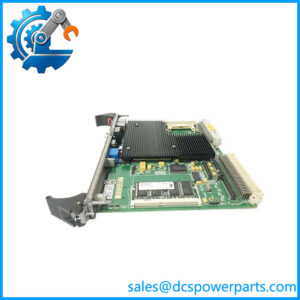
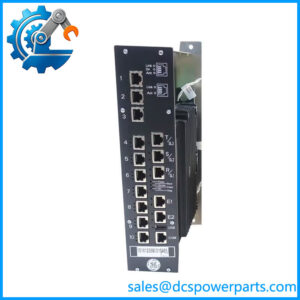
Description
Product Overview
IC752SPL013-BA is the local operator interface of a GE EX2100 static excitation system — the unit GE’s own documentation calls the Diagnostic Interface, and which everyone on site calls simply the keypad. It is mounted on the control cabinet door, wired into the cabinet’s keypad control rack, and it is the only place in the exciter where a person can stand in front of the equipment and see what the regulator is doing without a laptop, a toolbox connection or the plant’s HMI.
What it does is deliberately bounded. It monitors frequency, current, power and voltage; it starts and stops the exciter; it sets and adjusts configuration parameters; it examines and resets faults. Those four capabilities, listed in that order in the EX2100 user’s guide, describe the whole job: this is a terminal, not a controller. The excitation algorithms run in the DSPX and ACLA boards of the control module, the parameters they use are held in the controller, and the keypad is the window and the keyboard through which they are viewed and changed. That distinction matters most on the day a keypad fails, because a replacement assembly restores the ability to see and type — it does not, by itself, restore an excitation configuration.
The human interface is a membrane keypad and a display that carries both text and animated graphics. The default Status screen presents eight parameters as numbers or bargraphs, with a set of health and state icons displayed at all times so that the exciter’s condition is readable at a glance rather than through a menu. Eight navigation keys — Status, Menu, four arrows, Escape and Enter — move through a menu tree that opens onto Fault List, Alarms, Alarm String, application data, diagnostic and utility functions, general setup and the I/O interface. A separate group of eight control keys handles the operating functions: Reset Faults, Command Menu, Auto, Manual, voltage/VAR/power-factor raise and lower, Run and Stop. Contrast is adjusted by holding the Menu key while using the up and down arrows, a small detail that tells you how much of this interface is designed to be used in a real cabinet rather than a lab.
Its two documented behaviours are the ones that cause trouble. First, access is protected: the keypad has a password and a privilege level, and the password that protects it is itself a parameter in the exciter’s parameter set — GE warns explicitly that after changing the keypad password the parameters must be saved to backup, or the compare function will report the Keypad Password as a difference. Second, the parameter backup functions allow the active set to be saved, restored or compared against a backup copy, and restoring is permitted only with the exciter stopped, replacing the active values irreversibly. A technician who treats those functions as a convenience rather than a controlled operation can overwrite a working configuration in one keystroke, with no route back.
Physically the assembly is a door-mounted, field-replaceable unit, in a control cabinet that also houses the keypad control rack, the control power distribution and supplies, and the I/O terminal boards. The cabinet door carries the exciter’s data nameplate on its inner face — the model number that GE requires before it will process a parts order, and the reason a keypad should never be bought by appearance alone.
Which brings the practical point home. GE’s part numbering separates order-specific assemblies, common assemblies, components and printed wiring boards, and the Renewal Parts List issued with each exciter’s custom instructions is the document that identifies what is actually fitted to that machine. IC752SPL013-BA identifies an EX2100 keypad assembly; the trailing letters identify the assembly variant, and whether that variant is the one on a given exciter is a question for its own renewal parts list and nameplate — not for a photograph of the door.
EX2100 is the classic static excitation platform; new supply today is built around the EX2100e generation, and the classic keypad survives as field support hardware for machines that are still earning their keep.
Technical Specifications
| Parameter | Value |
|---|---|
| Model | IC752SPL013-BA |
| Manufacturer | GE Industrial Systems, Salem, Virginia, USA |
| Product type | Door-mounted keypad and display assembly (Diagnostic Interface) for the EX2100 excitation control system |
| System position | Local operator interface wired into the control cabinet’s keypad control rack; excitation control and parameter storage remain in the control module boards |
| Display | Text plus animated graphics; Status screen presents eight parameters as numbers or bargraphs, with health and state icons displayed continuously |
| Navigation keys | Eight: Status, Menu, Up, Down, Left, Right, Escape, Enter |
| Control keys | Eight: Reset Faults, Command Menu, Auto, Manual, +, −, Run, Stop |
| Local functions | Monitor frequency, current, power and voltage; start and stop the exciter; view and reset faults; edit and adjust configuration parameters |
| Menu structure | Fault List, Alarms, Alarm String, application data, diagnostic and utility, general setup, I/O interface |
| Contrast adjustment | Menu key held down while using the up and down arrows |
| Access control | Password entry with privilege level; the keypad password is stored as a parameter and must be saved to backup after modification |
| Parameter backup | Save active parameters, restore from backup, compare active against backup; restore only permitted with the exciter stopped and is irreversible |
| Mounting / service | Control cabinet door; field-replaceable assembly; data nameplate on the inner face of the door |
| Variant identification | Trailing letters denote the assembly variant; correct fit confirmed against the exciter’s Renewal Parts List and nameplate, not against appearance |
| Lifecycle note | EX2100 is the classic excitation platform; new supply is based on the EX2100e generation, and this keypad serves the installed base |
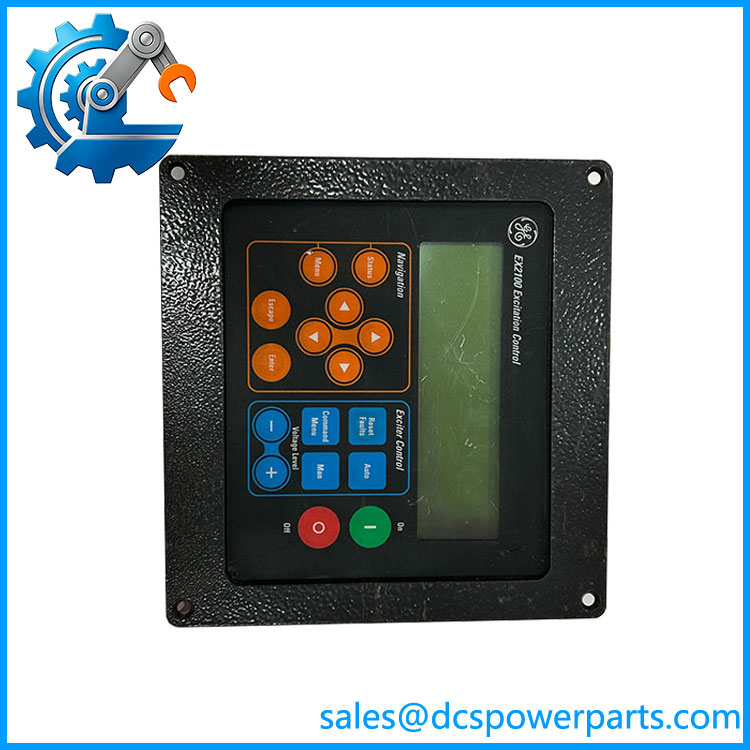
IC752SPL013-BA
Key Features and Advantages
Local operation without a laptop: the keypad gives a plant technician the exciter’s frequency, current, power and voltage, the ability to start and stop, and the ability to change parameters, from the cabinet door. Sites that have no toolbox connection, no plant HMI link and no engineer on shift depend on exactly this, and it is why the assembly is treated as a critical spare rather than an accessory.
A status screen built for a glance, not a menu walk: eight parameters as numbers or bargraphs plus always-visible health icons means an operator walking past the cabinet can tell whether the exciter is healthy before opening anything — which is how faults actually get noticed in a plant.
Two separate key groups that stop mis-operation: navigation and editing live on one set of keys, running the machine on another. Auto and Manual are explicit keys rather than a buried menu choice, and Run/Stop are physical, so the mode a machine is in is something you press rather than something you infer.
Fault handling that supports first-out analysis: Fault List, Alarms, Alarm String and Reset Faults are reachable from the main menu, with the selected fault displayed with a timestamp. On an excitation system, the sequence in which limits and trips appear is the diagnosis, and having it locally readable matters when the event recorder is somewhere else.
Parameter backup with guard rails: save, restore and compare are all available, and the restrictions are the valuable part — restore is blocked while the exciter runs and overwrites irreversibly, so the function cannot quietly damage a live machine’s tuning. The compare function is the practical way to prove a machine’s settings still match the commissioned set after years of small edits.
Password and privilege separation at cabinet level: local access is protected, with privilege levels distinguishing what an operator may change from what a commissioning engineer may change. The password being a parameter is a subtlety worth knowing, since it means access control travels with the parameter set.
Field-replaceable by design: a door-mounted assembly that comes off and goes on without disturbing the controller, the I/O wiring or the cabinet’s internals — the shortest possible route from a dead display to a working exciter.
Part numbering you can act on: the assembly is identified by a GE catalogue number and a renewal parts list rather than by resemblance, which is what keeps a “looks the same” keypad from arriving with the wrong variant.
Support for a platform still in service: on machines where the classic remains the exciter, this assembly is the difference between restoring local control and losing it.
Applications
Commissioning and start-up of exciters: initial parameter entry, mode checks, voltage and VAR adjustments and fault verification are done from the door-mounted keypad before any plant-level connection exists — the situation every new exciter and every retrofit passes through, when the toolbox may not yet be connected and the HMI may not yet be talking.
Routine operation in plants without a dedicated excitation HMI: smaller thermal, gas and hydro installations, captive power plants and industrial sites where the exciter is operated from its own cabinet rather than from a control room, and where the keypad is the primary interface rather than a backup.
Fault investigation after a trip: reading the Fault List and Alarm String locally, at the machine, while the event is still fresh — with timestamps that let the fault sequence be aligned against the turbine or generator records afterwards.
Redundant-control exciters: on systems with two controllers, the local interface is where the active and standby states are observed and where a transfer is verified, work that is far easier standing at the cabinet than reading it second-hand.
Isolated and black-start capable stations: sites where the plant’s own control and monitoring systems may be unavailable during a start, and where the exciter must be operable from its own front panel.
Maintenance and settings audit: comparing the active parameter set against the backup after years of drift, restoring a known-good set during a controlled outage, and verifying firmware and hardware information before a spare is fitted — all functions the keypad exposes and which no remote system can perform on a stopped machine.
Replacement of failed displays: the most common reason a IC752SPL013-BA is ordered — a dead or unreadable display on an exciter that is otherwise healthy, where losing local access would mean losing the ability to operate the machine during the next disturbance.
Related Products
DSPX — digital signal processor board in the control module; executes the regulator algorithms whose values the keypad displays and edits. ACLA — control board of the control module; part of the controller pair the keypad communicates with. ECTB — terminal board carrying customer contact I/O for the exciter, the path by which local start/stop commands from the keypad reach the machine. EXTB — terminal board for exciter internal I/O, paired with ECTB in the control cabinet. EGPA — exciter gate pulse amplifier board; its bridge feedback and conduction status are among the conditions reported through the local interface. EDEX — de-excitation module; its operation appears in the fault and alarm records read at the keypad. EGDM / EXAM — field ground detector module and exciter attenuator module; ground detection alarms surface on the keypad’s alarm screens. EPSM — control power supply module; a keypad that will not illuminate is a power question before it is a keypad question. EPBP / EBKP — backplanes of the control module; the boards behind the interface. IC752SPL014 — an adjacent GE assembly number for a different operator panel; ordering one because it resembles the other is how the wrong part reaches a cabinet.
Installation and Maintenance
Before installation: identify the machine first and the part second. Read the model number from the data nameplate on the inner face of the control cabinet door, then check the exciter’s Renewal Parts List to confirm that IC752SPL013-BA is the assembly variant specified for that requisition — the trailing letters are not decoration, and an adjacent number can describe a different panel altogether. With the cabinet isolated, confirm that the failure really is the interface rather than the supply or the controller: a dark display is a power or backplane question until proven otherwise, and a display that lights but shows nothing is a communications question. Photograph the existing unit’s mounting and harness before removal, and note any parameter values that staff have changed locally since the last documented set.
Fitting and commissioning: replace the assembly without disturbing the controller boards or the terminal wiring, restore the harness, and power up. Confirm the display initialisation, then verify the Status screen shows the eight expected parameters and that the health icons are stable. Check that the stored password and privilege level behave as the site expects, and that Auto and Manual selection and Run/Stop respond correctly before the machine is returned to service. If the password has been changed, save the parameters to backup immediately — otherwise the compare function will later report the Keypad Password as a difference and send someone chasing a fault that does not exist.
Maintenance practice: treat the keypad as an access-controlled device, not a convenience panel. Keep the commissioned parameter set backed up and compare it against the active set at each major outage; restore only during a controlled shutdown, since restore is blocked while running and cannot be undone. Do not change parameters to “see what happens” on a live exciter, and record any change made locally so the next comparison has a known baseline. Inspect the membrane keypad for wear at the frequently used keys and the display for dimming or segment loss, clean the front with a dry lint-free cloth, and keep the cabinet door closed and its gasket sound — the interface is rated as part of the cabinet, not on its own. Hold a spare assembly matched to the exciter’s parts list, because a keypad failure with no spare takes away local control of the machine at exactly the moment it is needed.
Warranty and Quality
Each IC752SPL013-BA is supplied as a GE keypad and display assembly, with the assembly variant checked against the buyer’s exciter model and renewal parts list before dispatch — because the correct-looking panel for the wrong requisition is the failure mode this part invites. Units are inspected for display condition, membrane keypad integrity and key response, harness and connector state, mounting hardware, label legibility and evidence of prior installation or repair; where an cabinet is available for test, assemblies are powered and checked for initialisation, Status screen presentation, menu navigation across the full tree, Auto/Manual and Run/Stop key response, password and privilege behaviour, and the save, restore and compare functions under the documented restrictions. A 12-month repair, replacement or refund commitment applies. Support covers what this part actually raises: how to confirm the variant from the data nameplate and renewal parts list, how to tell a keypad failure from a supply or controller failure, why a password change must be followed by a parameter backup, when restore is permitted and why it cannot be undone, how to compare the active set against the backup, and what the end of the classic generation means for machines that still rely on this interface.