Description
Product Overview
In an embedded VME control or computing system, software installation, system recovery, and local data access can depend on storage hardware that is no longer common in modern computers. The GE Fanuc VMIVME-7459 addresses this requirement by providing IDE/ATAPI storage in a single-slot VME form factor. Depending on its ordered configuration, it can accommodate an optical drive and an optional hard disk, allowing a compatible single-board computer to access removable media and local disk storage without redesigning the original chassis.
The GE Fanuc VMIVME-7459 connects to the host computer’s IDE interface through user-defined pins on the VME P2 connector. Its cable arrangement depends on the host SBC, slot spacing, and presence of other storage modules. Available configurations differ in optical-drive type, hard-drive or CompactFlash option, and included cable assembly, so the base model number alone does not establish the complete hardware configuration. Before ordering a replacement, verify the full suffix, installed drive type, IDE master/slave jumper settings, and cable assembly required by the existing system.
Key Technical Specifications
| Parameter | Specification |
|---|---|
| Product Model | VMIVME-7459 |
| Manufacturer / Lineage | VMIC / GE Fanuc Embedded Systems |
| Module Type | VMEbus IDE CD/DVD and hard-drive storage module |
| Form Factor | 6U Eurocard, single-slot, 4HP |
| Height | 233.25 mm (9.2 in) |
| Depth | 160 mm (6.3 in) |
| Thickness | 20.3 mm (0.8 in) |
| Backplane Connector | 96-pin DIN P2 |
| Storage Interface | IDE/ATAPI |
| Optical Drive Options | CD-RW or DVD-R/CD-RW, depending on configuration |
| Hard Drive Option | IDE drive, with documented configurations up to 80 GB |
| CompactFlash Option | 1 GB configuration listed in the original ordering guide |
| CD-RW Transfer Rate | 8× read / 8× write / 24× rewrite for the documented CD-RW option |
| Typical Random Access Time | 130 ms |
| Operating Temperature | +5°C to +45°C |
| Storage Temperature | −20°C to +60°C |
| Relative Humidity | 20%–80%, noncondensing |
| Cable Options | VMXC-2, VMXC-3, VMXC-H, depending on system layout |
| Installation | Single slot in a compatible VME chassis |
Specifications reflect published VMIVME-7459 documentation. Exact drive capacity, optical-drive type, and included accessories depend on the suffix and build configuration.
Major Features and Advantages
Multiple storage configurations
The VMIVME-7459 family supports different combinations of optical and disk storage. Depending on the configuration, the module can provide CD-RW, DVD-R/CD-RW, an IDE hard drive, or CompactFlash storage. This allows maintenance teams to select a configuration that matches the host computer’s original storage requirements.
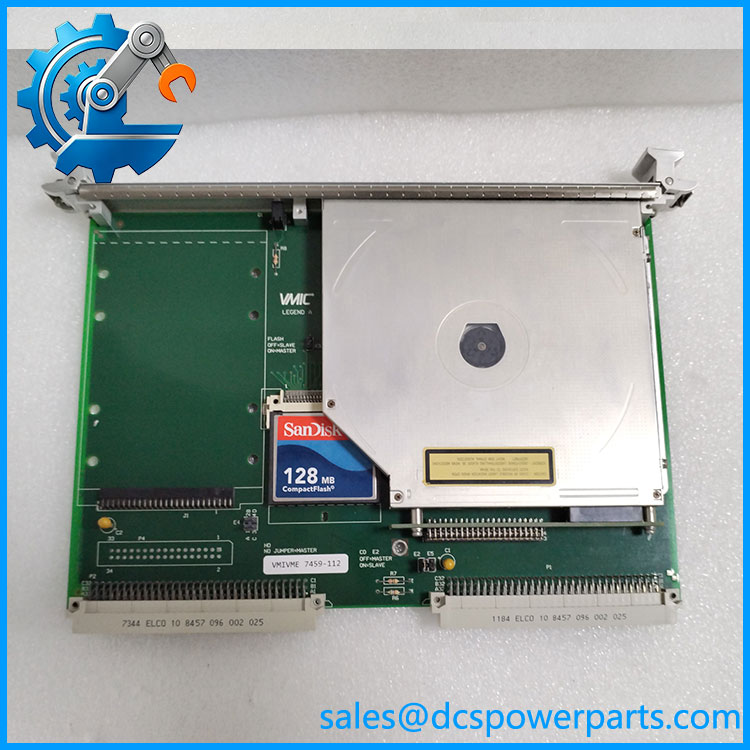
VMIVME-7459
IDE/ATAPI connectivity through VME P2
The module routes IDE signals through the P2 connector’s user-defined pins. This arrangement allows the storage module to communicate with a compatible VME single-board computer using the appropriate cable assembly. The P2 connection does not mean the drive is a general-purpose VMEbus peripheral; IDE signal routing and host compatibility must be verified.
Support for removable-media maintenance
The optical-drive options support documented CD formats, including CD-ROM and CD-RW media; the DVD option also supports specified DVD formats. In legacy systems, removable media can be important for loading software, restoring system files, or maintaining applications that rely on the original optical-drive configuration.
Optional local disk storage
The documented family includes IDE hard-drive configurations up to 80 GB. This provides local storage for systems whose software and data access depend on legacy IDE hardware. Actual usable capacity and drive compatibility depend on the installed drive, host BIOS, operating environment, and ordered configuration.
Flexible chassis and cable arrangements
The VMIVME-7459 can be connected to a compatible SBC using different cable assemblies. The original documentation identifies the VMXC-2 two-slot cable, VMXC-3 three-slot cable, and VMXC-H 14-inch cable for different physical arrangements. Select the cable based on the actual chassis layout rather than assuming that every unit includes the same cable.
Practical support for legacy VME systems
For an established VME platform, retaining the original storage architecture can reduce the need to modify application software, boot procedures, and host interfaces. However, replacement planning should account for the age of IDE drives and optical media, the condition of the cable assembly, and the availability of a tested unit.
Application Scenarios and Common Pain Points
- Legacy VME embedded computers: Provides IDE-based local storage for compatible single-board computers.
- Software loading and recovery: Supports systems that depend on optical media or local IDE storage for software installation and recovery.
- Industrial test and data systems: Provides removable-media and disk-storage functions in compatible VME chassis.
- Maintenance of installed control equipment: Helps preserve existing storage interfaces when replacing failed hardware in a legacy system.
Common problems to investigate include:
- Drive not detected: Check IDE cabling, master/slave jumpers, drive power, and host BIOS or software support.
- Optical media cannot be read: Test with known-compatible media and verify the installed optical-drive option.
- Intermittent storage access: Inspect the P2 connection, cable routing, connectors, and drive condition.
- Replacement does not fit the existing setup: Confirm the 4HP form factor, front-panel style, cable length, and slot arrangement.
- Different drive capacity than expected: Check the full ordering suffix and installed drive label; do not assume all units contain the same storage hardware.
Related Products
These models are related to legacy VME computing and storage systems, but they serve different functions and are not automatic substitutes.
| Model | Product type / distinction |
|---|---|
| VMIVME-7452 | Legacy VME floppy and storage module |
| VMIVME-7455 | VMEbus IDE optical-drive module |
| VMIVME-7750 | VME single-board computer |
| VMIVME-7807 | VME single-board computer with Pentium M processor options |
| VMIVME-7486 | Legacy VME embedded computing module |
| VMIVME-3125 | VME analog input data-acquisition board |
| VMXC-2 | Two-slot cable assembly for compatible storage-to-SBC connections |
| VMXC-3 | Three-slot cable assembly for applicable multi-module layouts |
| VMXC-H | 14-inch cable assembly for specified chassis arrangements |
Confirm connector routing and system-level compatibility before ordering a related component.
Engineer’s Guide: Three Checks Before Ordering
1. Verify the complete configuration suffix. Identify the optical-drive option, hard-drive or CompactFlash configuration, and cable option. Two modules with the same base number may contain different storage hardware.
2. Check the host SBC and IDE arrangement. Confirm that the existing computer supports the installed drive type and that the correct P2-to-IDE cable and master/slave jumper settings are used. Do not assume that the P2 connector alone guarantees compatibility.
3. Request functional-test evidence. For a used, refurbished, or repaired module, ask whether the optical drive reads media, the hard drive or CompactFlash device is detected, and the module operates with a compatible host SBC. Confirm whether the storage device and required cable are included in the quoted configuration.
Frequently Asked Questions
1. What is the GE Fanuc used for?
The is a single-slot VME storage module designed for compatible VME single-board computers. It provides IDE/ATAPI connectivity for supported optical drives and optional local storage.
2. Does every include a hard drive and CD-RW drive?
No. The product family has multiple configurations. Some versions include an optical drive, some include a hard drive, and others combine storage devices or use a CompactFlash option. Verify the suffix and physical inventory before purchasing.
3. What is the maximum hard-drive capacity?
The original product documentation lists configurations with IDE hard drives up to 80 GB. This does not guarantee that every unit has an 80 GB drive or that every replacement drive will work with the installed host software.
4. Which cable is required for the ?
The choice depends on the SBC type and the physical layout of the VME chassis. The documented options include VMXC-2, VMXC-3, and VMXC-H. Verify the existing cable part number and module spacing before ordering.
5. Can the replace a VMIVME-7455?
Not without checking the hardware configuration and application requirements. Both are associated with legacy VME optical storage, but their supported options, physical arrangements, and interfaces must be compared before substitution.
6. What should buyers check when purchasing a refurbished ?
Confirm the complete part number and suffix, installed drive type, drive capacity, cable inclusion, jumper configuration, physical condition, and functional-test results. If the original system depends on bootable optical media, ask for a test using the required media type and host platform.
7. Is the still in production?
Abaco Systems lists the VME-7459 product as having entered Restricted Production Phase on July 1, 2011. It should therefore be treated as a legacy product, and current availability should be confirmed directly with the supplier.
Procurement recommendation: For the , verify the complete configuration suffix, drive hardware, and required cable assembly before placing an order. A module with the correct base model but the wrong storage configuration may not restore the original system’s boot or data-access functions.