Description
Product Overview
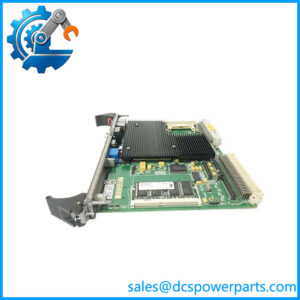
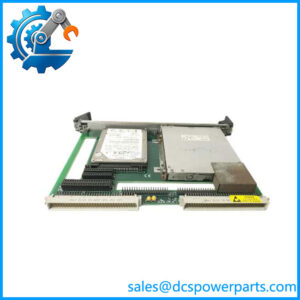
When an established VME-based control or test system loses its central computing board, replacement selection must account for the processor, memory, backplane interface, peripheral connections, and existing software environment. The GE Fanuc V7768-312000 is a VMEbus single-board computer designed for embedded computing applications that need local processing and direct integration with VME hardware. It combines an Intel processor platform with network, storage, serial, USB, and graphics interfaces on a 6U Eurocard.
The GE Fanuc V7768-312000 belongs to the V7768 family, which uses the Intel 945GME chipset and supports up to 2 GB of DDR2 SDRAM. Depending on the installed configuration, the family provides a Core 2 Duo processor up to 2.16 GHz or a Celeron M option, dual Gigabit Ethernet, two SATA interfaces, four USB 2.0 ports, and one PCI-X PMC expansion site. Before ordering, verify the exact processor configuration, memory module, rear-transition I/O requirements, BIOS settings, and operating-system image. A matching V7768 family designation alone does not establish that every system configuration is interchangeable.
Key Technical Specifications
| Parameter | Specification |
|---|---|
| Product Model | V7768-312000 |
| Manufacturer | GE Intelligent Platforms / GE Fanuc |
| Product Type | VMEbus single-board computer |
| Form Factor | 6U VME Eurocard, single slot |
| Processor | Intel Core 2 Duo, up to 2.16 GHz; Celeron M option in the family |
| Chipset | Intel 945GME / 945GM family |
| System Memory | Up to 2 GB DDR2 SDRAM via one SODIMM |
| L2 Cache | Up to 4 MB with Core 2 Duo configuration |
| VME Interface | Tundra Universe II bridge; VME64 modes supported |
| Ethernet | Two Gigabit Ethernet ports |
| Serial Interfaces | Two 16550-compatible serial ports |
| USB | Four USB 2.0 ports |
| Storage | Two SATA interfaces; CompactFlash option up to 8 GB |
| Expansion | One 133 MHz PCI-X PMC site |
| Graphics | Integrated graphics with front-panel SVGA |
| Keyboard / Mouse | Front-panel PS/2 interface |
| Operating System Support | Windows, VxWorks, Linux, subject to version and driver compatibility |
| Board Dimensions | Approximately 233.4 × 160 × 20.3 mm |
| Power Supply | +5 VDC primary rail; confirm full current requirements from the applicable hardware manual |
| Operating Temperature | Depends on processor and board configuration; verify the exact revision |
| Installation | Compatible 6U VME chassis |
The V7768 family documentation supports these core specifications. Exact suffix-specific options and electrical limits should be checked against the board label and applicable hardware reference manual.
Major Features and Advantages
Intel processor architecture
The platform supports Intel Core 2 Duo processing up to 2.16 GHz, with a Celeron M configuration also documented for the family. This provides local computing capacity for embedded applications involving control logic, data collection, test automation, and system-level monitoring. Confirm the processor fitted to the specific -312000 board before planning software or performance requirements.
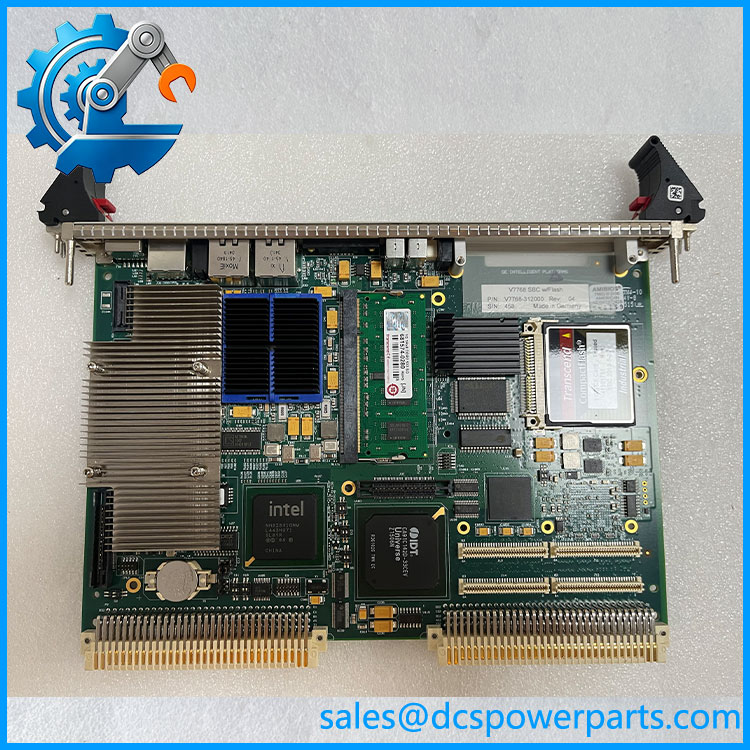
V7768-312000
VMEbus integration
The board uses a Tundra Universe II bridge to connect the processor subsystem to the VME backplane. The documented interface supports VME64 transfer modes, including A32/A24 addressing and several block-transfer modes. This architecture is relevant to systems that depend on existing VME I/O cards or specialized instrumentation modules.
Dual Gigabit Ethernet connectivity
Two front-panel Gigabit Ethernet ports support network connections for host communication, data transfer, or system maintenance. The availability of dual network ports does not by itself establish support for any particular redundancy or industrial protocol; those functions depend on the operating system and application software.
Multiple peripheral and storage interfaces
Four USB 2.0 ports, two serial ports, two SATA interfaces, and an optional CompactFlash boot device provide several ways to connect peripherals and storage. This can help preserve existing system workflows, but drive type, cable routing, rear I/O mapping, and BIOS boot settings must match the installation.
PMC expansion capability
The provides one PCI-X PMC expansion site. A board-to-board connector can also support a compatible PMC237CM1/V expansion carrier, adding three further PMC sites in the documented configuration. Confirm carrier availability, mechanical clearance, and power requirements before designing around the additional expansion hardware.
Embedded operating-system support
The family documentation lists Windows, VxWorks, and Linux support. Actual usability depends on the specific release, BIOS revision, device drivers, boot medium, and application software. For a replacement board, retaining the original software image and configuration records can reduce commissioning uncertainty.
Application Scenarios and Common Pain Points
- Industrial control and monitoring: Embedded processing within systems built around VME backplanes.
- Automated test systems: Acquisition, processing, and transfer of test data through network, serial, and VME interfaces.
- Data acquisition platforms: Host processing for compatible VME measurement and I/O cards.
- Simulation and instrumentation: Embedded computing where legacy VME hardware and application software remain in service.
- Telecommunications and specialized equipment: Control or processing functions in systems designed around the platform.
Common field issues include:
- Board does not boot: Check the installed memory, BIOS settings, boot device, and power supply.
- VME cards are not detected: Verify backplane configuration, slot assignment, VME addressing, and driver support.
- Network interface is unavailable: Check port status, cabling, operating-system drivers, and network configuration.
- Operating-system image fails after replacement: Compare processor options, BIOS revision, boot-media type, and software dependencies.
- Rear I/O is incomplete: Confirm whether the installation requires a compatible rear-transition module and the correct P2 signal routing.
Related Products
These products are related to the VME computing ecosystem but have different hardware roles. They should not be treated as direct substitutes without checking system requirements.
| Model | Product type / distinction |
|---|---|
| -312001 | family single-board computer variant |
| -320000 | family processor-board variant |
| -322000 | family configuration variant |
| V7769 | Related VME single-board computer with a different mechanical configuration |
| VMIVME-7750 | Older VME single-board computer platform |
| VMIVME-7807 | VME single-board computer based on Pentium M technology |
| PMC237CM1/V | PMC expansion carrier for compatible configurations |
| ACC-0602RC-100 | Rear-transition module for supported rear-I/O arrangements |
| ACC-0603RC-100 | Rear-transition module option for supported configurations |
Suffix-level differences matter. Confirm mechanical fit, processor configuration, I/O mapping, BIOS compatibility, and software requirements before considering an alternate part.
Engineer’s Guide: Three Checks Before Ordering
1. Confirm the exact board variant. Match the complete -312000 part number and revision. Record the installed processor, SODIMM capacity, CompactFlash configuration, and any PMC expansion hardware.
2. Verify the chassis and I/O arrangement. Check the VME rack, backplane requirements, front-panel connectors, P2 rear I/O, and any required rear-transition module. Do not assume that a physically compatible VME board has the same I/O mapping or configuration.
3. Establish software and functional-test requirements. Confirm the operating-system image, BIOS settings, device drivers, and application dependencies. Ask for test evidence covering boot, memory recognition, VME interface operation, Ethernet, serial ports, and storage where those functions are required.
Safety note: Follow the chassis manufacturer’s procedures for power isolation and electrostatic-discharge protection. Confirm that the board is fully seated and secured before restoring power.
Frequently Asked Questions
1. What is the GE Fanuc -312000 used for?
It is a VMEbus single-board computer for embedded systems that require local processing, VME backplane connectivity, and integrated network and peripheral interfaces. Typical application areas include industrial control, instrumentation, data acquisition, and automated test systems.
2. What processes the use?
The family supports Intel Core 2 Duo processors up to 2.16 GHz and a Celeron M option. The precise processor installed on aicular unit should be confirmed from its hardware identification and configuration records.
3. How much memory does the support?
The family supports up to 2 GB of DDR2 SDRAM using a single SODIMM. Confirm the installed memory capacity and module specification when replacing an existing board.
es the support Gigabit Ethernet?
Yes. The family documentation specifies two Gigabit Ethernet ports. Confirm driver support, operating-system compatibility, and the condition of the physical ports when commissioning a replacement.
an the replace another8 variant?
Not automatically. Processor options, board revisions, I/O routing, BIOS settings, and installed expansion hardware can differ. Verify the complete part number and compare the original system configuration before substituting another variant.
6. What should be tested on a used or bished ?
At minimum, request inspection of the PCB and connectors, successful boot, memory recognition, VME interface operation, Ethernet connectivity, serial ports, and required storage interfaces. The test report should identify which functions were actually exercised.
Is the still in production?
The family is identified as a legacy or end-of-life product in available product information. Confirm current availability, hardware revision, warranty terms, and dispatch lead time directly with the supplier.
Procurement recommendation: For t Fanuc , prioritize exact hardware identification, VME and rear-I/O compatibility, and documented boot and interface testing. A replacement that powers up successfully may still fail if the original BIOS, operating system, or I/O configuration is not supported.