Description
Product overview
When an operator needs to review process values, respond to alarms, or issue commands without accessing a controller cabinet, a panel-mounted HMI provides the local interface between personnel and the automation system. The GE Fanuc IC755CSW07CDA fills this role within the QuickPanel+ family, combining a 7-inch color display with touch-based operation in a compact panel-mount unit. It is intended for applications where operators need a dedicated interface to machine or process-control software.
The IC755CSW07CDA uses a Freescale i.MX535 processor based on a 1 GHz ARM Cortex-A8 architecture. Published documentation lists 512 MB DDR2 SDRAM, 256 MB SLC NAND flash, and 512 KB battery-backed SRAM. Communications include 10/100Base-T Ethernet, one RS-232 serial port, two USB 2.0 host ports, a Mini-USB device port, and an SD/SDHC card slot. These are model-family specifications; buyers should still verify the exact unit revision, firmware build, and application requirements before arranging a replacement.
Key technical specifications
| Parameter | Specification |
|---|---|
| Product model | IC755CSW07CDA |
| Manufacturer / brand | GE Intelligent Platforms / GE Fanuc; later Emerson portfolio |
| Product type | QuickPanel+ View & Control HMI |
| Display size | 7-inch widescreen TFT LCD |
| Display resolution | 800 × 480 pixels (WVGA) |
| Touchscreen | Projected capacitive, two-point multitouch |
| Processor | Freescale i.MX535, 1 GHz ARM Cortex-A8 |
| RAM | 512 MB DDR2 SDRAM |
| Flash memory | 256 MB SLC NAND flash |
| Retentive memory | 512 KB battery-backed SRAM |
| Working voltage | 24 VDC ±20% |
| Maximum power consumption | 15 W |
| Ethernet | 1 × 10/100Base-T, RJ-45 |
| Serial interface | 1 × RS-232 |
| USB | 2 × USB 2.0 Type-A host; 1 × Mini-USB device |
| Removable storage | 1 × SD/SDHC card slot |
| Operating temperature | 0°C to +55°C |
| Storage temperature | −10°C to +60°C |
| Mounting method | Panel mount; VESA 75 mounting option documented |
| Overall dimensions | Approximately 192 × 137 × 36 mm |
| Weight | Approximately 800 g |
| Protection / compliance | Published documentation lists IP65F and other compliance ratings; confirm the exact unit’s markings and applicable installation conditions |
Specification note: These values are based on published QuickPanel+ documentation. The precise certification markings and hardware condition should be verified for the supplied unit. The model is not documented as having a native RS-485 port; do not assume RS-485 compatibility without confirming the intended communication path.
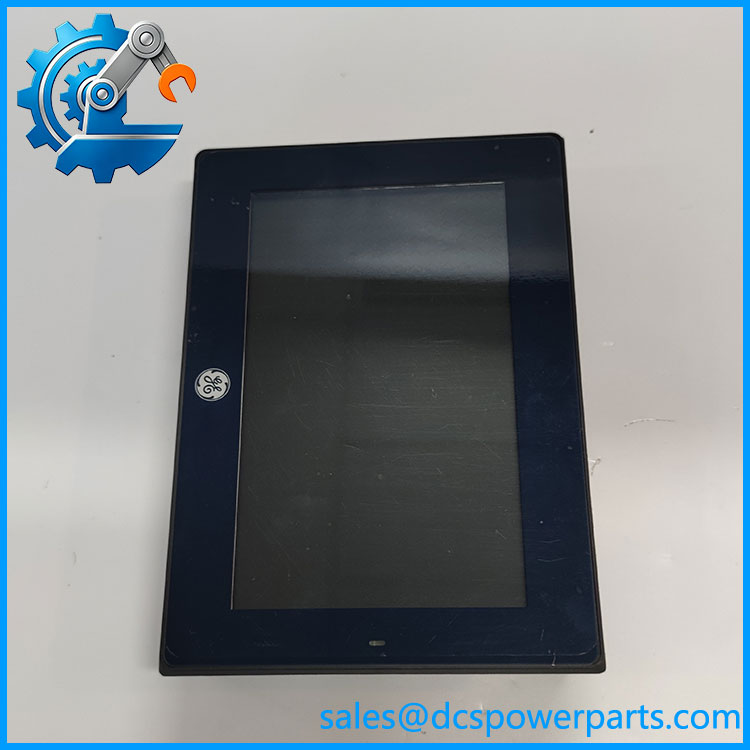
IC755CSW07CDA
Major features and advantages
1. Compact operator interface
The 7-inch widescreen display provides a local view of machine states, process variables, alarms, and operator controls. Its 800 × 480 resolution suits compact machine panels where a smaller footprint is preferable to a larger industrial terminal. The projected-capacitive touchscreen supports two-point touch input, allowing direct interaction with configured HMI screens.
2. Embedded computing architecture
The IC755CSW07CDA combines an ARM Cortex-A8-based processor with onboard RAM, NAND flash, and battery-backed SRAM. This architecture supports its embedded operating environment and HMI application execution. For a replacement project, processor and memory specifications alone do not establish application compatibility: the installed firmware, project version, runtime components, and saved configuration also matter.
3. Multiple connection options
Ethernet supports connection to compatible plant networks and automation devices. The RS-232 interface can serve equipment that uses the corresponding serial protocol, while USB and SD/SDHC provide documented peripheral and removable-storage options. Actual connectivity depends on the configured application and the communication drivers it supports.
4. Panel integration
The published dimensions and panel-cutout information help maintenance teams assess mechanical fit before replacement. The unit uses natural-convection cooling, so the cabinet layout must allow adequate heat dissipation. Buyers should check panel depth, connector clearance, power wiring, and grounding before installation.
Application scenarios and common pain points
- Machine control stations: Local operation, status monitoring, and alarm acknowledgment where the HMI project supports those functions.
- Industrial process panels: Displaying process values and operator commands through compatible control-system communications.
- Maintenance and retrofit projects: Replacing a failed QuickPanel+ unit while retaining an existing application, subject to software and hardware compatibility.
- Equipment refurbishment: Restoring a legacy operator station when the original panel model and application environment must be preserved.
Common issues to investigate include an unresponsive touchscreen, a blank display, startup failures, network communication loss, serial-port configuration errors, and loss of retained data. These symptoms do not automatically indicate a failed HMI; power quality, application software, cabling, network settings, and peripheral faults should also be checked.
Related products and accessories
These models and accessories belong to the same product family or serve related replacement needs. They are not automatically interchangeable.
| Model | Relationship |
|---|---|
| IC755CBW07CDA | Related 7-inch QuickPanel+ model with a blank bezel |
| IC755CSW07CDACA | Related 7-inch View & Control variant with conformal coating |
| IC755CSS12CDA | 12-inch QuickPanel+ variant with a different display size and hardware configuration |
| IC755ACC07GAS | Replacement gasket for the 7-inch QuickPanel+ |
| IC755ACC07MNT | Mounting clips and power/serial connector accessory kit |
| IC755ACC07PRO | Replacement screen-protector kit |
| IC755ACCBATT | Replacement battery pack accessory |
| IC755ACC07ADP | Panel adapter kit for specified QuickPanel+ installations |
Engineer’s guide: three checks before ordering
1. Confirm the complete part number and revision. Check the rear label, bezel, connector layout, and any suffixes. The conformal-coated and blank-bezel variants should not be treated as identical without confirming the installation requirements.
2. Verify the existing HMI software environment. Confirm the operating-system and firmware build, project backup, runtime requirements, and communication drivers. A physically matching terminal may still fail to run the existing project as expected.
3. Inspect power and communication requirements. Verify the 24 VDC supply, wiring polarity, Ethernet configuration, and RS-232 pinout. If the original installation communicates over RS-485 or another interface, establish how that connection is implemented before ordering a substitute.
Important: Before removing a working unit, back up the HMI project, communication settings, and any configuration data that can be exported. Do not assume that the replacement contains the original application or retained data.
Frequently asked questions
1. What is the IC755CSW07CDA used for?
It is a 7-inch QuickPanel+ View & Control HMI used for operator interaction with compatible machine and process-control applications.
2. What power supply does it require?
Published specifications state 24 VDC ±20%, with maximum power consumption of 15 W. Confirm the unit label and the installed supply’s capacity before commissioning.
3. Does it support Ethernet and serial communication?
Yes. The documented interfaces include one 10/100Base-T Ethernet port and one RS-232 serial port. The protocols and devices available to the application depend on the configured drivers and system architecture.
4. Can it replace another 7-inch QuickPanel+ model?
Not on screen size alone. Compare the complete part number, bezel, coating, mounting dimensions, firmware, connectors, and application requirements. Confirm compatibility before treating another model as a direct substitute.
5. Does a replacement unit include the original HMI project?
Do not assume so. Project files, firmware builds, network settings, and retained data may vary by unit and condition. Request confirmation of what is included and whether the terminal has been functionally tested.
6. What should buyers verify when sourcing a refurbished unit?
Ask for photographs of the actual nameplate and connectors, a record of power-up and touchscreen testing, confirmation of Ethernet and serial-port checks where applicable, the firmware information available, and a clear statement of cosmetic condition and warranty terms.
7. What information is needed to confirm compatibility before purchase?
Provide the existing HMI’s full part number and revision, the controller or equipment model, the communication method, the current project or firmware version if known, and any panel-mounting constraints. These details help identify potential differences before installation.
For procurement, the most useful confirmation is not just that the label reads IC755CSW07CDA, but that the unit’s hardware, firmware status, condition, and included accessories match the requirements of the intended installation.