Description
Key Technical Specifications
| Parameter | Specification |
|---|---|
| Manufacturer | Motion Engineering / Danaher Motion / Kollmorgen |
| Model | ZMP-SynqNet-PCI |
| Controller Type | Multi-axis motion controller |
| Processor | PowerPC MPC8245 |
| Processor Clock | 400 MHz |
| Onboard Memory | 16 MB SDRAM |
| Memory Speed | 133 MHz |
| Host Bus | 32-bit universal PCI |
| PCI Bus Speed | 25–66 MHz |
| Memory Interface | 32-bit direct memory map |
| Motion Network | SynqNet |
| Network Physical Layer | 100BASE-T |
| Network Connectors | RJ45 SynqNet IN and OUT |
| Servo Update Rate | Maximum 48 kHz, four axes |
| Twelve-Axis Update Rate | Maximum 16 kHz |
| Local I/O Connector | High-density D-15 |
| Digital Inputs | 3 optically isolated inputs |
| Digital Outputs | 3 optically isolated outputs |
| Emergency Stop | 1 external E-stop input |
| Input ON Voltage | 4.0–28.8 VDC |
| Input OFF Voltage | Maximum 0.8 VDC |
| Output Low Voltage | Maximum 1.0 V at 50 mA |
| Typical Power | 5 VDC at 2.2 A |
| Additional Power | 12 VDC at 0.1 A for fan operation |
| Operating Temperature | 0–50°C |
| Storage Temperature | 0–85°C |
| Humidity | 20–90% RH, non-condensing |
| Required Airflow | 200 linear feet per minute |
| Dimensions | Approximately 174.6 × 106.4 mm |
These specifications come from Kollmorgen’s ZMP-SynqNet Series hardware brochure. The 48 kHz and 16 kHz values are maximum update rates for the stated axis configurations, not guaranteed rates for every application.
Product Introduction
The Kollmorgen ZMP-SynqNet-PCI is designed for industrial machines requiring synchronized motion across multiple servo axes. Its onboard PowerPC processor handles real-time motion calculations, while the SynqNet network transfers synchronized commands and feedback between the controller, drives, and distributed I/O equipment.
The board installs in a standard 32-bit universal PCI slot and provides two RJ45 SynqNet connections for network IN and OUT. A separate high-density D-15 connector provides local digital I/O and emergency-stop signaling. Motion applications are developed using the manufacturer’s MPI programming library and associated Motion Developer’s Toolkit.
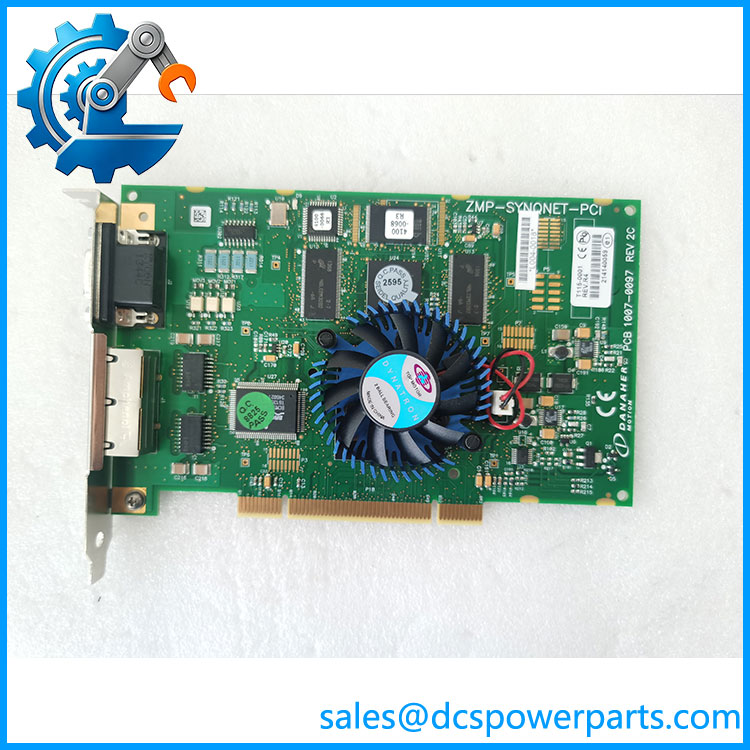
ZMP-SYNQNET-PCI
Application Scenarios & Field Pitfalls
Typical applications
- Semiconductor manufacturing equipment: Coordinates synchronized servo axes in wafer handling, positioning, and process machinery.
- CNC machine tools: Supports coordinated motion, interpolation, and positioning functions across multiple servo axes.
- Electronic assembly systems: Controls synchronized movements in precision assembly and automated inspection equipment.
- Industrial robotics and automation: Connects compatible SynqNet drives and I/O nodes for coordinated machine movement.
Field checks before replacement
- Check the PCI generation and slot. This is a conventional 32-bit universal PCI card, not a PCI Express board. Confirm that the host computer provides a compatible PCI slot and signaling voltage.
- Verify the SynqNet network. The RJ45 connectors are dedicated motion-network ports. They should not be treated as ordinary Ethernet LAN connections.
- Confirm the motion software environment. The original hardware documentation references the MPI development toolkit, Motion Console, Motion Scope, and controller firmware. Verify software and operating-system compatibility before replacing the board.
- Check axis update requirements. The documented maximum is 48 kHz for four axes and 16 kHz for twelve axes. Actual performance depends on the configured axis count and application.
- Inspect local I/O wiring. The D-15 connector carries optically isolated digital signals and an external E-stop input. Verify the pinout and signal polarity before reconnecting field wiring.
- Verify cooling and power. The board requires 5 VDC and an additional 12 VDC supply for fan operation. Confirm that the fan operates and that the host chassis provides the specified airflow.
- Review network topology. Check SynqNet node order, drive addressing, cable condition, and ring configuration where used. A physical link does not prove that all nodes have loaded compatible firmware or configuration.
- Protect against unexpected motion. Danaher Motion’s hardware guide requires power isolation and ESD precautions during installation. It also warns that incorrect configuration can cause unexpected machine movement during startup and testing.
Related Products
The following products belong to the ZMP-SynqNet motion-control family or its associated architecture:
- ZMP-SynqNet-PCI-RJ – RJ45-equipped PCI controller configuration; associated with part number T015-0001 in Danaher documentation.
- ZMP-SynqNet-PCI-LT – Related PCI controller version with a different hardware configuration.
- ZMP-SynqNet-CPCI-3U-RJ – CompactPCI 3U version with SynqNet RJ45 connectivity.
- eZMP-SynqNet – Standalone SynqNet motion controller supporting a larger system-level configuration.
- QMP-SynqNet-PCI-RJ – Later Kollmorgen motion-controller family; not a direct hardware replacement without system migration review.
The PCI and CompactPCI versions have different host interfaces and mechanical formats. Similar product-family names do not establish software or hardware interchangeability.
Procurement and Replacement Notes
The ZMP-SynqNet-PCI is a legacy motion-control board. Replacement selection should consider the complete machine-control environment rather than the board designation alone.
Before purchasing, request:
- Photograph of the complete PCB and identification label
- PCB assembly number and revision
- Confirmation of ZMP-SynqNet-PCI versus PCI-RJ configuration
- PCI edge connector and component-condition photographs
- Fan operation and 5 VDC / 12 VDC power verification
- SynqNet port communication test
- Local D-15 I/O functional test
- Firmware and MPI software compatibility information
Important: Some hardware listings identify PCB assembly 1107-0097 Rev. 2C, while Kollmorgen documentation identifies ordering references such as T015-0001 and T115-0006 for related PCI-RJ configurations. These identifiers should not be assumed to represent identical hardware revisions. Verify the actual PCB label and complete part number before approving a replacement.