Description
Product Overview
The Beijer Electronics E300-04380 is a programmable human-machine interface (HMI) terminal designed to provide local operator access to industrial equipment controlled by a PLC. Rather than executing the primary machine-control logic, the panel displays information supplied by the controller and allows operators to interact with configured functions, alarms, and operating parameters. The E300 family uses a monochrome LCD interface and physical operator controls, making it suitable for machine installations where straightforward text-based monitoring is sufficient. Published specifications identify the E300-04380 as a 24 V DC operator interface with a rated current consumption of 450 mA. The model is discontinued, so accurate identification is particularly important when maintaining an existing installation.
Within a PLC-based control architecture, the Beijer Electronics E300-04380 acts as the operator-facing interface rather than a replacement for the PLC itself. Depending on the installed application, an operator may use the terminal to monitor process values, acknowledge alarms, select operating modes, or issue commands to the controller. Published E300 family specifications identify a 240 × 64-pixel backlit monochrome LCD and serial communication interfaces, including RS-232 and RS-422. The exact communication protocol, connector pinout, and available functions depend on the particular hardware and application configuration. A physically compatible terminal may still fail to communicate correctly if its project file or serial settings differ from those of the original unit.
For legacy equipment maintenance, the Beijer Electronics E300-04380 can be a practical replacement candidate when the original panel’s model, electrical requirements, communications, and programmed application match. Before ordering, verify the complete type designation, including any suffix such as 04380A, and confirm that the existing project can be recovered or transferred. A replacement terminal should be tested for display readability, keypad response, serial communication, and correct interaction with the PLC. Since this is a discontinued product, availability of programming tools, replacement accessories, and application backups should be considered part of the maintenance plan—not left until installation day.
Product Introduction (Non-Templated)
A failed operator terminal can leave a working PLC difficult to monitor or operate, particularly when the original application project is no longer readily available. The Beijer Electronics -04380 uses a 240 × 64-pixel monochrome display and a 24 V DC supply rated at 450 mA.
For a legacy HMI replacement, verify the serial interface, PLC protocol, and application backup before committing to installation. The correct hardware alone does not guarantee that the original operator screens and machine commands will be restored.
Key Technical Specifications
| Parameter | Value |
|---|---|
| Manufacturer | Beijer Electronics |
| Product Model | -04380 |
| Product Series | |
| Product Type | Programmable HMI / Operator Interface |
| Display Type | Backlit monochrome LCD |
| Display Resolution | 240 × 64 pixels, reported for the family |
| Power Supply | 24 V DC |
| Listed Current Consumption | 450 mA |
| Approximate Power at Rated Voltage and Current | 10.8 W |
| Communication Interfaces | RS-232 and RS-422, reported for the family |
| Operator Controls | Physical keypad / function controls; confirm exact configuration |
| Mounting | Panel-mounted operator terminal; verify cutout dimensions |
| Programming | Compatible legacy programming environment; verify exact software requirements |
| Product Status | Discontinued |
| Typical Application | Local PLC monitoring and operator command entry |
| Condition | New surplus, subject to inspection and testing |
Specifications are based on ished and family descriptions. Display details, serial interfaces, and control layout should be verified against the exact unit’s nameplate and manual.
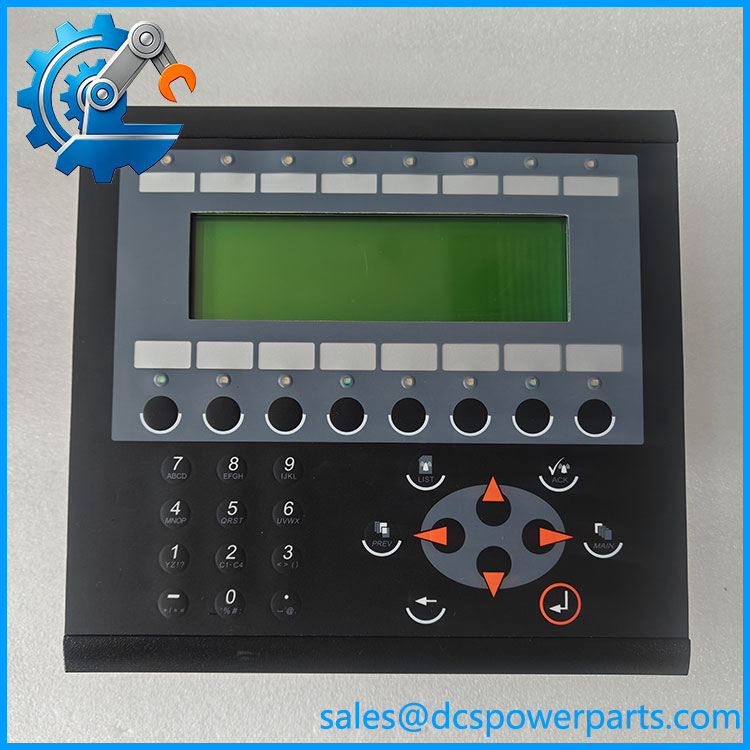
E300 04380
Related Products
The following models are relevant to legacy HMI maintenance. They are not automatically interchangeableh the .
1. -04380A — A related operator-terminal designation. Confirm the hardware revision, connector arrangement, keypad layout, and project compatibility before using it as a substitute.
2. -02750C — Another operator-interface model with a 24 V DC supply requirement. The type number differs, so verify display and control layout as well as the PLC communication configuration.
3. -02750D — A related terminal listed with a 24 V DC supply and 450 mA consumption. It may be relevant when reviewing alternative legacy panels, but the differing model designation requires a compatibility check.
4. -02710A — An -series operator interface with a different type designation. Confirm its display configuration, mounting dimensions, and communications before considering it for an existing machine.
5. E200-02800F — A smaller E200 operator interface with published RS-232 and RS-422 interface information. Its different series and display arrangement make it an alternative to evaluate, not a direct replacement.
6. E1032 — A separate Beijer operator-interface model. Its hardware and programming environment must be checked independently; the shared manufacturer does not establish compatibility with an application.
7. EXTER T60M — A different Beijer operator-terminal family with a 24 V DC supply and a 5.75-inch monochrome display listed in product references. It represents a different hardware platform and should be considered only as part of a planned HMI migration.
8. Mitsubishi MELSEC FX2N PLC — A legacy PLC used in documented -based machine applications. It is relevant when confirming the original HMI’s serial protocol and controller connection; it is a PLC, not an HMI replacement.
Frequently Asked Questions (FAQ)
1. Is the Beijer Elonics compatible with my existing PLC?
Compatibility depends on the PLC model, communication protocol, serial settings, and application project installed in the term. The is an operator interface, so it does not replace the PLC’s control logic.
Before ordering, verify:
- The PLC manufacturer and exact model.
- Whether the connection uses RS-232 or RS-422.
- The communication protocol and baud rate.
- The original HMI project and required programming software.
A matching connector alone is not sufficient evidence of compatibility.
2. What is the differenctween and -04380A?
The model suffix distinguishes the listed type designation, but the available product information does not establish that every hardware and software detail is identical.
Compare the complete nameplate, connector layout, keypad arrangement, hardware revision, and programming requirements. If the replacement must load an existing project, verify compatibility with the exact terminal type before installation.
3.s the support modern PLC communication protocols or firmware version 3.1?
The available documentation does not establish support for a specific firmware version 3.1 or for every modern PLC protocol. The is a discontinued legacy terminal, and its communication capabilities depend on the actual hardware and programming environment.
For an upgrade, confirm the supported PLC driver, serial protocol, project format, and required software version. If the original PLC is being replaced as well, the communication configuration may need to be redesigned.
4. Can I hotp the while the machine is running?
Do not assume that live replacement is permitted simply because the terminal uses 24 V DC.
The HMI may be part of an active operating sequence, and removing it can eliminate operator visibility or access to commands. Follow the machine’s approved maintenance procedure, establish a safe operating state, and confirm the permitted replacement method before disconnecting the panel.
5. Will replg the erase my PLC program or HMI screens?
Replacing the physical HMI does not normally erase the PLC’s own program. The HMI screens and configuration, however, are separate and may not be present on a replacement terminal.
Before removal:
- Back up the HMI project if the original data is accessible.
- Record communication settings and PLC addresses.
- Verify that the programming software can handle the replacement model.
- Load the correct project and test all displayed values, alarms, and operator commands.
Without a usable project backup, restoring the original interface may require additional engineering work.
6. How can I verify that a nerplus is genuine and functional?
A new-surplus label does not prove that the terminal is unused or fully operational. Because the model is discontinued, request evidence for the specific unit being supplied.
- Check the complete model and serial-number label.
- Inspect the LCD, keys, connectors, and housing.
- Request a power-on test and serial communication test.
- Confirm whether the unit includes any required cables, accessories, or programming media.
- Obtain written warranty terms and a clear acceptance-testing procedure.
A powered display alone does not establish that the communication port or operator keys function correctly.
7. What warranty should I expeor an replacement?
Warranty coverage depends on the supplier’s written terms and the condition of the actual unit. Do not assume that a discontinued surplus terminal carries the same warranty as a newly manufactured product.
Before purchase, confirm the warranty period, functional-test scope, delivery inspection window, and procedure for reporting a failure. For critical equipment, establish whether the seller has tested the display, keypad, and serial interfaces and whether the original application project is included.
Procurement recommendation: For the Beijer Elonics , prioritize exact model identification, recovery of the original HMI project, and verification of PLC communications. Those checks will have a greater effect on replacement success than the 24 V DC power rating alone.