Description
Product Overview
The Beckhoff CP6202-0021-0050 is an industrial built-in Panel PC designed for machine-level visualization and operator interaction. Its 15-inch TFT display provides a 1024 × 768 resolution in a 4:3 format, making it suitable for industrial applications that use established HMI screen layouts. The front panel has no integrated keyboard and includes both a single-touch touchscreen and a USB Type-A socket. This configuration allows operators to interact with compatible control software by touch while retaining front access to supported USB peripherals.
In an automation installation, the Beckhoff CP6202-0021-0050 can serve as the operator interface for viewing machine status, monitoring process values, acknowledging alarms, and entering commands through the installed application. Its actual capabilities depend on the operating system, visualization software, runtime environment, and communications interfaces configured for the system. The Panel PC’s model designation alone does not confirm that a specific PLC runtime, fieldbus card, software license, or application image is included. Processor, memory, and storage details should therefore be verified against the exact hardware revision.
For maintenance teams replacing a failed terminal, matching the Beckhoff CP6202-0021-0050 requires more than confirming the screen size. Check the complete part number, front-panel arrangement, cabinet cutout, rear connectors, storage configuration, and installed software. Beckhoff’s CP6202 technical drawing directory provides mechanical drawing files for the model family, which can assist with mounting checks.
Record application backups, network settings, drivers, and runtime versions before changing hardware whenever possible.
Before purchasing, confirm the unit’s condition, revision, included accessories, and testing status. For a legacy machine, a replacement that fits mechanically may still require software restoration or configuration work before it can resume its original role.
Product Introduction
A failed operator terminal can leave a machine without its normal visualization interface even when the main controller remains operational. The Beckhoff CP6202-0021-0050 industrial touchscreen Panel PC combines a 15-inch display, single-touch input, and front USB access. Verify the mounting dimensions, rear interfaces, and software environment before ordering it as a replacement for an existing automation terminal.
Key Technical Specifications
| Parameter | Specification |
|---|---|
| Manufacturer | Beckhoff |
| Model | CP6202-0021-0050 |
| Product series | CP62xx Economy Panel PC |
| Product type | Built-in industrial Panel PC |
| Display size | 15 inches |
| Resolution | 1024 × 768 pixels |
| Display format | 4:3 |
| Touchscreen | Single-touch |
| Integrated keyboard | None |
| Front USB | USB Type-A socket |
| Mounting | Built-in panel installation |
| Processor | Verify against the exact hardware revision |
| Memory | Verify against the delivered configuration |
| Storage | Verify installed storage device and capacity |
| Operating system | Confirm the installed image and license |
| Communication interfaces | Verify against the unit’s rear connections |
| Front protection rating | Confirm against the applicable technical documentation |
| Operating temperature | Confirm for the exact configuration |
| Condition | New, used, or refurbished; confirm per unit |
| Warranty | Confirm with the supplier |
The CP62xx family includes multiple hardware and front-panel configurations. Do not assume specifications from a different suffix apply to this exact model.
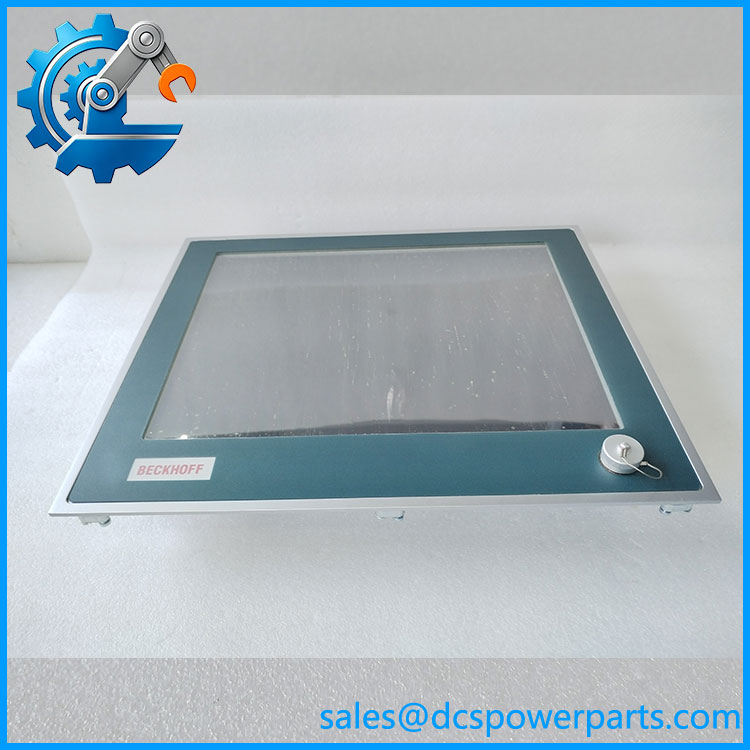
CP6202-0021-0050
Related Products
The following models are useful for comparing display size and operator-interface configuration within Beckhoff’s Panel PC range. They are not automatically interchangeable.
- -0020-0050 — Similar 15-inch configuration with front USB, but without the touchscreen specified for the
-0021version. - -0001-0050 — 15-inch touchscreen configuration without the front USB arrangement identified by
-0021. - -0000-0050 — 15-inch display configuration without touchscreen or integrated keyboard.
- CP6203-0021-0050 — 19-inch touchscreen Panel PC with front USB; different display dimensions and resolution.
- CP6201-0021-0050 — 12-inch-class touchscreen configuration with front USB; smaller display.
- CP6212-0001-0050 — 15-inch touchscreen model with function keys.
- CP6222-0001-0050 — 15-inch touchscreen model with a numeric keyboard.
- CP6232-0001-0050 — 15-inch touchscreen model with an alphanumeric keyboard.
- CP6602-0021 — Related Beckhoff Panel PC configuration; hardware platform and system compatibility must be checked separately.
The display and front-panel distinctions are reflected in Beckhoff’s CP62xx ordering information. Confirm the full ordering code and mechanical dimensions before selecting a substitute.
Frequently Asked Questions
Q1: What is the Beckhoff -0021-0050 used for?
It is a built-in industrial Panel PC for HMI visualization and operator interaction. Its specific functions depend on the control application and software installed on the unit.
: Can the be hot-swapped while the machine is running?
Do not assume hot-swapping is supported. Replacing the Panel PC may interrupt visualization or communications. Follow the machine manufacturer’s shutdown procedure and site safety requirements before disconnecting the unit.
Q3: How do I verify operating-system and firmware compatibility?
Record the existing operating system, BIOS revision, drivers, visualization software, automation runtime, and license requirements. Compare these with the replacement configuration before commissioning. Compatibility cannot be established from the model number alone.
Q4: Will the replacement retain the original HMI configuration?
Not automatically. Application files, network settings, runtime licenses, and persistent data may reside on the original storage device or elsewhere in the control system. Back up the original configuration and verify the replacement’s software image before installation.
Q5: How can I confirm the unit’s condition and authenticity?
Check the manufacturer label, complete model number, serial number, connectors, and physical condition. Request photographs of the actual unit and a documented test report. Confirm whether it is new, used, or refurbished.
Q6: What should I check before ordering a replacement?
Verify the 15-inch display, 1024 × 768 resolution, single-touch function, front USB socket, mounting cutout, rear connections, storage, and software requirements. Compare the full suffix rather than matching only the family.
Q7: What warranty and testing information should I request?
Ask for the warranty period, return terms, and a clear description of the tests performed. Relevant checks include power-up, display operation, touchscreen response, front USB operation, and connector inspection. Treat any function as tested only when supported by the supplier’s report.