Description
Product Overview
When an HVAC control panel needs to read room sensors, monitor equipment status, and operate 24 VAC control loads over a building automation network, the field controller must match both the installed I/O and the existing control application. The Alerton VLC-550-E addresses this requirement as a programmable unitary controller for building-management systems. Its universal inputs accommodate supported temperature sensors, dry contacts, voltage signals, current signals, and pulse inputs. Its triac outputs are intended for compatible AC control loads, allowing local control functions to be integrated with a BACnet MS/TP network.
The VLC-550-E uses the Alerton VisualLogic programming environment and supports BD4 DDC application files. Its RS-485 interface supports BACnet MS/TP master communication at selectable baud rates up to 115.2 kbps. These capabilities make it relevant to HVAC control panels and building automation installations that use compatible Alerton applications and field devices. For a replacement project, verify the existing controller’s application file, point assignments, network settings, wiring, and output-load requirements before removing the installed unit. A matching model number alone does not guarantee that the replacement will operate correctly with the site’s existing configuration.
Key Technical Specifications
| Parameter | Specification |
|---|---|
| Product model | VLC-550-E |
| Manufacturer | Alerton / Honeywell |
| Product type | Programmable unitary field controller |
| Power supply | 24 VAC, 50–60 Hz |
| Minimum power requirement | 9 VA; maximum 90 VA with loads |
| Universal inputs | Five physical input points; supported input types include 3 kΩ Ibex or 10 kΩ Type II thermistors, dry contacts, 0–20 mA, 0–5 V, 0–10 V, and dry-contact pulses |
| Current-input requirement | External 250 Ω resistor for 0–20 mA inputs |
| Pulse input | Maximum 100 Hz; IN-0 does not support pulse input |
| Outputs | Five triac outputs |
| Output rating | 24 VAC, 500 mA continuous; 800 mA RMS for 60 ms |
| Sensor power output | 20 VDC ±10%, maximum 100 mA |
| Communication interface | EIA-485 / RS-485, twisted shielded pair |
| Communication protocol | BACnet MS/TP, master |
| Baud rates | 9.6, 19.2, 38.4, 76.8, and 115.2 kbps |
| Programming | Alerton VisualLogic toolset; BD4 DDC files |
| Processor | 32-bit ARM Cortex-M4F, 80 MHz |
| Memory | 512 MB non-volatile flash, as stated in the manufacturer datasheet |
| Mounting | Screw mounting |
| Terminal wiring | Removable header-type screw terminals, 14–24 AWG |
| Dimensions | Approximately 125 × 127 × 36 mm |
| Operating temperature | −17 to 70°C |
| Relative humidity | 5–95%, non-condensing |
Specifications are based on the published VLC-550-E datasheet. Confirm terminal assignments and the exact hardware revision against the documentation supplied with the unit before installation.
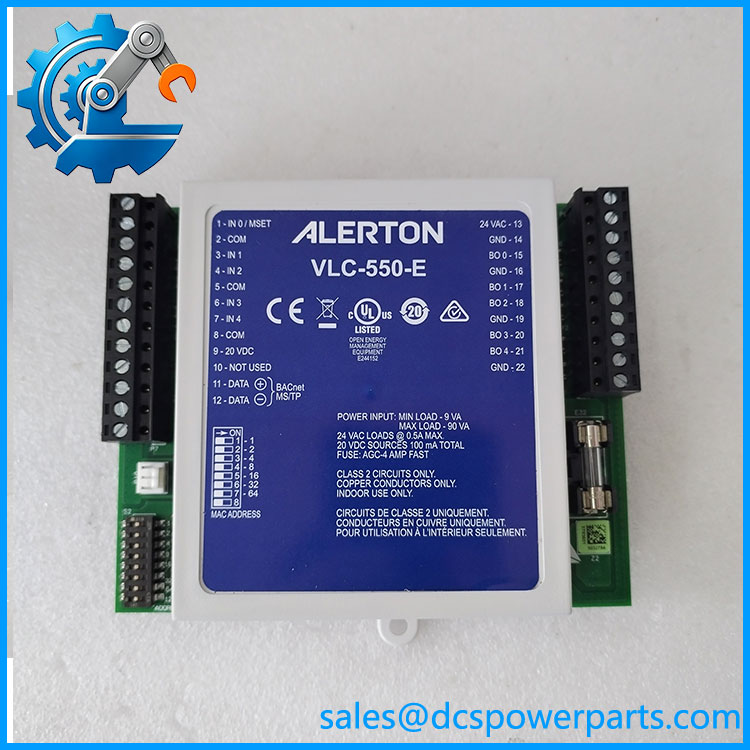
VLC-550-E
Major Features and Advantages
1. Flexible sensor input support
The universal inputs accommodate several common HVAC sensing and status-monitoring methods. This can reduce the need for separate input-conditioning hardware when the installed sensors fall within the controller’s supported electrical ranges. For current-loop signals, the specified external 250 Ω resistor is essential; omitting it can produce incorrect readings.
2. Direct control of compatible AC loads
Five triac outputs provide switching for compatible 24 VAC control devices. The published continuous rating is 500 mA per output, with a higher short-duration rating specified for 60 milliseconds. Engineers should verify the actual load current, inrush behavior, and device type before connecting actuators, relays, or other field loads.
3. BACnet MS/TP network integration
The RS-485 interface allows the controller to communicate with a compatible BACnet building automation network. Selectable baud rates support integration with different network configurations, but the controller’s baud rate, MAC address, device instance, and network wiring must match the site configuration.
4. Programmable local control
Support for Alerton VisualLogic and BD4 DDC files allows application-specific control logic. During replacement, preserving the correct application file and confirming its compatibility with the controller’s hardware and firmware can be more important than the physical installation alone.
5. Compact installation format
The controller’s approximately 125 × 127 × 36 mm dimensions and screw-mounting arrangement suit compact control panels. Check available enclosure space, terminal access, cable routing, and service clearance before installation.
Application Scenarios and Common Pain Points
| Application | Typical requirement | Key engineering check |
|---|---|---|
| Air-handling units | Sensor monitoring and control of HVAC equipment | Verify input types and triac load ratings |
| Central plant equipment | Local control integrated with a building network | Confirm application logic and BACnet mapping |
| Terminal HVAC units | Temperature and equipment-status monitoring | Match sensor resistance curves and point assignments |
| Building-management upgrades | Replacement of an installed field controller | Confirm firmware, wiring, application file, and network settings |
| Maintenance and repair | Recovery from controller or output failure | Determine whether the fault is in the controller, field wiring, load, or network |
Common field problems
- Incorrect temperature readings: Check sensor type, resistance characteristics, wiring, and input configuration.
- Output does not operate the load: Confirm the 24 VAC supply, load current, wiring, and whether the connected device is compatible with triac switching.
- Controller is offline: Check RS-485 polarity, shield and grounding practices, network baud rate, addressing, and termination requirements for the installed topology.
- Replacement will not run the existing application: Confirm the correct BD4 DDC file and compatibility with the installed hardware and firmware.
- Unstable operation after installation: Check supply loading, wiring errors, and whether connected loads exceed the controller’s ratings.
Related Products
These models belong to the wider Alerton VisualLogic controller family. They are useful for application comparison, but they are not automatically interchangeable with the VLC-550-E.
| Model | Relationship |
|---|---|
| VLC-853-E | Related VisualLogic unitary controller |
| VLC-1188-E | Related VisualLogic controller model |
| VLC-16160-E | Related VisualLogic controller model |
| VLC-1600-E | Related VisualLogic controller model |
| VLC-651R-E | Related controller in the published VisualLogic family |
| VLC-660R-E | Related controller in the published VisualLogic family |
| VAV-SD-E | Related controller for variable-air-volume applications |
| VAV-SD2A-E | Related VAV controller model |
The models above are documented in the VisualLogic unitary controller family listing. Compare their I/O configurations, application requirements, and communications before considering a substitution.
Engineer’s Guide: Three Checks Before Ordering
1. Verify the full model number and physical condition. Confirm that the label reads VLC-550-E, and inspect the terminals, enclosure, and board for damage or corrosion. For used or refurbished units, request clear photographs and test evidence.
2. Confirm application and network compatibility. Check the installed BD4 DDC file, firmware requirements, BACnet MS/TP addressing, baud rate, and required field points. Do not assume that a controller with the same model number arrives with the correct site application.
3. Check the electrical load before energizing. Verify the 24 VAC supply capacity and the ratings of each connected output. Confirm sensor types and the external resistor requirement for 0–20 mA inputs.
Warning: Do not connect line-voltage loads directly to the controller’s 24 VAC triac outputs. Use the appropriate interface hardware where required by the load and control design.
Frequently Asked Questions
1. What is the Alerton used for?
It is a programmable field controller for HVAC and building automation. It reads supported field inputs, controls compatible 24 VAC loads, and communicates with a BACnet MS/TP network.
2. What power supply does the require?
The published specification is 24 VAC at 50–60 Hz, with a minimum requirement of 9 VA and a maximum of 90 VA with loads. Size the supply for the actual connected equipment and application.
3. Does it support BACnet?
Yes. The supports BACnet MS/TP over RS-485, with published baud rates up to 115.2 kbps. Network parameters must be configured to match the building automation system.
4. Can it replace another Alerton controller?
Not without checking the exact model, I/O configuration, control application, firmware, and wiring. A controller from the same product family may have different point counts or functions.
5. Is the discontinued?
Some product listings report that it has been discontinued, but that alone does not establish the current manufacturer lifecycle status in every region. Confirm availability and support status before committing to a maintenance or upgrade plan.
6. What should I request when purchasing a replacement?
Request confirmation of the exact model, hardware revision, condition, included accessories, functional test scope, warranty terms, and lead time. For a used unit, ask whether the power supply, inputs, outputs, and communications have been tested.
7. Is the suitable for a safety-critical shutdown function?
Do not assume so. Its documented role is as a BACnet application-specific building controller. Any safety-related function must use equipment and an architecture specifically approved for the applicable safety requirements.