Description
Product Overview
The LS Electric XP80-TTA/AC is an industrial human-machine interface (HMI) panel from the XP Series, developed for operator interaction with programmable controllers and industrial automation equipment. It features a 12.1-inch TFT color LCD with an 800 × 600 pixel resolution, providing a graphical interface for displaying machine conditions, process values, alarm messages, and operator commands. The panel is intended for industrial environments where operators need a dedicated interface to monitor equipment and interact with the control application.
Communication is an important part of the LS Electric XP80-TTA/AC installation. XP Series documentation describes Ethernet connectivity, serial communication options, USB host functionality, and support for screen projects created with the relevant engineering software. These functions allow the HMI to exchange data with supported controllers and use compatible peripherals. The actual connection method depends on the PLC model, selected communication driver, network configuration, and project settings. The HMI’s presence alone does not guarantee compatibility with every controller or protocol.
For maintenance and procurement teams, the LS Electric XP80-TTA/AC is particularly relevant when preserving an established machine interface or replacing a failed operator panel. Before ordering, confirm the complete model designation, supply requirements, panel cutout, connector layout, and communication settings. Verify the installed screen project and its engineering-software version, as well as any PLC drivers and application-specific configuration. A replacement panel may require project restoration and communication testing before it can operate correctly with the existing controller.
The model is reported as discontinued, making unit condition and long-term maintenance planning important considerations. Confirm whether the available unit is unused stock, used, or refurbished, and request documented testing of the display, touch input, power-up behavior, and communications. For an older installation, retaining a verified backup of the HMI project can reduce the time needed to restore operator functions after replacement.
Product Introduction
When an older machine loses its operator interface, restoring the original HMI configuration can be more practical than redesigning the control station. The LS Electric XP80-TTA/AC XGT Panel HMI provides a 12.1-inch color display for industrial monitoring and operator commands. Check the project backup, PLC communication settings, panel dimensions, and power requirements before installing a replacement.
Key Technical Specifications
| Parameter | Specification |
|---|---|
| Manufacturer | LS Electric |
| Model | XP80-TTA/AC |
| Alternate model notation | XP80-TTAAC |
| Product series | XP Series / XGT Panel |
| Product type | Industrial HMI operator panel |
| Display technology | TFT color LCD |
| Display size | 12.1 inches |
| Resolution | 800 × 600 pixels |
| Color depth | 65,536 colors |
| Ethernet | 10/100BASE-T listed for the XP Series |
| Serial communication | Supported; verify exact port configuration |
| USB interface | USB host for compatible peripherals |
| Engineering software | Verify project compatibility with the applicable XP-Builder version |
| Front protection | IP65F listed; installation conditions apply |
| Power supply | Confirm the AC-rated model’s input range from its nameplate and hardware manual |
| Memory | Verify exact installed specification against the applicable revision |
| Mounting | Panel-mounted HMI |
| Lifecycle status | Reported discontinued |
| Condition | Confirm per unit |
| Testing and warranty | Confirm with supplier |
The display and interface information is based on XP Series documentation and model-specific technical references. Electrical ratings and memory details should be checked against the exact hardware revision rather than assumed from a related XP panel.
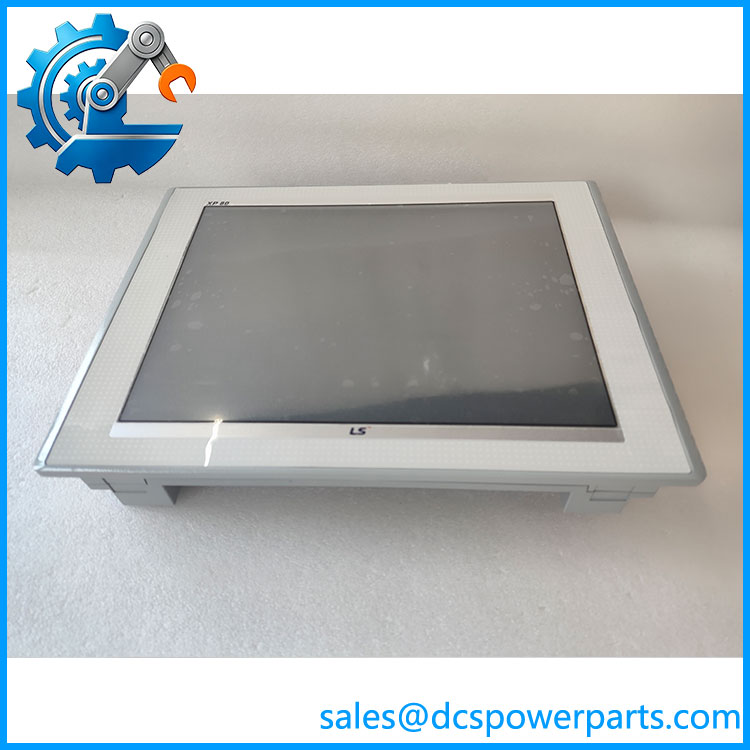
XP80-TTAAC
Related Products
The following models belong to the LS Electric XP HMI range and may be useful when assessing an alternative. Screen size, power configuration, and communications must be checked before substitution.
- XP70-TTA/AC — Smaller 10.4-inch-class HMI in the XP Series.
- -TTA/DC — Related model with a DC power configuration; verify electrical and hardware differences.
- -TTB/AC — Related AC model; confirm the exact front-panel and hardware specifications.
- XP90-TTA/AC — Larger XP Series HMI model; panel dimensions and project compatibility require review.
- XP50-TTA/AC — Smaller 8.4-inch-class color HMI.
- XP40-TTA/DC — Smaller XP Series panel with a DC power configuration.
- XP30-TTA/DC — Compact color HMI for installations with different screen-size requirements.
- XP30-BTE/DC — Compact monochrome XP Series operator panel with a different display and interface configuration.
These are related product-family models, not confirmed drop-in replacements. Verify the complete ordering code, mechanical dimensions, electrical supply, and project compatibility using the relevant hardware documentation.
Frequently Asked Questions
Q1: What is the LS Eric /AC used for?
It is an industrial HMI operator panel used to display process information and provide operator interaction with compatible PLC-based automation systems. Its functions depend on the installed screen project and controller configuration.
Q2: the /AC be hot-swapped while the machine is running?
Do not assume live replacement is supported. Removing the HMI may interrupt operator monitoring or control commands. Follow the machine manufacturer’s shutdown procedure and verify the effects on the control process before disconnecting the panel.
Q3: How do I check XP-Builder and PLC communication compatibility?
Identify the original project version, HMI runtime requirements, PLC model, communication driver, and connection settings. Check the relevant XP Series manual and software documentation before downloading a project to a replacement panel.
Q4: Will a replent /AC retain the original screen project?
Not automatically. The project may need to be restored from a backup using compatible engineering software. Preserve the original project files, PLC communication parameters, alarm settings, and other application data before replacing the hardware.
Q5: How can I verify the unit’s condition and authenticity?
Check the model and serial labels, screen condition, touch response, connectors, and signs of repair. Request photographs of the actual unit and a documented functional test report. Confirm whether the unit is unused, used, or refurbished.
Q6:the /AC still manufactured?
Available product references report it as discontinued. Confirm current lifecycle and support status with LS Electric before planning a long-term maintenance strategy.
Radwell International+1
Q7: What should I verify before purchasing a replacement HMI?
Confirm the full model code, AC power requirements, panel cutout, display and touch operation, connector layout, PLC protocol, project version, condition, warranty, and return terms. A physical match does not by itself establish software or communications compatibility.