Description
Key Technical Specifications
| Parameter | Specification |
|---|---|
| Product model | IC754CSX06CTD |
| Manufacturer | GE Fanuc |
| Product family | QuickPanel |
| Product type | Industrial HMI / operator interface |
| Display size | 6-inch class; diagonal active area may be approximately 5.7 inches |
| Display technology | Color TFT LCD |
| Touch input | Touchscreen |
| Operating system | Windows CE.NET, reported for this model |
| Memory | Listings report 64 MB / 96 MB; confirm exact configuration |
| Serial communication | RS-232 and RS-485 reported; verify port availability |
| Ethernet | Not confirmed for this exact configuration |
| USB / expansion | Not verified for this exact configuration |
| Supply voltage | DC input; exact permitted range requires the model-specific hardware manual |
| Resolution | Not conclusively verified for this exact model |
| Mounting | Panel-mounted operator terminal; confirm cutout and depth before replacement |
| Front protection rating | Not verified for this exact suffix |
| Operating temperature | Confirm from the applicable hardware manual |
| Software environment | Legacy QuickPanel project and runtime environment; confirm development-tool compatibility |
The model-specific product listing identifies the display, Windows CE.NET, and serial communication, but the available records do not establish every electrical and mechanical specification consistently. Do not assume the voltage range, resolution, Ethernet support, or enclosure rating from a different QuickPanel variant.
Major Features and Advantages
Local operator visualization
The IC754CSX06CTD provides a touchscreen interface for presenting machine information and accepting operator input. Depending on the loaded application, the screen may display operating states, alarms, setpoints, and process values. The actual functions depend on the original project and the connected control system rather than the HMI model alone.
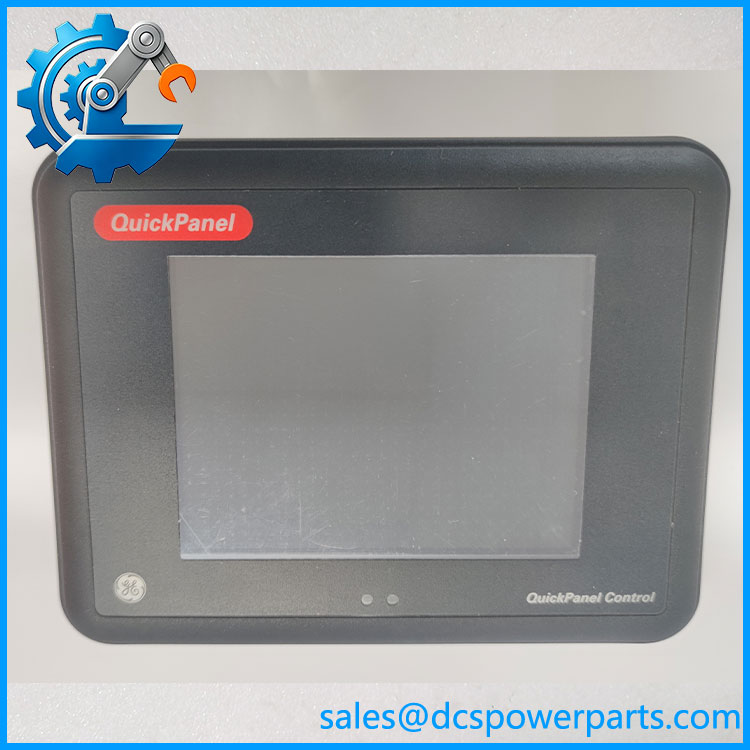
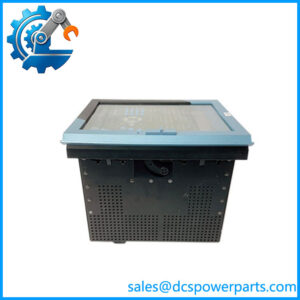
IC754CSX06CTD
Compact color display
The 6-inch color TFT format suits machines and control cabinets where panel space is limited. Before selecting a replacement, compare the visible screen area, resolution, touch response, panel cutout, and enclosure depth. A similar screen size does not guarantee that an alternative HMI will fit the existing cabinet.
Serial communication
Product-specific listings report RS-232 and RS-485 interfaces. These ports may be used for communication with compatible controllers or other equipment, depending on the installed application and wiring. Confirm the required electrical standard, connector pinout, baud rate, parity, station address, and protocol before commissioning a replacement.
Legacy software environment
The product is listed with Windows CE.NET. Existing HMI applications may depend on the original runtime, development environment, communication drivers, and project files. Preserve a verified backup of the application and configuration before removing a working terminal. Do not assume a replacement panel can load the project without conversion or additional engineering.
Maintenance continuity
For an installed system, retaining the original model can reduce the amount of interface redesign required, provided the replacement’s hardware and software match. A used or refurbished unit should be assessed for touchscreen operation, display condition, communication ports, power-up behavior, and retention of the required application.
Application Scenarios and Common Pain Points
Potential applications include:
- Machine operator stations: Displaying equipment status and providing local operator commands.
- Industrial process monitoring: Presenting process values, operating states, and alarms configured in the HMI project.
- Legacy PLC systems: Maintaining an existing operator interface where the original controller communications and application remain in service.
- Panel maintenance: Replacing a damaged touchscreen or failed terminal while preserving the existing cabinet and wiring.
- Equipment refurbishment: Restoring a machine interface where the original application and commissioning records are available.
Common issues include a damaged or unresponsive touchscreen, a dim or blank display, loss of communication with the controller, incorrect serial-port settings, and unavailable project files. An HMI that powers up but shows no application may have a runtime or project problem rather than a display hardware fault.
Related Products
These related QuickPanel models are useful for family-level comparison. They are not confirmed drop-in replacements for IC754CSX06CTD.
| Model | General description | Key distinction |
|---|---|---|
| IC754CSL06CTD | 6-inch QuickPanel Control, color TFT | Different model designation; verify memory and hardware revision |
| IC754CBL06CTD | 6-inch QuickPanel Control | Separate hardware configuration |
| IC754VSL06CTD | 6-inch QuickPanel View | View-oriented model; controller functionality may differ |
| IC754VBL06CTD | 6-inch QuickPanel View | Different model configuration |
| IC754OTL06CTD | 6-inch QuickPanel OEM/control family | OEM-oriented configuration |
| IC754CSF06CTD | 6-inch QuickPanel Control | Different memory and configuration options may apply |
| IC754CSF15CTD | 15-inch QuickPanel Control | Larger display and different panel dimensions |
GE Fanuc documentation distinguishes QuickPanel Control and QuickPanel View models, while the hardware guide identifies separate product numbers and revisions. Check the exact model’s compatibility documentation before treating any related terminal as interchangeable.
Engineer’s Guide: Three Checks Before Installation
1. Confirm the full model and hardware revision. Match the nameplate, connector arrangement, display type, and panel dimensions. Do not substitute another 6-inch QuickPanel solely because its front panel appears similar.
2. Back up and verify the HMI project. Obtain the original project file, runtime version, communication parameters, and any required license or development-tool information. Confirm that the project can be restored to the replacement terminal before removing the existing unit.
3. Validate power and communication before returning the machine to service. Confirm the specified DC input, wiring polarity, serial interface, protocol, and controller settings from the correct manual. Test touchscreen response, displayed values, alarms, and operator commands under controlled conditions.
Frequently Asked Questions
Q1. What is the GE Fanuc IC754CSX06CTD?
It is a 6-inch color touchscreen HMI from the GE Fanuc QuickPanel family, intended for local machine or process visualization and operator interaction.
Q2. Does it use Windows CE.NET?
Product-specific listings identify Windows CE.NET as its operating system. Confirm the exact runtime and revision on the installed unit when planning a software recovery or replacement.
Q3. Does it support RS-232 and RS-485?
These serial interfaces are reported in the model’s product listing. Confirm the physical ports and their configured functions from the unit and its documentation before preparing cables or controller settings.
Q4. What is its operating voltage?
The available sources identify it as a DC-powered terminal, but I could not verify a definitive input range from an authoritative manual for this exact model. Check the nameplate and model-specific hardware guide before applying power.
Q5. Can another 6-inch QuickPanel replace it?
Not automatically. Display dimensions, memory, operating system, communication interfaces, project runtime, and panel cutout can differ. Confirm both hardware and software compatibility before selecting an alternative.
Q6. What should be checked when buying a used or refurbished unit?
Request the full model and revision, clear photographs, evidence of power-up testing, touchscreen checks, communication-port testing, and confirmation that the required application can be loaded. Ask whether the quoted unit includes any necessary accessories or configuration files.
Q7. What are the warranty and lead time?
These depend on the supplier and the condition of the individual unit. Confirm stock status, dispatch timing, warranty coverage, return terms, and the extent of functional testing in writing.
Procurement recommendation: Treat IC754CSX06CTD as a legacy QuickPanel HMI requiring model-specific verification. Before purchase, confirm the DC input rating, serial interface configuration, panel dimensions, and availability of a restorable application project.