Description
Product Overview
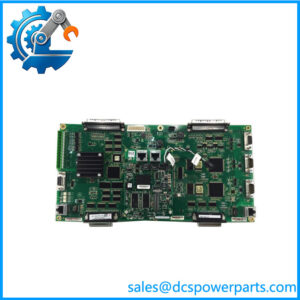
In an installed Series 90-70 control system, loss of Ethernet communication can interrupt PLC programming access, supervisory data exchange, or connections to supported host applications. The GE Fanuc IC697CMM742 provides a dedicated Ethernet interface for systems that use this legacy PLC platform. It supports TCP/IP communications using the Service Request Transfer Protocol (SRTP), helping connect compatible PLCs and programming or host software without replacing the existing controller architecture.

ManualZilla
+1
The GE Fanuc IC697CMM742 provides three alternative Ethernet connection methods: 10Base-T, 10Base2, and AUI. The RS-232 Station Manager port supports local diagnostic and management access, while the RS-485 port is intended for software loading. Four status indicators help technicians assess module operation, LAN status, serial activity, and reported exceptions. For replacement planning, verify the existing cable type, PLC rack and power-supply configuration, firmware revision, and host communication requirements before ordering.
AutomationPlus
+1
Key Technical Specifications
| Parameter | Specification |
|---|---|
| Product Model | IC697CMM742 |
| Manufacturer | GE Fanuc Automation |
| PLC Platform | Series 90-70 |
| Module Type | Ethernet Interface, Type 2 |
| Network Standard | IEEE 802.3 CSMA/CD |
| Ethernet Data Rate | 10 Mbps |
| 10Base-T Port | 8-pin RJ-45 |
| 10Base2 Port | BNC coaxial connector |
| AUI Port | 15-pin D-sub connector |
| Station Manager Port | 6-pin RJ-11, RS-232 DTE |
| Software-Load Port | 15-pin D connector, RS-485 DTE |
| Module Supply | +5 VDC and +12 VDC from PLC power supply |
| Typical / Listed Current Draw | 2.0 A at +5 VDC; 0.5 A at +12 VDC maximum when powering an external AUI transceiver |
| Operating Temperature | 0°C to +55°C ambient |
| Status Indicators | MODULE OK, LAN ONLINE, SERIAL ACTIVE, STATUS |
| Installation | One slot in a compatible Series 90-70 PLC rack |
| Internal Fuse | 5 × 20 mm, 250 V, 1.0 A, slow-acting |
Specifications are based on the IC697CMM742 documentation. Confirm the exact hardware revision and installation requirements before applying these values to a replacement unit.
Major Features and Advantages
Multiple Ethernet connection options
The module provides 10Base-T, 10Base2, and AUI interfaces. This supports different legacy network layouts, subject to the existing cabling and transceiver arrangements. Only one Ethernet connection method should be selected according to the installation design and module documentation; the three ports should not be assumed to function as a modern Ethernet switch.
Support for Series 90-70 communication
The IC697CMM742 is designed for the GE Fanuc Series 90-70 PLC environment. Its Ethernet interface supports SRTP over TCP/IP, enabling communication with compatible PLCs and supported programming or host applications. Confirm software and firmware compatibility against the actual controller installation rather than assuming support for every modern Ethernet protocol.
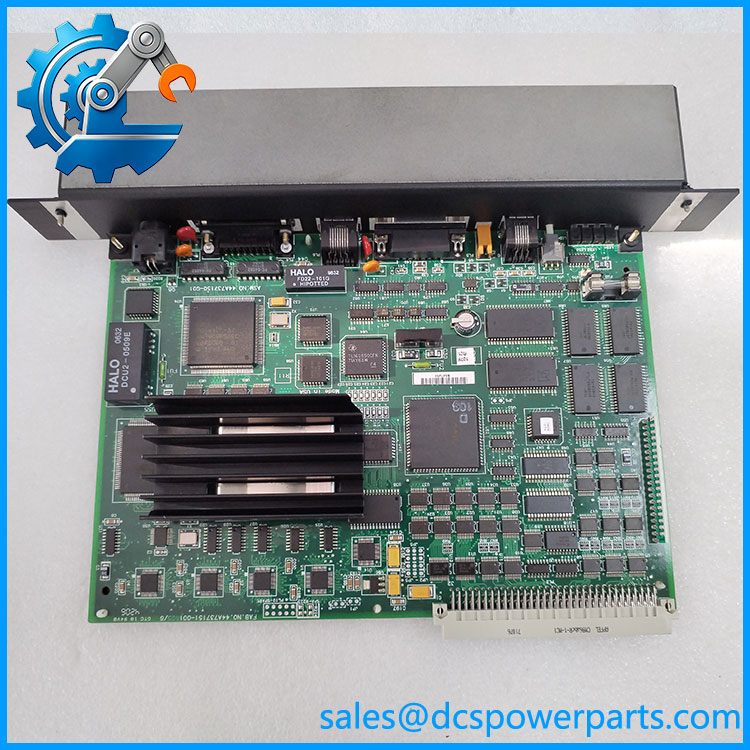
IC697CMM742
Local diagnostics and maintenance access
The RS-232 Station Manager interface provides a local service connection, while the RS-485 software-load port supports the module’s software-loading function. These interfaces can assist troubleshooting when network communication is unavailable, provided the correct cables, procedures, and software are available.
Status indicators for fault isolation
Four LEDs provide information about module operation, LAN status, serial activity, and status exceptions. During commissioning, record the indicator states and compare them with the official diagnostic tables. LED behavior should be treated as diagnostic evidence, not as proof that end-to-end PLC communication is functioning correctly.
Practical replacement planning
For a legacy control system, replacing the communication module may be less disruptive than redesigning the network interface. That decision depends on the condition of the installed module, availability of a verified replacement, firmware requirements, and the plant’s maintenance strategy. Because the interface is rated at 10 Mbps, network upgrades should be evaluated separately rather than assuming the module can support faster Ethernet speeds.
Application Scenarios and Common Pain Points
Legacy PLC network connectivity: Used where a Series 90-70 PLC needs Ethernet communication with compatible controllers or host software.
PLC programming and service access: Supports communication with appropriate programming tools and diagnostic applications. Verify software versions and connection procedures before a maintenance window.
Existing 10Base-T installations: The RJ-45 port may suit installations already wired for compatible 10Base-T Ethernet. The presence of an RJ-45 connector does not mean the interface supports 100 Mbps or Gigabit Ethernet.
Legacy coaxial or AUI networks: The 10Base2 and AUI interfaces may matter when maintaining older network infrastructure. Check cable condition, termination, transceiver requirements, and the original network topology before reconnecting equipment.
Common field problems to investigate:
- No network link or LAN activity: inspect cabling, connectors, network equipment, and the selected port.
- PLC accessible locally but not over Ethernet: check network addressing, host configuration, protocol support, and controller communication settings.
- Intermittent communication: review cable condition, network topology, electrical environment, and error or status indications.
- Replacement module fails to communicate: verify exact catalog number, hardware revision, firmware, configuration, and the applicable software version.
Related Products
The following models are associated with the GE Fanuc Series 90-70 platform or its communication architecture. They serve different functions and are not automatically interchangeable with the IC697CMM742.
| Model | Product type / distinction |
|---|---|
| IC697CMM741 | Series 90-70 Ethernet controller/interface variant |
| IC693CMM321 | Series 90-30 Ethernet interface module |
| IC697RCM711 | Series 90-70 redundancy communication module |
| IC697BEM711 | Bus receiver for expansion-rack applications |
| IC697BEM713 | Bus transmitter with parallel programming port |
| IC697BEM731 | Genius I/O bus controller |
| IC697BEM733 | Genius I/O bus scanner |
| IC697PCM711 | Programmable coprocessor module |
These product roles are listed in GE Fanuc Series 90-70 communications and specialty-module references. Check the system architecture before selecting an alternative.
Engineer’s Guide: Three Checks Before Ordering
1. Confirm the physical network interface. Identify whether the existing installation uses RJ-45 10Base-T, BNC 10Base2, or an AUI transceiver. Check cable and connector requirements before dispatch.
2. Verify the PLC and software configuration. Confirm the Series 90-70 rack, available power-supply capacity, installed firmware revision, and supported programming or host software. Do not assume that an older SRTP interface supports every modern industrial Ethernet protocol.
3. Establish the replacement unit’s condition and test scope. Request confirmation of the complete catalog number, hardware revision, firmware where applicable, and any repair history. Ask which functions were tested and whether the test covered Ethernet communication, serial ports, and status indicators.
Important: The is a legacy 10 Mbps interface. A matching connector alone does not establish electrical, firmware, or application compatibility. Confirm the exact installation requirements before removing the existing module.
Frequently Asked Questions
1. What is the GE Fanuc used for?
It is an Ethernet Interface (Type 2) module for the Series 90-70 PLC. It provides network communication for supported PLC-to-PLC, programming, and host-application connections using the documented communication architecture.
2. Which Ethernet ports does the support?
It provides 10Base-T through an RJ-45 connector, 10Base2 through a BNC connector, and an AUI interface through a 15-pin connector. Confirm which interface is used in the installed network before ordering cables or transceivers.
3. What voltage does the require?
The module draws +5 VDC and +12 VDC from the PLC power supply. The documented current figures are 2.0 A on the +5 VDC rail and up to 0.5 A on the +12 VDC rail when powering an external AUI transceiver. Check the system power budget and the relevant manual before installation.
4. Can the replace another Series 90-70 communication module?
Not solely because the modules fit the same rack. Compare the exact catalog number, interface type, firmware, communication requirements, and configuration. A different communication module may have different functions or limitations.
5. Is a refurbished suitable for plant maintenance?
It may be suitable when its condition, configuration, and test results meet the site’s maintenance requirements. Request inspection details and functional-test evidence, especially for Ethernet connectivity, serial interfaces, and status indications. Visual inspection alone is insufficient.
6. What should be confirmed before purchasing an ?
Confirm the complete model number and revision, required Ethernet connector, PLC platform, firmware and software compatibility, supply requirements, physical condition, warranty terms, and dispatch lead time. For a production-critical system, also confirm whether a tested replacement is available before scheduling a shutdown.
7. How can I verify compatibility before installing the replacement?
Record the installed module’s catalog number and revision, photograph its wiring and connector arrangement, document the current network setup, and check the relevant Series 90-70 manual. After installation, verify module status, LAN activity, and actual communication with the intended host or PLC.
Procurement note: For the GE Fanuc , prioritize exact catalog-number verification, confirmed hardware condition, and documented functional testing. These checks help reduce the risk of receiving a physically compatible module that cannot restore the required network connection.