Description
Product Overview
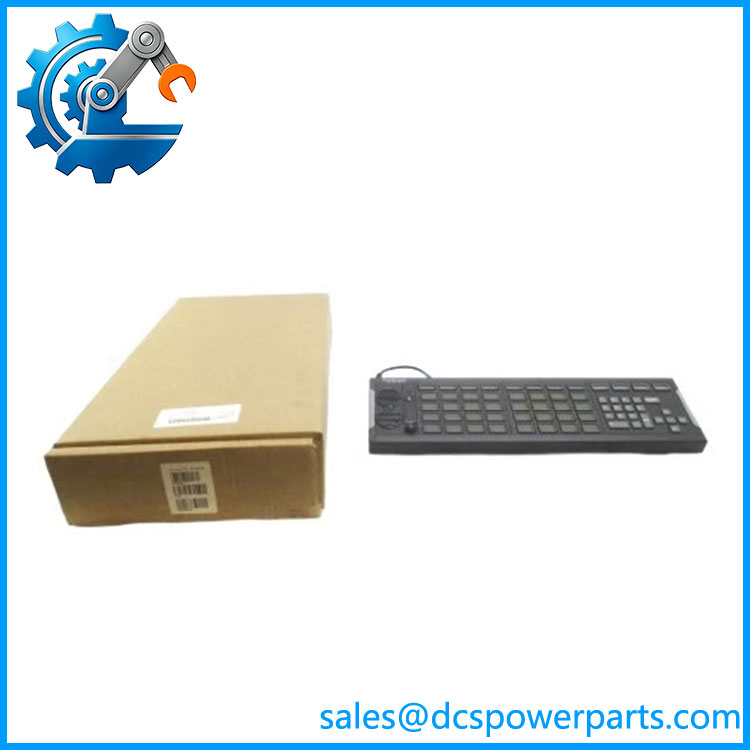
The Foxboro P0924WV is a USB annunciator and numeric operator keyboard designed for Foxboro I/A Series DCS operator stations. It combines physical alarm annunciation with workstation input, giving operators dedicated keys for acknowledging or responding to process conditions while also providing numeric and navigation functions. Schneider Electric’s own Foxboro documentation identifies the P0924WV specifically as a USB annunciator/numeric keyboard, rather than a conventional DCS I/O module.
Its operator panel contains four rows of eight annunciator keys, giving 32 LED-equipped keys, plus a separate row of 12 macro keys without LEDs. The keyboard also provides four arrow keys surrounding a Select key for numeric and navigation operations. Each annunciator LED can be configured by workstation software for red, yellow, green, or off states, allowing the physical panel to represent different process or alarm conditions. A dedicated Lamp Test key and Silence Horn key are provided on the left side of the assembly.
For legacy Foxboro control rooms, the Foxboro P0924WV is an operator-station peripheral rather than a controller, FBM, or analog output card. That distinction is important during procurement because replacing an annunciator keyboard does not replace the DCS controller or workstation software behind it. The unit communicates with its host through USB and can connect directly to a workstation USB port or through a USB hub. Schneider’s documentation also specifies that extended USB runs from 1.8 m to 30.5 m require the appropriate extension hardware and that this keyboard cannot be connected through a Remote Graphics Unit.
The Foxboro P0924WV remains relevant for I/A Series maintenance and control-room modernization projects where the existing operator interface must be preserved. To be completely transparent, software and workstation compatibility needs to be checked before installation: Schneider documentation lists supported Windows environments that vary by documentation generation, including Windows 10 LTSC and Windows Server 2022 in newer material.
Product Introduction
A failed annunciator keyboard can remove both alarm visibility and direct operator input from an otherwise functioning DCS workstation. Foxboro P0924WV addresses that specific control-room requirement with 32 configurable LED annunciator keys, 12 macro keys, numeric/navigation controls, and dedicated horn-silence and lamp-test functions.
Connected through USB, it serves as a physical operator interface for Foxboro I/A Series DCS stations. For a legacy replacement, verify the workstation operating environment, USB architecture, annunciator configuration, and required extension hardware before commissioning.
Key Technical Specifications
| Parameter | Value |
|---|---|
| Product Model | P0924WV |
| Manufacturer / Brand | Foxboro / Schneider Electric |
| Product Series | I/A Series DCS |
| Product Type | USB Annunciator / Numeric Keyboard |
| Host Interface | USB |
| Annunciator Keys | 4 rows × 8 keys |
| LED Keys | 32 |
| Macro Keys | 12, without LEDs |
| LED States | Red, yellow, green, or off |
| Numeric Input | Dedicated keypad section |
| Navigation | Four arrow keys surrounding Select key |
| Special Keys | Silence Horn and Lamp Test |
| Alarm Relay | Two-pole relay with self-check function |
| USB Direct Connection | Supported |
| USB Hub Connection | Supported |
| Extended USB Distance | 1.8–30.5 m with specified extension kits |
| Remote Graphics Unit | Not supported |
| Application | Foxboro DCS operator workstation |
| Condition | New Surplus — verify actual unit condition |
The core specifications above are supported by Schneider Electric’s Foxboro documentation.
P0924WV
Related Products
- P0924TT — Another Foxboro annunciator keyboard option listed by Schneider Electric for Foxboro DCS thin-client configurations. It should be evaluated against the workstation’s required keyboard type rather than assumed to be electrically identical to .
- P0928JJ — Foxboro operator-station LCD display option. Unlike , it provides visual display hardware rather than physical alarm-keyboard input.
- P0928JH — Another Foxboro display option used with supported thin-client configurations. It complements an operator keyboard by providing the screen rather than the physical annunciator interface.
- RH103FR — Foxboro-qualified LCD monitor option for thin-client configurations. It addresses display requirements and is functionally separate from the keyboard.
- RH103DN — USB speaker set for Foxboro thin-client stations. It provides audio output and therefore complements, rather than replaces, the ‘s annunciator/alarm functions.
- P0903CW — Related Foxboro annunciation keyboard hardware. It belongs to the same general operator-interface category, but the exact workstation compatibility should be verified before substitution.
- P0917QE — Foxboro I/A Series workstation power-supply component. It supports the workstation infrastructure rather than performing the annunciator-keyboard function.
Frequently Asked Questions
1. What is Foxboro used for?
The is a USB annunciator/numeric keyboard for Foxboro DCS operator stations. It provides three main operator functions:
- Visual alarm annunciation through configurable LED keys
- Audible alarm interaction through the horn/silence circuitry
- Physical workstation input through macro, numeric, navigation, and operator keys
It therefore sits at the human-machine interface level rather than in the DCS controller or field I/O layer.
2. Can I hot-swap the ?
The fact that the keyboard uses USB does not mean it should automatically be disconnected and reconnected during active plant operation.
For a live control room, first consider whether removing the keyboard would affect:
- Alarm acknowledgement
- Audible alarm handling
- Operator command access
- Process-response macros
- Operator workstation configuration
For maintenance, use the site’s approved workstation replacement procedure and confirm that a redundant operator station is available where required.
3. Does work with Windows 10 or Windows Server 2022?
Schneider Electric’s newer Foxboro documentation lists support for Windows 10 21H2 LTSC, Windows Server 2022, Windows 10 v1607, Windows 10 v1809 Thin Clients, and Windows Server 2016.
Older Foxboro documentation lists earlier operating-system generations, including Windows 7 and Windows Server 2008 R2.
The important point is that OS compatibility depends on the Foxboro workstation/software generation, not simply on the USB connector. Check the exact Foxboro DCS release and Annunciator Keyboard software before upgrading a workstation.
4. Can be connected through a Remote Graphics Unit?
No. Schneider Electric’s documentation specifically states that the USB annunciator/numeric keyboard cannot be connected through a Remote Graphics Unit (RGU). It can connect directly to a host USB port or through a USB hub.
For longer USB connections, the documented extension arrangement supports distances from 1.8 m to 30.5 m using the specified extension kits.
5. Will replacing erase my DCS control logic?
No—the keyboard is an operator peripheral, not the DCS controller where the process-control application resides.
Replacing the physical does not normally constitute replacing or downloading the DCS control strategy. However, the workstation must recognize the keyboard correctly, and its annunciator/macro configuration must correspond to the installed DCS application.
After replacement, verify:
- USB recognition.
- Annunciator LED operation.
- Lamp Test.
- Silence Horn.
- Numeric and navigation keys.
- Configured macro functions.
- Alarm relay operation.
6. Is a New Surplus authentic?
Condition terminology alone does not establish authenticity. For a control-room spare, inspect the actual hardware before installation.
Check the following:
- Foxboro identification label
- part number
- Serial or traceability information where present
- Key and LED condition
- USB connector condition
- Alarm relay circuitry
- Physical enclosure and mounting condition
- Original packaging, if supplied
For a critical DCS spare, retain photographs and incoming-inspection records with the procurement documentation.
7. What should I check before using as a replacement?
Use a workstation-level compatibility check rather than treating it as a generic USB keyboard.
Recommended verification sequence:
- Confirm the existing keyboard part number.
- Identify the Foxboro DCS release and workstation type.
- Check the supported operating system.
- Verify the USB connection architecture.
- Confirm whether an extension kit is required.
- Compare annunciator and macro-key configuration.
- Test LED states and Lamp Test.
- Test horn-silence operation.
- Verify the alarm relay behavior.
- Confirm normal operator response before returning the station to service.
The most important procurement distinction is that is a DCS operator-interface peripheral, not a Foxboro FBM I/O card. Schneider Electric’s own documentation supports this identification.