Description
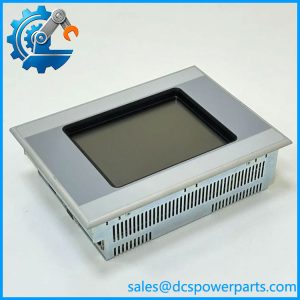
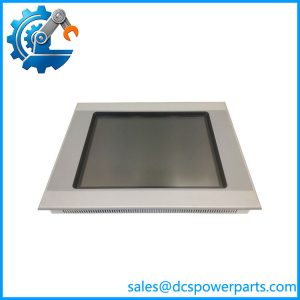
Eaton XV-303-70-BE0-A00-1C HMI/PLC Touch Panel
Product Introduction
Machine operators rarely care whether an automation system is built around an HMI, PLC, or both—they care whether the screen responds correctly and whether the control logic underneath it keeps communicating with the machine. The Eaton XV-303-70-BE0-A00-1C combines a 7-inch industrial touchscreen with embedded controller functionality, making it more than a visualization terminal. It belongs to Eaton’s XV300 family and uses a 1024 × 600 TFT display with projected-capacitive multi-touch technology.
The XV-303-70-BE0-A00-1C is the BE0 hardware configuration, which provides one Ethernet interface together with CAN, RS-232, RS-485, USB host/device, and SmartWire-DT connectivity. Eaton documentation identifies Windows Embedded Compact 7 Pro and an integrated PLC license for the -1C version. For replacement work, the complete catalog number matters: the closely related CE0 and BE2 variants change the interface arrangement, so treating every XV-303-70 as interchangeable is a procurement mistake.
Key Technical Specifications
| Parameter | Specification |
|---|---|
| Manufacturer | Eaton |
| Series | XV300 |
| Model | XV-303-70-BE0-A00-1C |
| Article Number | 179655 |
| Product Type | HMI/PLC touch display |
| Display Size | 7.0 in |
| Display Technology | TFT |
| Resolution | 1024 × 600 pixels |
| Colors | 16 million |
| Touch Technology | Projected capacitive multi-touch |
| Front Construction | Anti-glare tempered glass with plastic bezel |
| Operating System | Windows Embedded Compact 7 Pro |
| PLC Function | XSoft-CoDeSys-based PLC functionality |
| PLC License | Included |
| Ethernet | 1 × 10/100 Mbps |
| CAN | 1 × CANopen / easyNet |
| RS-232 | 1 × |
| RS-485 | 1 × |
| USB Host | 1 × USB 2.0 |
| USB Device | 1 × USB 2.0 |
| SmartWire-DT | 1 × master interface |
| SD Card | 1 slot |
| Rated Supply Voltage | 24 VDC |
| Permissible Supply Voltage | 19.2–30 VDC effective |
| Typical Power Consumption | 14 W |
| Maximum Power Consumption | 14.4 W |
| Rated Operational Current | 0.7 A |
| Operating Temperature | 0 to 50°C |
| IP Rating | IP20 |
| Dimensions | Approx. 135 × 282 × 51 mm |
| Mounting | Front-panel mounting |
| Article / Ordering No. | 179655 |
The interface arrangement and electrical data above are supported by Eaton’s XV300 documentation and the product-specific datasheet.
Application Scenarios & Engineering Considerations
HMI and Machine Control
The XV-303-70-BE0-A00-1C is intended for applications where visualization and controller functionality need to coexist in the operator station. Its embedded PLC capability allows control logic to run in the same XV300 platform rather than requiring a separate conventional PLC in every application. Eaton lists the XV303 family under operator interfaces with XSoft-CoDeSys functionality.
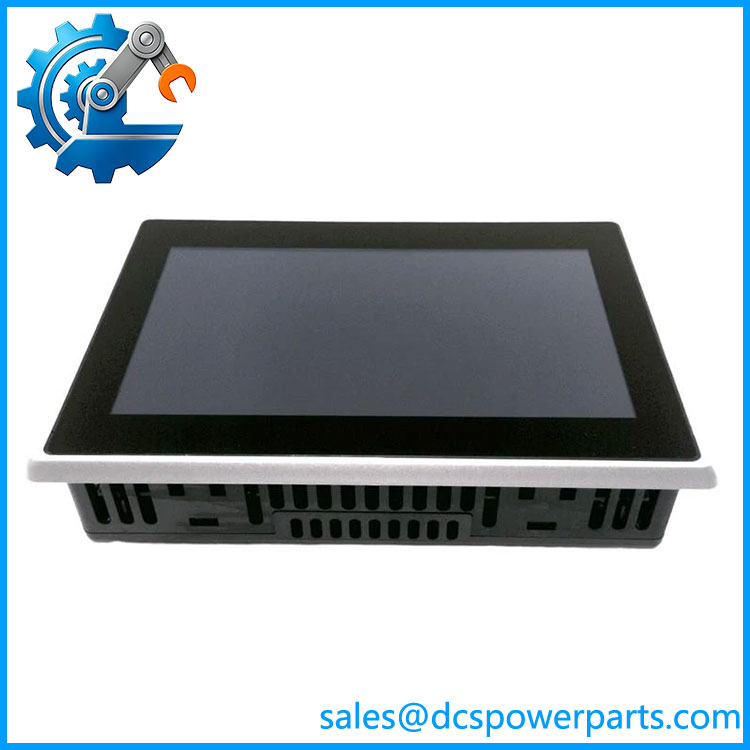
XV-303-70-BE0-A00-1C
Typical applications include:
- Machine operator stations
- Packaging and production equipment
- Material-handling systems
- Process-machine control panels
- Compact PLC/HMI architectures
- SmartWire-DT-based control systems
SmartWire-DT Systems
The BE0 configuration is significant because it includes a SmartWire-DT master interface. Eaton’s manual specifically lists the XV-303-70-BE0 configuration with SmartWire-DT connectivity.
This can simplify machine-level control architectures where motor starters, switching devices, and other field components are connected through the SmartWire-DT system.
Serial and CAN Equipment
The unit also provides RS-232, RS-485, and CAN connectivity. That matters when an existing machine contains older drives, controllers, barcode equipment, or other serial devices that are not Ethernet-native.
Do not assume all three interfaces are electrically isolated. Eaton’s documentation identifies the applicable interfaces as not galvanically isolated in the relevant configuration.
Legacy Machine Replacement
For an older Eaton/Moeller automation installation, the XV-303-70-BE0-A00-1C can be useful as an exact hardware replacement. The important part is not just the 7-inch display size. The BE0 interface configuration, -1C software/PLC designation, SmartWire-DT capability, and physical mounting dimensions all need to correspond to the original installation.
Related Products
- Eaton XV-303-70-B00-A00-1C — 7-inch XV303 HMI/PLC configuration with a different interface arrangement; not automatically interchangeable.
- Eaton XV-303-70-CE0-A00-1C — 7-inch version with dual Ethernet; the CE0 configuration differs from BE0.
- Eaton XV-303-70-BE2-A00-1C — 7-inch version with additional communication capability compared with BE0.
- Eaton XV-303-70-CE2-A00-1C — dual-Ethernet / expanded-interface configuration.
- Eaton XV-303-10- — 10.1-inch member of the same XV303 HMI/PLC family.
- Eaton XV-303-15-CE0-A00-1C — larger 15.6-inch XV303 configuration.
- Eaton XV-313 Series — rear-mounted XV300 family, intended for applications requiring a different mounting arrangement.
These related models should be considered family references, not automatic substitutes. Eaton assigns different catalog numbers according to display size, networking, PLC configuration, and interface hardware.
Engineer’s Guide: Field Pitfalls to Avoid
1. Do not order by “XV-303-70” alone
The 7-inch XV303 family contains multiple configurations. Eaton’s catalog distinguishes B00, C00, B02, C02, BE0, CE0, BE2, and CE2 versions. Their Ethernet and fieldbus interfaces are not identical.
For procurement, retain the complete:
and the article number:
179655
2. BE0 is not the same as CE0
The BE0 configuration provides one Ethernet port, while CE0 provides two Ethernet ports. Eaton’s technical documentation explicitly separates these configurations.
If the machine uses Ethernet redundancy or a second network connection, substituting a BE0 for a CE0 can create an immediate integration problem.
3. Verify the PLC software environment
The -1C designation is important. Eaton identifies the 70- as an HMI/PLC unit with XSoft-CoDeSys functionality and a PLC license.
Before replacing an installed unit, determine whether the original application contains PLC logic in the XV panel itself. A replacement that is treated only as an HMI may not restore machine operation.
4. Back up the application before replacement
Record the HMI project, PLC application, communication settings, recipes, user configuration, and SD-card contents where applicable. Screen replacement is only half the job if the controller application is stored locally.
5. Check the 24 VDC supply carefully
The product-specific datasheet specifies a 24 VDC rated supply, with an effective permissible range of 19.2–30 VDC. Maximum power consumption is approximately 14.4 W.
The unit also has a built-in fuse, so an unexplained failure should trigger a check of the upstream 24 VDC supply and wiring rather than simply installing another panel.
6. Pay attention to SmartWire-DT
The SmartWire-DT master is one of the defining features of the BE0 configuration. If the existing machine uses SmartWire-DT, verify the master connection and project configuration before commissioning.
7. IP20 means cabinet installation
The 70- is specified as IP20. It is not an exposed outdoor terminal. Cabinet sealing, condensation control, temperature, and contamination should be considered at the installation level.
FAQ
What is Eaton 70-?
It is a 7-inch Eaton XV300 HMI/PLC touch panel, article number 179655, with a 1024 × 600 TFT display, capacitive multi-touch, embedded PLC functionality, and SmartWire-DT connectivity.
Does it include a PLC?
Yes. Eaton’s catalog identifies the -1C XV303 versions as HMI/PLC products with XSoft-CoDeSys PLC functionality and a PLC license included.
What communication interfaces does the BE0 version have?
The exact BE0 configuration provides one 10/100 Mbps Ethernet, CAN, RS-232, RS-485, USB host, USB device, and SmartWire-DT.
Does it have PROFIBUS?
The BE0 configuration does not list PROFIBUS. Eaton’s interface table distinguishes the BE0, CE0, BE2, and CE2 versions, with PROFIBUS availability depending on the configuration.
What is the display resolution?
The 7-inch display has 1024 × 600 pixels and supports 16 million colors. Eaton identifies the display as capacitive multi-touch.
What power supply does it require?
The rated control supply is 24 VDC. The product-specific datasheet gives an effective permissible range of 19.2–30 VDC and maximum power consumption of approximately 14.4 W.
Can XV-303-70-CE0-A00-1C replace BE0?
Not as a direct assumption. CE0 has a different Ethernet configuration. If the existing machine only requires one Ethernet interface, the difference may be irrelevant functionally; if the second network connection is part of the control architecture, it is significant. Verify the machine project and wiring before substitution.
What should be checked when purchasing a replacement?
Verify the complete designation, Eaton article number 179655, display/touch condition, Ethernet and SmartWire-DT interfaces, hardware revision, installed software/PLC license status, and the availability of the original application project. For used equipment, actual functional condition should be confirmed before installation.