Description
Key Technical Specifications
| Parameter | Value |
|---|---|
| Model | BTV04.2GN-FW |
| Manufacturer | Bosch Rexroth Indramat |
| Product Family | SYSTEM200 BTV04 |
| Material Number | 282182 |
| Product Type | Miniature Control Panel / HMI |
| Display | Monochrome graphical LCD |
| Display Resolution | 128 × 64 pixels |
| Display Area | 68 × 37 mm |
| Keyboard | Standard keyboard |
| Programmable Keys | 7 |
| Total Keys | 38 |
| COM1 | RS-485, bus-capable |
| COM2 | RS-232 |
| Digital Inputs | 10 × 24 V, isolated |
| Digital Outputs | 11 × 24 V, isolated |
| Supply Voltage | 24 VDC |
| Maximum Current Consumption | 400 mA |
| Front Protection | IP65 |
| Housing Protection | IP20 |
| Firmware | Ordered separately |
The Bosch Rexroth documentation identifies BTV04.2GN-FW as material number 282182. The type code specifies the BTV04 line, design 2, graphical 128 × 64-pixel display, standard keyboard, and the FW designation indicating that firmware is ordered separately.
Product Introduction
What the BTV04.2GN-FW Does
The Bosch Rexroth BTV04.2GN-FW is a SYSTEM200 operator panel used as the human-machine interface for industrial machine and motion-control equipment. It combines a 128 × 64-pixel graphical LCD, standard keyboard, programmable keys, RS-485 and RS-232 interfaces, plus isolated 24 V digital I/O.
The is particularly relevant to legacy VisualMotion and Indramat-based installations. Its real maintenance advantage is not simply the display. It preserves the operator-interface architecture of older machines, reducing the need to redesign the control-panel interface during a component replacement. Bosch Rexroth documentation lists material number 282182 for this exact hardware configuration.
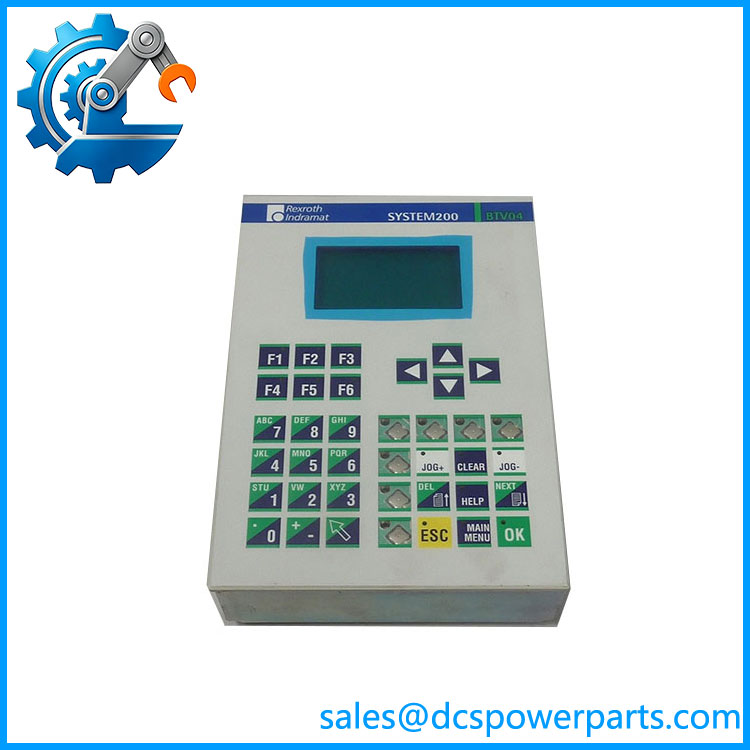
BTV04.2GN-FW
Application Scenarios & Field Pitfalls
Engineering Pain Point
A failed HMI on an older motion-control machine can stop production even when the underlying drive and controller remain operational. The problem becomes more difficult when the original operator panel depends on dedicated firmware and an established serial interface. Replacing it with a visually similar panel without checking the firmware configuration can leave the display powered but unable to communicate correctly with the controller.
Typical Applications
- Machine Tools — Operator interface for legacy CNC and motion-control equipment.
- Material Handling — Local machine control and status display on automated handling systems.
- Packaging Machinery — Operator commands, machine status, alarms, and parameter access.
- Industrial Motion Systems — Local interface for VisualMotion-based multi-axis machine control.
Technical Pitfalls to Avoid
- Treat the
-FWsuffix as significant.
Bosch Rexroth documentation explicitly states that firmware for BTV units must be ordered separately. For , the documented boot-loader firmware is FWA–DOL-01VRS-EN*, material number 282914. The Screen Manager software is separately identified as SWA–SCM-02VRS-MS-C1.44*, material number 284173. - Check the host controller and serial interface.
The provides RS-485 and RS-232 interfaces, but the physical availability of an interface does not guarantee that a particular machine configuration uses it. The original communication wiring and controller configuration should be documented before replacement. - Do not substitute BTV05 or BTV06 based only on appearance.
Bosch Rexroth identifies .2GN-FW, BTV05.2-HN-RS-FW, and BTV06.1HN-RS-FW as separate hardware configurations with different material numbers and firmware requirements. - Check the 24 VDC supply under load.
The is specified for 24 VDC and has a listed maximum current consumption of 400 mA. A marginal cabinet power supply can produce display or communication symptoms that resemble HMI failure.
Related Products
- BTV05.2-HN-RS-FW — Larger BTV family operator panel with its own hardware and firmware configuration. It is related to the but should not be considered a direct drop-in replacement. Bosch Rexroth assigns material number 282096.
- BTV06.1HN-RS-FW — Another SYSTEM200 BTV operator panel, assigned material number 285948. It belongs to the same general HMI family but uses a different hardware configuration.
- FWA–DOL-01VRS-EN* — Boot-loader firmware associated with the . Bosch Rexroth lists material number 282914 and specifies it as required with each configuration.
- SWA–SCM-02VRS-MS-C1.44* — Screen Manager runtime/software associated with units. Bosch Rexroth identifies material number 284173 for this software configuration.
- IKB0017 — BTV-DKC interface cable identified by Bosch Rexroth with material number 282872. It provides the RS-485 interface between a BTV panel and DKC drive-controller equipment in documented applications.
- DKC21.3 Series — Indramat drive-controller family documented together with in motion-control applications. The provides the operator interface while the DKC performs drive-control functions, so they are complementary rather than interchangeable components.
- FWA–ELW-01VRS* — firmware/software configuration used in documented ECODRIVE-related applications. It is relevant when the is integrated with a drive-control application requiring the corresponding software package.
- .2GN-FW, Material No. 282182 — The exact hardware configuration documented by Bosch Rexroth. When replacing an existing panel, matching both the type code and material number is preferable to ordering by the generic “” family name alone.
Procurement note: The is a legacy HMI where firmware is part of the replacement equation. Before installation, verify the panel’s material number, firmware requirement, controller type, serial wiring, and the original machine project. The hardware can be electrically powered and still be unusable if the software configuration does not match the machine.