Description
Product Overview
In an HVAC control panel, a single controller may need to monitor temperature sensors, accept equipment status signals, and command both switched loads and modulating actuators. The Alerton VLC-853-E is designed for these requirements, combining eight universal inputs with five 24 VAC triac outputs and three analog outputs. Its input channels support specified thermistors, dry contacts, pulse signals, voltage inputs, and current inputs. The analog outputs support voltage or current operation, allowing the controller to serve a range of compatible field devices without requiring a separate controller for every signal type.
The VLC-853-E communicates over BACnet MS/TP using an RS-485 interface and supports programmable control logic through Alerton’s VisualLogic toolset. Typical applications include air-handling units, central plant systems, clean rooms, fume hoods, and large terminal units. For a replacement installation, verify the existing BD4 DDC application, firmware requirements, network address, input configuration, output wiring, and connected load ratings. A controller with the correct model number may still require application setup before it can operate as intended within the building automation system.
Key Technical Specifications
| Parameter | Specification |
|---|---|
| Product model | VLC-853-E |
| Manufacturer | Alerton / Honeywell |
| Product type | Programmable unitary field controller |
| Supply voltage | 24 VAC, 50–60 Hz |
| Minimum power requirement | 15 VA |
| Maximum power with loads | 97 VA |
| Universal inputs | 8 |
| Supported input types | 3 kΩ Ibex or 10 kΩ Type II thermistors, dry contacts, 0–20 mA, 0–5 V, 0–10 V, and dry-contact pulse |
| Current-input conditioning | External 250 Ω resistor required for 0–20 mA inputs |
| Pulse input | Up to 100 Hz; not supported on IN-0 |
| Binary outputs | 5 hot-switched triac outputs |
| Triac output rating | 24 VAC, 500 mA continuous; 800 mA AC RMS for 60 ms |
| Analog outputs | 3 universal outputs |
| Analog output modes | 0–10 VDC, maximum 10 mA; or 4–20 mA, maximum 550 Ω |
| External sensor power | 20 VDC ±10%, maximum 100 mA |
| Communication interface | EIA-485 / RS-485, twisted shielded pair |
| Communication protocol | BACnet MS/TP, master |
| Supported baud rates | 9.6, 19.2, 38.4, 76.8, and 115.2 kbps |
| Programming environment | Alerton VisualLogic; BD4 DDC format |
| Processor | 32-bit ARM Cortex-M4F, 80 MHz |
| Non-volatile flash | 512 MB, as specified in the product datasheet |
| Mounting | Screw mounting |
| Terminal type | Removable screw terminals; 14–24 AWG wire |
| Dimensions | Approximately 125 × 137 × 36 mm |
| Operating temperature | −17 to 70°C |
| Relative humidity | 5–95%, non-condensing |
Specifications are taken from the published VLC-853-E technical datasheet. Confirm the exact terminal layout and revision-specific documentation before wiring or commissioning.
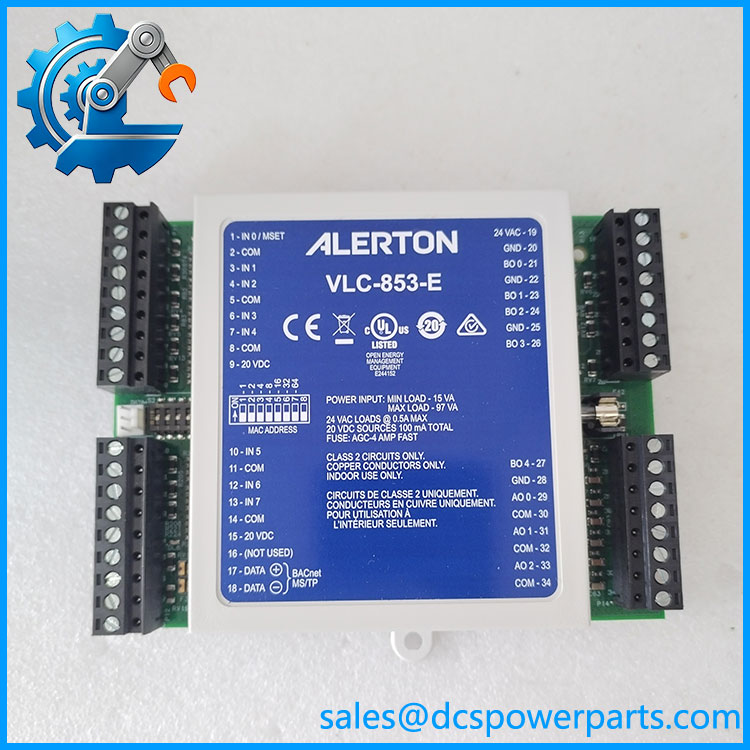
VLC-853-E
Major Features and Advantages
1. Eight configurable universal inputs
Eight universal inputs allow one controller to monitor multiple temperature, status, and process signals. Supported input types include specified thermistors, dry contacts, voltage signals, current signals, and pulse inputs. This flexibility is useful when an HVAC panel combines sensor measurements with equipment run-status or alarm contacts.
For current-loop inputs, the required external 250 Ω resistor must be installed as specified. The IN-0 terminal also has a pulse-input limitation, so pulse-based applications need to be assigned to a supported channel.
2. Five triac outputs for switched AC control
The five triac outputs are rated for 24 VAC control loads, with a published continuous current rating of 500 mA per output. They can be used for compatible switched HVAC devices, subject to the connected load’s electrical characteristics.
Before connecting an actuator, relay coil, or other field device, check its operating voltage, current draw, and inrush behavior. A triac output is not a general-purpose dry contact and should not be treated as an isolated relay output.
3. Three universal analog outputs
The three analog outputs support 0–10 VDC voltage mode or 4–20 mA current mode within the published ratings. This allows the controller to operate compatible modulating devices, such as actuators or control interfaces.
The output mode and the receiving device’s input requirements must agree. For current mode, confirm that the receiving circuit’s total impedance does not exceed the specified 550 Ω maximum.
4. BACnet MS/TP network communication
The RS-485 interface supports BACnet MS/TP communication at selectable baud rates up to 115.2 kbps. The controller is listed as a BACnet Application Specific Controller in the published BTL listing.
For a stable network connection, confirm the baud rate, MAC address, device instance, cable polarity, shielding, and termination arrangement against the site’s network design.
5. Programmable control with non-volatile storage
The VLC-853-E supports Alerton’s VisualLogic programming environment and BD4 DDC files. Program data is stored in non-volatile flash memory, and the datasheet identifies a 100 ms internal logical loop time.
For maintenance work, preserve the existing application file and document the original configuration before making changes. A replacement unit may require software loading and recommissioning rather than a simple hardware swap.
Application Scenarios and Common Pain Points
| Application | Typical control requirement | Key check |
|---|---|---|
| Air-handling units | Sensor monitoring and fan, valve, or damper control | Verify each input type and output load |
| Central plant equipment | Multiple field signals integrated with building automation | Confirm DDC logic and BACnet settings |
| Clean rooms and fume hoods | Coordinated monitoring and HVAC control | Validate sensor calibration and control sequences |
| Large terminal units | Temperature control and equipment status monitoring | Check analog output mode and actuator compatibility |
| Retrofit projects | Replacement of an existing VisualLogic controller | Confirm application file, wiring, firmware, and network configuration |
Common field issues
- Incorrect sensor readings: Check sensor type, wiring, input configuration, and current-loop resistor installation.
- Actuator does not respond: Verify the output mode, field wiring, supply voltage, and actuator input requirements.
- Triac output fails under load: Check current draw and startup current against the published ratings; investigate wiring shorts before replacing the controller.
- BACnet communication is intermittent: Check RS-485 polarity, shielding, network topology, baud rate, addressing, and termination.
- Replacement controller does not run the required sequence: Verify the BD4 DDC file, software compatibility, and point configuration.
Related Products
The following Alerton controllers are part of the broader VisualLogic family. They are relevant when reviewing an existing installation or planning a replacement, but their I/O configurations differ.
| Model | Relationship to VLC-853-E |
|---|---|
| VLC-550-E | Related VisualLogic controller with a different I/O configuration |
| VLC-1188-E | Related unitary controller for building automation |
| VLC-1600-E | Related VisualLogic controller model |
| VLC-16160-E | Related controller in the VisualLogic family |
| VLC-651R-E | Related programmable field controller |
| VLC-660R-E | Related programmable field controller |
| VAV-SD-E | Related controller for variable-air-volume applications |
| VAV-SD2A-E | Related VAV controller model |
These models appear in Alerton’s published VisualLogic controller family and BACnet listing. They should not be considered direct replacements solely because they share the same product family. Compare I/O counts, terminal assignments, application requirements, and network configuration first.
Engineer’s Guide: Three Checks Before Ordering
1. Verify the exact model and hardware condition. Confirm the e label and inspect the terminals, circuit board, and enclosure for physical damage or corrosion. For used or refurbished equipment, request clear photographs and documented functional testing.
2. Confirm the software and network configuration. Check the existing BD4 DDC file, firmware requirements, BACnet device settings, and point mapping. Do not assume a replacement unit will arrive with the site’s application already loaded.
3. Match every field signal to the correct I/O rating. Verify sensor resistance curves, current-input resistor requirements, analog output mode, triac load current, and the 24 VAC supply capacity before commissioning.
Important warning: The triac outputs are intended for compatible 24 VAC loads. Do not connect line-voltage loads directly to them. Use appropriately rated interface hardware where required by the control design.
Frequently Asked Questions
1. What is then used for?
It is a programmable field controller for HVAC and building automation systems. It monitors supported field inputs, operates compatible binary and analog devices, and communicates over BACnet MS/TP.
2. What is the power supply requirement?
The published datasheet specifies 24 VAC at 50–60 Hz, with a minimum requirement of 15 VA and a maximum of 97 VA with loads. The supply must be sized for the actual controller and connected devices.
3. How many inputs and outputs does it have?
e has eight universal inputs, five triac binary outputs, and three universal analog outputs. Check the datasheet for the ratings and restrictions associated with each I/O type.
4.e communicate with a BACnet system?
Yes. It supports BACnet MS/TP over RS-485, with selectable baud rates up to 115.2 kbps. Successful integration depends on correct network addressing, communication settings, wiring, and application configuration.
5. Can it replace a or VLC-853C3?
The manufacturer datasheet states backward compatibility with older and VLC-853C3 models. Even so, confirm the installed hardware, firmware, application file, wiring, and project-specific requirements before carrying out a replacement.
6e discontinued?
Some product listings identify the model as discontinued. That is not enough to establish current manufacturer support in every region, so confirm lifecycle status and availability before planning a retrofit or long-term maintenance strategy.
7. What should I verify before purchasing a replacement?
Confirm the model number, hardware revision, condition, I/O functionality, communication operation, warranty terms, and lead time. For a used unit, request the scope and results of testing, including input readings, output operation, and BACnet communication.