Description
ABB PP885R 3BSE069296R1 | Panel 800 Rugged Operator Panel
Key Technical Specifications
| Parameter | Specification |
|---|---|
| Product Model | PP885R |
| Article Number | 3BSE069296R1 |
| Manufacturer | ABB |
| Product Family | Panel 800 Version 6 |
| Panel Type | Rugged Touch Panel |
| Display Size | 15.4 inches |
| Display Format | 16:10 widescreen |
| Resolution | 1280 × 800 |
| Touchscreen | Analog resistive |
| Touch Durability | 5 million finger-touch operations |
| Brightness | 450 cd/m² |
| Viewing Angle | 160° horizontal / 140° vertical |
| Display Technology | TFT color LCD |
| Backlight | LED |
| Configuration Environment | Panel Builder 800 Version 6 |
| Ethernet | Panel 800 Version 6 platform provides Ethernet interfaces |
| USB | Panel 800 Version 6 platform provides USB Host 2.0 |
| Serial Communication | RS232 and isolated RS422/485 available on the platform |
| Product Classification | Rugged operator panel |
| Typical System Role | HMI / operator interface |
ABB’s Version 6 datasheet identifies PP885R 3BSE069296R1 specifically as the 15.4-inch rugged variant. It distinguishes the PP885R from the similarly sized PP886H: PP885R uses a resistive touchscreen and 450 cd/m² display, while PP886H is a high-brightness panel without a touchscreen.
Product Introduction
The ABB PP885R 3BSE069296R1 is a rugged operator panel in the Panel 800 Version 6 family. Its 15.4-inch widescreen display uses a 1280 × 800 resolution and 16:10 aspect ratio, while the analog resistive touchscreen is specified for up to 5 million finger-touch operations. The 450 cd/m² display and 160°/140° viewing angles are intended for demanding operator-interface installations where screen readability and physical touch durability matter.
For engineering teams, the important point is that is not simply a replacement LCD or generic industrial monitor. It belongs to ABB’s Panel 800 Version 6 hardware and software ecosystem and is configured using Panel Builder 800 Version 6. ABB’s product documentation lists the as a rugged touch-panel variant alongside the PP880R and PP886H.
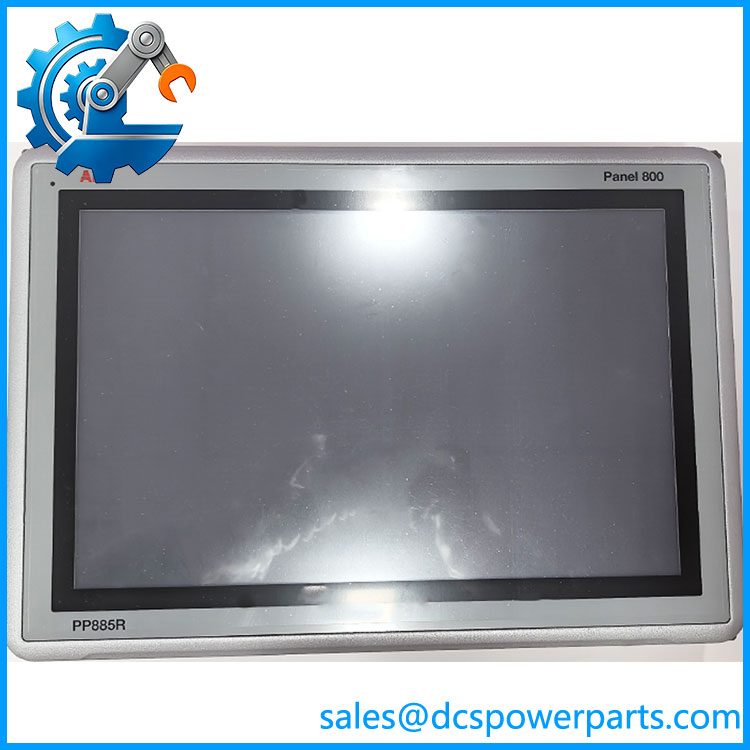
PP885R 3BSE069296R1
Application Scenarios & Field Pitfalls — The Engineer’s Perspective
Engineering Pain Point
Replacing an HMI in an operating plant is rarely just a matter of matching screen size. The project may depend on the original Panel Builder application, communication drivers, firmware generation, display resolution, touch calibration, and cabinet cutout. A replacement should therefore be checked against the installed Panel 800 project rather than selected solely by the 15.4-inch display specification.
Typical Applications
- Process control operator stations: Local visualization of process values, alarms, trends, and equipment status.
- DCS/PLC operator interfaces: Panel 800 applications requiring an industrial touchscreen between operators and the underlying control system.
- Marine and demanding industrial installations: The belongs to ABB’s rugged-panel category rather than the standard Panel 800 touch-panel group.
- Existing Panel 800 Version 6 installations: Particularly where the existing application was developed with Panel Builder 800 Version 6.
Technical Pitfalls to Avoid
- Do not confuse with PP885M or PP885H.
ABB assigns different article numbers to these variants. is the rugged 15.4-inch touch-panel version, while PP885M and PP885H are separate configurations. The complete article number should therefore be verified before procurement. - Do not assume the display specification defines interchangeability.
A 15.4-inch, 1280 × 800 panel with a similar physical appearance does not automatically contain compatible Panel 800 hardware or support the same runtime environment. - Check the Panel Builder project before replacement.
ABB specifically identifies Panel Builder 800 Version 6 as the configuration environment for the PP885 family. Preserve the original application project and document its version before replacing a panel. - Verify the touch technology.
uses an analog resistive touchscreen rated for 5 million finger-touch operations. Do not assume a different Panel 800 variant with a different display or interaction architecture will behave identically. - Confirm physical installation requirements.
Before approving a replacement, compare the existing cabinet cutout, panel depth, mounting hardware, cable routing, and environmental requirements against the hardware documentation. A matching display size does not guarantee a matching cutout. - Verify the complete ABB article number.
3BSE069296R1 is the key procurement identifier. Similar-looking PP885 variants carry different ABB article numbers, so ordering only by the family name can result in the wrong hardware.
Related Products
- ABB PP880R 3BSE069295R1 — 7-inch rugged Panel 800 touch panel with 800 × 480 resolution; substantially smaller than .
- ABB PP885M 3BSE069280R1 — 15-inch Panel 800 black touch-panel variant; separate hardware/article number and should not be assumed equivalent to .
- ABB PP885H 3BSE069281R1 — 15-inch high-brightness Panel 800 variant; different configuration from the rugged .
- ABB PP886H 3BSE069297R1 — 15.4-inch rugged-family panel with high-brightness display characteristics but no touchscreen; not a functional touchscreen replacement for .
- ABB PP885 3BSE069276R1 — 15-inch high-performance Panel 800 touch panel with 1280 × 800 resolution; requires comparison of the installed application and physical installation before considering replacement.
- ABB Panel Builder 800 Version 6 — Configuration environment associated with the Panel 800 Version 6 family, including .
Procurement and Replacement Note
For a 3BSE069296R1 replacement, record the installed panel’s complete article number, hardware/revision information, Panel Builder project version, application backup, communication configuration, and physical mounting dimensions before procurement.
The most important identification point is 3BSE069296R1, not simply “.” ABB’s documentation assigns separate article numbers to PP880R, , PP886H, PP885M, PP885H, and other Panel 800 variants.
Where the existing unit is being replaced in a live control system, validate the Panel Builder application, runtime compatibility, communication drivers, touchscreen behavior, and cabinet installation before treating the new panel as a direct replacement. Do not rely on screen size alone.