Description
Product Overview
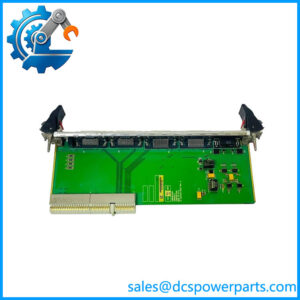
The SIGMATEK DCP161 05-004-161 is an industrial processor module designed for the DIAS automation platform. It serves as the machine-control computing unit, executing application logic and coordinating communication with connected I/O and peripheral equipment. Unlike a discrete input or output module, the DCP161 performs central processing tasks rather than directly providing a bank of field signal channels. Its role is particularly relevant in established machine-control installations where the original controller hardware, application program, and connected DIAS modules must remain operational.
At the hardware level, published specifications identify an Intel 386EX processor, 40 KB of Flash-PROM, 112 KB of program storage, and 124 KB of data storage. The module uses a 5 V DC supply and draws approximately 600 mA according to available product records. Communication capabilities include serial interfaces and CAN bus, although the exact port arrangement and supported configurations should be verified for the specific unit. The DCP161 is associated with SIGMATEK’s DIAS architecture, where the processor exchanges control data with compatible expansion modules and machine peripherals. These characteristics make it relevant to legacy equipment maintenance, particularly when replacing a failed controller or retaining an established automation design.
For maintenance engineers, the SIGMATEK DCP161 should be selected on the basis of system compatibility rather than model number alone. Before installation, confirm the DIAS rack or backplane arrangement, power-supply requirements, serial and CAN connections, and application-program compatibility. A replacement processor may also require restoration of the original application, configuration, and communication parameters. The SIGMATEK DCP161 05-004-161 is therefore best suited to documented replacement projects in which the existing control architecture and commissioning records are available. If the original program is missing, establish a recovery plan before removing the working controller.
Product Introduction (Non-Templated)
When a legacy machine stops because its CPU fails, an electrically similar processor is not necessarily a functional replacement. The SIGMATEK DCP161 provides the processing function for compatible DIAS automation systems, using a 5 V DC supply rated at approximately 600 mA.
For a DIAS controller replacement or legacy machine upgrade, verify the rack interface, program availability, and communication configuration before ordering. Retaining the original application and parameter records can substantially reduce commissioning work.
Key Technical Specifications
| Parameter | Value |
|---|---|
| Product Model | |
| Part Number | 05-004-161 |
| Manufacturer | SIGMATEK |
| Product Type | CPU / processor module |
| Automation Platform | DIAS |
| Processor | Intel 386EX |
| Supply Voltage | 5 V DC |
| Current Consumption | Approximately 600 mA |
| Flash-PROM | 40 KB |
| Program Storage | 112 KB, as reported in product listings |
| Data Storage | 124 KB |
| Communication Interfaces | Serial communication and CAN bus; exact configuration requires verification |
| Connected I/O Capacity | Up to 16 addressable I/O/peripheral modules, as reported in product records |
| Programming Environment | SIGMATEK LASAL compatibility should be confirmed for the installed system version |
| Installation | Compatible DIAS rack or system mounting arrangement; verify the hardware revision |
| Operating Temperature | Exact range requires confirmation from the applicable technical manual |
| Protection Rating | Not independently verified |
| Condition | Depends on the supplied unit and inspection records |
Specifications are based on available product records. Memory terminology, interface configuration, and expansion limits should be checked against the applicable documentation before engineering approval.
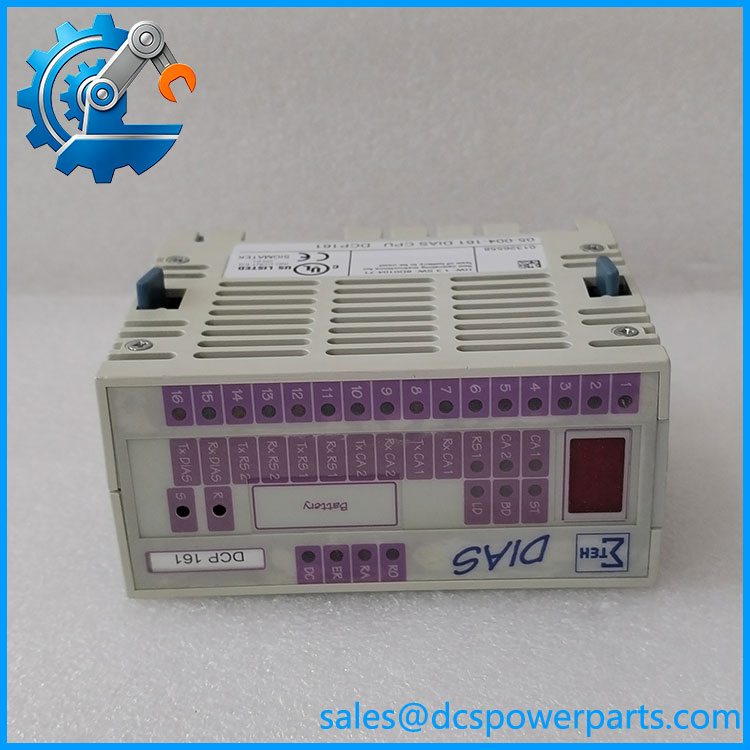
DCP161
Related Products
The following components are relevant when maintaining or evaluating a SIGMATEK DIAS installation. Confirm system-specific compatibility before ordering.
1. DPS001 — DIAS power-supply module listed as a supporting supply option for the system. Check the rack’s electrical requirements and backplane configuration before substitution.
2. DPS211 — A DIAS power-supply variant reported with one fiber-optic output. Consider it when the existing system architecture requires the corresponding optical connection.
3. DPS221 — A DIAS power-supply variant reported with two fiber-optic outputs. Its additional optical connections may suit a different system topology, but do not establish direct interchangeability with other supply variants.
4. DCP181 — A processor-model reference appearing in comparative product listings. Treat it as a possible system-level comparison only; processor performance, memory, interfaces, and application compatibility must be confirmed before considering an upgrade.
5. SIGMATEK DIAS I/O modules — Compatible I/O modules provide the field-signal interfaces used by the controller. Match the installed module types, addresses, and backplane configuration when replacing the CPU.
6. SIGMATEK DIAS rack or backplane assembly — Provides the mounting and system interconnection arrangement for the processor and associated modules. Confirm the precise rack version and connector layout before installation.
7. SIGMATEK LASAL engineering environment — The relevant programming and diagnostic environment for supported SIGMATEK systems. Verify software version compatibility, project files, and any required licensing or interface hardware before commissioning.
Frequently Asked Questions (FAQ)
1. Is the SIGMATEK a CPU module or a digital input module?
The is identified primarily as a CPU/processor module. Its published specifications include an Intel 386EX processor and program/data memory. A digital input module performs field-signal acquisition instead. Confirm the model printed on the physical label before purchasing because some product listings misclassify this part.
2. Can I replace a failed without changing the entire DIAS system?
Potentially, if the replacement matches the existing hardware configuration and supports the required application.
Check these items first:
- DIAS rack and backplane compatibility.
- Supply voltage and current requirements.
- Communication connections and configuration.
- Application-program and firmware compatibility.
- Availability of the original program and parameter backups.
A matching model number is a useful starting point, not a complete compatibility test.
3. Does the require a 5 V DC power supply?
Available specifications identify a 5 V DC supply requirement and approximately 600 mA current consumption.
Before powering the module, verify the correct supply source and pinout for the actual rack or assembly. Do not apply 24 V DC directly to a 5 V processor supply connection. Confirm the complete system wiring diagram before energizing the controller.
4. Can I hot-swap the while the machine is running?
Do not assume hot-swapping is supported. Removing a processor from an energized control rack can interrupt control execution, disrupt communications, and create unsafe machine states.
Use the manufacturer’s shutdown procedure, isolate the appropriate power source, secure hazardous motion, and confirm the correct insertion and removal procedure. Resume operation only after the controller and connected modules have passed the required checks.
5. Will replacing the erase my machine program?
The program may be stored in nonvolatile memory, working memory, or another system-specific location. Available product records identify Flash-PROM and SRAM, but they do not establish that every application and parameter is preserved through every replacement scenario.
Before removing the original unit, back up the application if possible, document the controller configuration, and identify the procedure for restoring the program to the replacement. If the original CPU no longer starts, check for archived project files and machine commissioning records.
6. How can I verify a new-surplus is genuine and functional?
Request clear photographs of the model and part-number labels, inspect the connector and housing condition, and compare the unit with the installed hardware. Ask for available provenance and inspection documentation.
Functional testing should identify what was actually checked: power-up, processor diagnostics, communication, program loading, or operation with a compatible DIAS system. A visual inspection alone does not demonstrate that the processor can execute the required application.
7. What warranty and commissioning checks should I request for a replacement?
Warranty terms depend on the supplied unit’s condition and the seller’s written policy. Confirm the coverage period, failure remedy, return conditions, and whether testing is included.
For commissioning, request or prepare:
- A documented inspection and test report.
- The applicable hardware identification and revision.
- A verified application-program backup.
- Communication and rack configuration records.
- A controlled startup and functional-test procedure.
For a production-critical machine, confirm program recovery and system compatibility before scheduling the replacement. This helps prevent a hardware repair from turning into an unplanned controller reconfiguration project.