Description
Product Overview
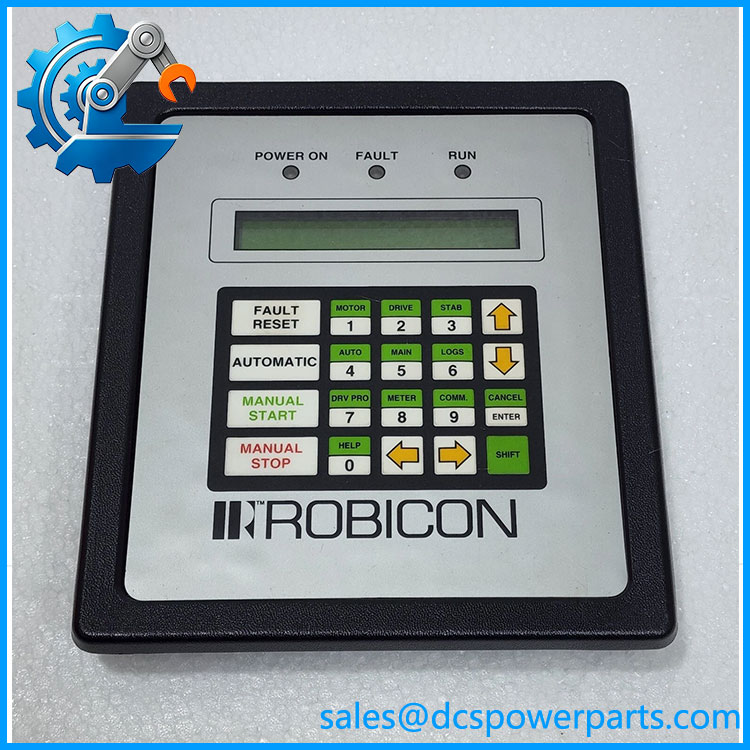
Local operator access matters when a medium-voltage drive trips, requires parameter review, or needs troubleshooting during maintenance. The Siemens Robicon A1A460A68.23M is identified in parts listings as a keypad interface with an LCD display for Robicon drive equipment. Robicon Perfect Harmony spare-parts documentation also lists the keypad as A1A460A68.23 within the NXGII controller platform. The keypad provides an operator-facing interface, while the drive’s controller boards and control software handle the underlying control functions.
For plant maintenance, this part is relevant when the original keypad has a damaged display, failed keys, or an interface fault that prevents normal local access. It should not be confused with the keypad adapter board or the controller CPU: those are separate components, and a fault in the interface path may require diagnosis beyond the keypad itself. Before purchasing a replacement, compare the complete part number and suffix, connector arrangement, and installed drive configuration. A catalog cross-reference is a useful starting point, not final proof that a replacement will work in every cabinet or firmware configuration.
The Siemens Robicon A1A460A68.23M is reported as discontinued by one parts supplier, which also lists A5E02363383 as a replacement reference. That status and cross-reference should be verified against the specific drive model and revision before procurement. Ask for photographs of the actual unit, label and revision details, condition classification, and any available functional-test record. During installation, follow the drive service procedure, preserve relevant configuration records, and confirm that the operator interface communicates correctly with the controller before returning the equipment to service.
Product Introduction
A failed local keypad can leave maintenance personnel without convenient access to drive status, alarms, and operator settings. The A1A460A68.23M is cataloged as a Robicon keypad interface with an LCD display, used within the Perfect Harmony drive ecosystem.
Because the part is reported as discontinued, procurement should confirm the approved replacement, suffix compatibility, and actual stock condition before committing to a shutdown maintenance schedule.
Key Technical Specifications
| Parameter | Details |
|---|---|
| Product model | A1A460A68.23M |
| Manufacturer / brand | Siemens Robicon |
| Product type | Keypad interface / operator panel |
| Display | LCD, according to supplier listing |
| System association | Robicon Perfect Harmony medium-voltage drives |
| Controller platform reference | NXGII spare-parts list includes keypad A1A460A68.23 |
| Main function | Local operator interaction with the drive |
| Related replacement reference | A5E02363383; verify approval and compatibility |
| Manufacturer lifecycle | Reported discontinued by a parts supplier; official lifecycle status requires confirmation |
| Supply voltage | Not verified for this exact part number |
| Interface / connector | Confirm from the installed unit and technical documentation |
| Mounting method | Verify against the applicable keypad assembly |
| Firmware compatibility | Not verified; confirm with drive configuration documentation |
| Operating temperature | Not verified |
| Protection rating | Not verified |
| Condition | Confirm actual condition with supplier |
| Warranty | Confirm the specific warranty terms with supplier |
The part identification, LCD description, replacement reference, and reported discontinuation are based on available parts listings, not a verified current manufacturer datasheet.
A1A460A68.23M
Related Products
The following items are related to the Robicon Perfect Harmony control and operator-interface ecosystem. They are not all direct substitutes.
- A5E02363383 — Listed as a replacement reference for .23M. Verify the exact drive and revision before using it as a substitute.
- .23 — Keypad reference listed in Robicon NXGII spare-parts documentation. Confirm suffix and hardware revision differences.
- A1A10000623.00M — NXGII single-board computer and keypad adapter assembly reference; a controller-side assembly rather than the keypad itself.
- A1A10000283.01M — Keypad adapter board listed in a Robicon parts reference. Investigate this component if the keypad itself tests correctly but the interface path fails.
- A1A10000423.00M — NXGII system I/O board; relevant to broader controller I/O diagnostics, not a direct keypad replacement.
- A1A363818.00M — NXGII communications board reference. Useful when troubleshooting controller communications, but it does not replace the operator keypad.
- A1A363628.00 — NXGII backplane reference. Consider only when controller interconnection or backplane faults are supported by diagnostics.
- A5E01708486 — Signal control board reference in the NXGII spare-parts list; a separate control component.
Frequently Asked Questions
Q1. What is the .23M used for?
It is listed as a keypad interface with an LCD display for Robicon drive equipment. It provides the local operator interface; it is not the drive’s main controller.
Q2. Is .23M discontinued?
A parts supplier lists it as discontinued and names A5E02363383 as a replacement reference. Confirm the current lifecycle status and approved replacement for your exact drive configuration before ordering.
Q3. Can I replace .23M with A5E02363383?
Possibly, but do not assume universal interchangeability. Confirm the drive model, keypad revision, mounting and connector arrangement, and applicable service documentation. Request written compatibility confirmation if the replacement is being used for a critical shutdown spare.
Q4. Can I hot-swap this keypad while the drive is running?
Do not assume hot-swapping is permitted. Follow the model-specific service procedure and site safety requirements. If removal requires opening an energized control enclosure, have qualified personnel establish the required safe state first.
Q5. Does it support firmware v3.1?
No verified firmware compatibility information was found for this exact part number. Check the drive’s control-platform revision and firmware documentation before commissioning a replacement.
Q6. Will replacing the keypad erase drive parameters?
The effect depends on the system architecture and where the parameters are stored. Record or back up accessible settings before maintenance, and follow the approved replacement procedure. Do not assume that the keypad stores—or does not store—configuration data without confirming the specific setup.
Q7. How can I verify that a replacement unit is genuine and functional?
Request clear photographs of the actual label, complete part number, suffix, revision markings, and connectors. Ask whether the unit is new, unused surplus, or refurbished, and request functional-test evidence where available. Confirm warranty coverage and return conditions in writing before purchase.